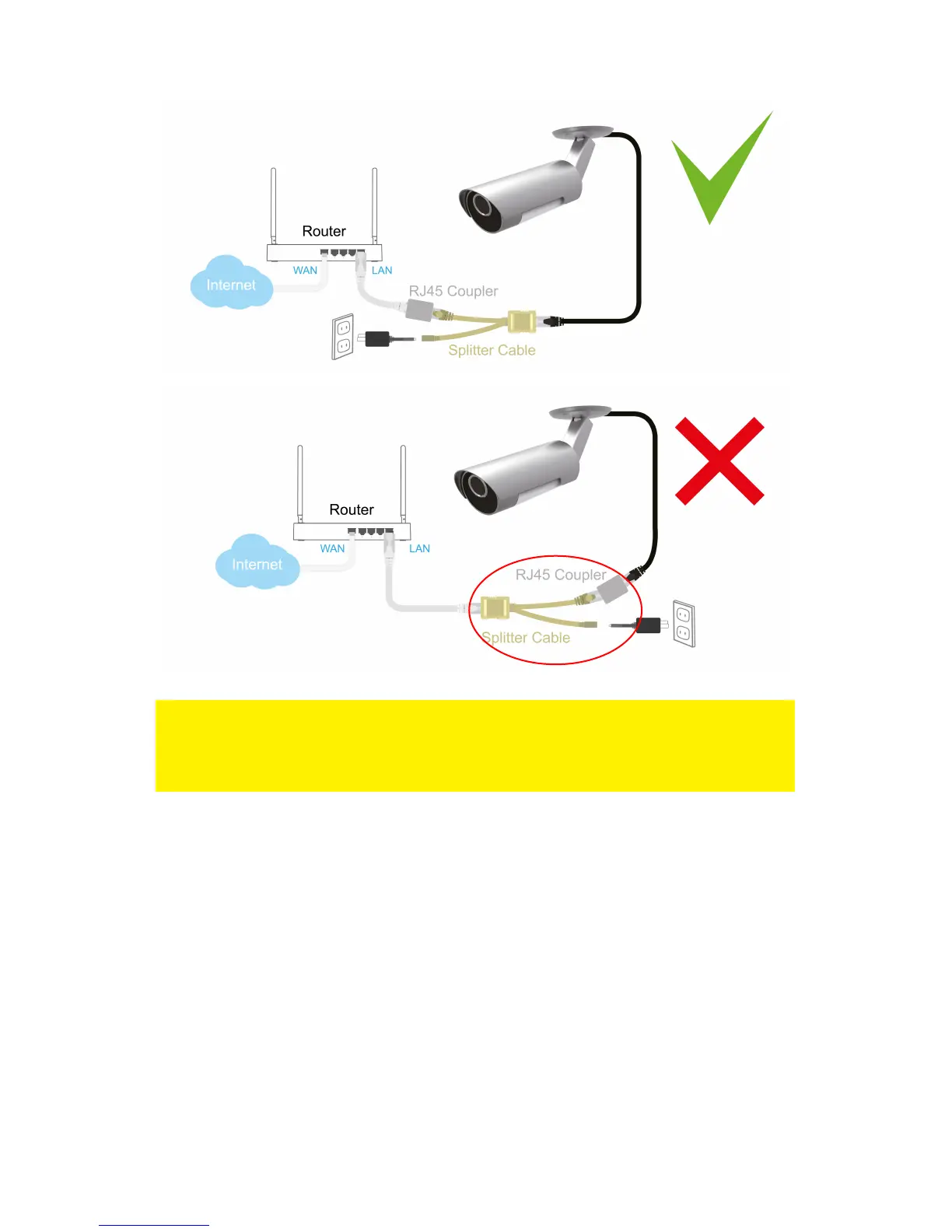
Note: If you wish to use the EM6260 wirelessly you will need to remove the Ethernet
cable between the router/modem/switch and the Splitter cable after successfully
setting up the wireless connection. The splitter cable and power adapter needs to be
connected to the EM6260 to supply the camera with power.
2.1.2 Option 2 Power adapter is plugged near the router/modem/switch.
1. Connect the supplied power adapter to the supplied “Splitter cable”.
2. Connect the Ethernet plug of the “Splitter cable” to the router/modem/switch..
3. Connect a Ethernet cable (max.50m) to the “Splitter cable”.
4. Connect the other end of the Ethernet cable to the “RJ45 coupler”.
5. Connect the Power + Ethernet plug from the EM6260 to the “RJ45 coupler”.
1
2
3
4
5



 To Next Page