5.3.2 Wi-Fi security
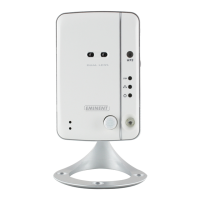
You can use the wireless connection to connect the EM6260 to the network. If your
network environment has a 802.11 b/g/n router or AP running, you can click the
“Enable Wi-Fi function” button to enable the wireless connection.
In order to use the wireless network, you need to fill in the following fields:
1. SSID – this is the ID (name) of the wireless router or AP of your wireless network
environment, this must be set correctly.
2. Security mode – this is the security mode used in your wireless router or AP. You
need to choose one of the three modes – None, WEP or WPA-PSK.



 To Next Page