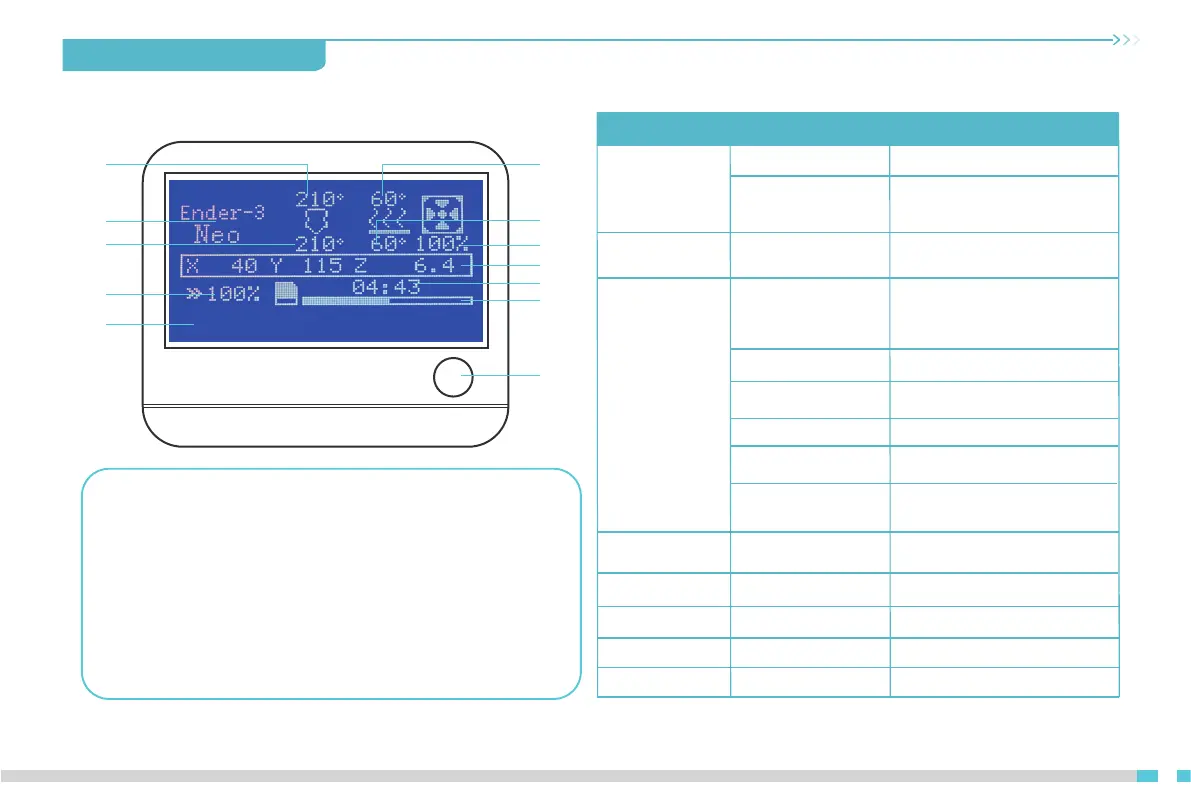
5. On-screen information
Displayed information
1
2
3
4
5
6
7
8
9
10
11
12
1 Set nozzle
temperature
2 Model 3 Current nozzle
temperature
4 Printing Speed 5 Prompt 6 Set heated bed
temperature
7 Current heated
bed temperature
8 Fan speed 9 Current nozzle position
10 Printing time 11 Printing Progress
12 Press: Select OK
Rotation: Toggle option/Change value
Motion
Info screen
Move Axis Moving X/Y/Z/Extruder
Auto Home/Level Bed
Probe Z Offset/
Disable Steppers
Temperature
Nozzle/ Bed/ Fan Speed/
Preheat PLA/ Preheat ABS
Advanced Settings
Set Home Offsets / Velocity /
Acceleration / Jerk /Probe Offsets /
Steps (mm) / Temperature /
Fillament / Initialize EEPROM
Probe Z offset
CR Touch
Reset / Self-Test / Deploy/
Stow / SW-Mode
Preheat PLA Conf /
Preheat ABS Conf /
Configuration
Change Filament
Preheat PLA/ Preheat
ABS/Preheat Custom
Change Media
Print from Media
Languages
About Printer
13
Power Outage
Store Settings /
Load Settings /
Restore Defaults
Fan Speed / Nozzle / Bed/
Store Settings
rabbit.gcode


 To Next Page