36
Connect the AC power cord to the DVR and then to a wall outlet.
WARNING: THE POWER CORD HAS A GROUNDING PIN.
IF YOUR POWER OUTLET DOES NOT HAVE A GROUND-
ING PIN RECEPTACLE, DO NOT MODIFY THE PLUG. DO
NOT OVERLOAD THE CIRCUIT BY PLUGGING TOO MANY
DEVICES IN TO ONE CIRCUIT.
Configuration
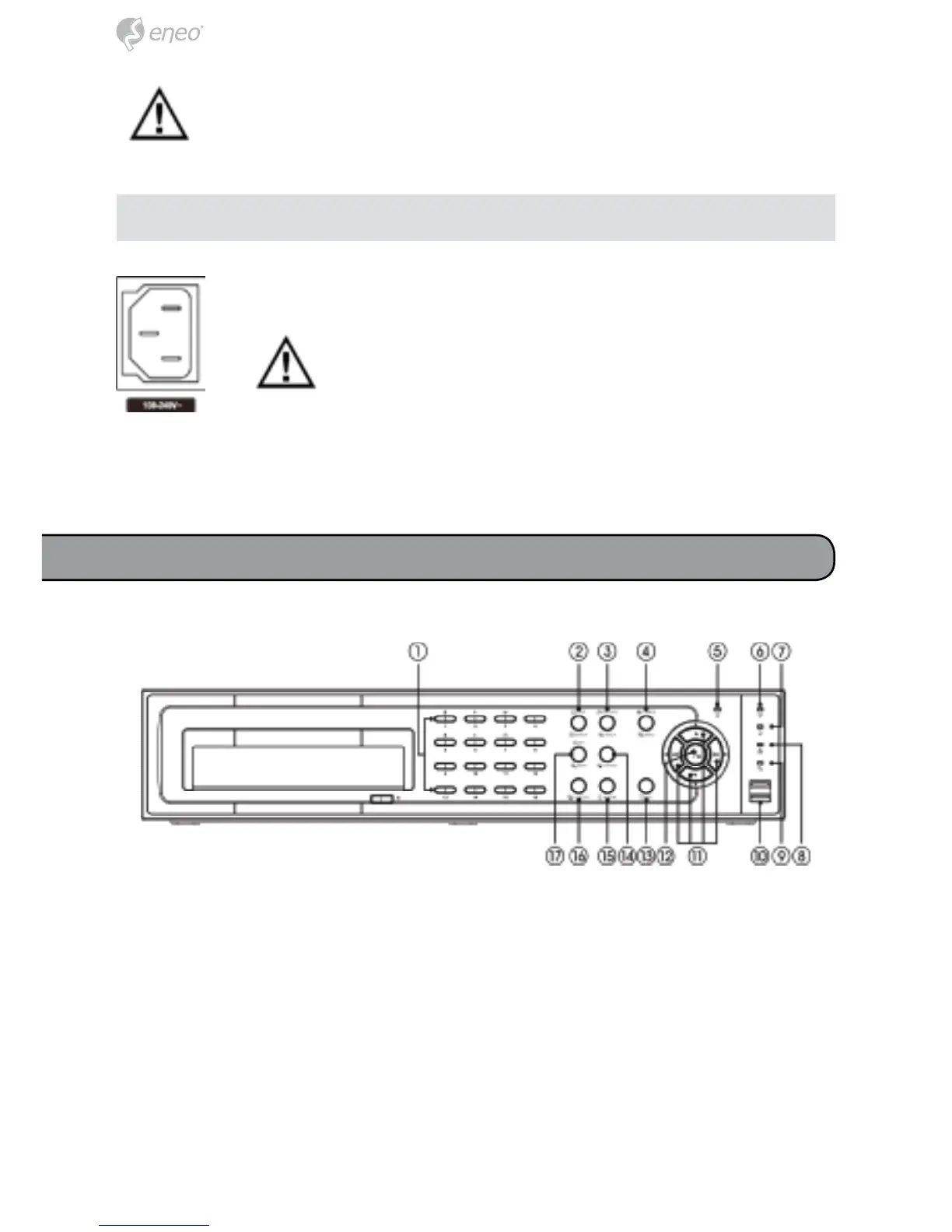
① Camera Buttons
② Display/SPOT Button
③ Group/Sequence Button
④ Menu/Cameo Button
⑤ Power LED
⑥ HDD LED
⑦ Alarm Out LED
⑧ Network LED
⑨ Clip Copy LED
⑩ USB Connector
⑪ Arrow Buttons
⑫ Play/Pause Button
⑬ Panic Button
⑭ Playback Mode Button
⑮ Alarm Button
⑯ Clip Copy Button
⑰ Zoom/PTZ Button
CAUTION: The network connector is not designed to be connected
directly with cable or wire intended for outdoor use.
Power Cord Connector



 To Next Page