45
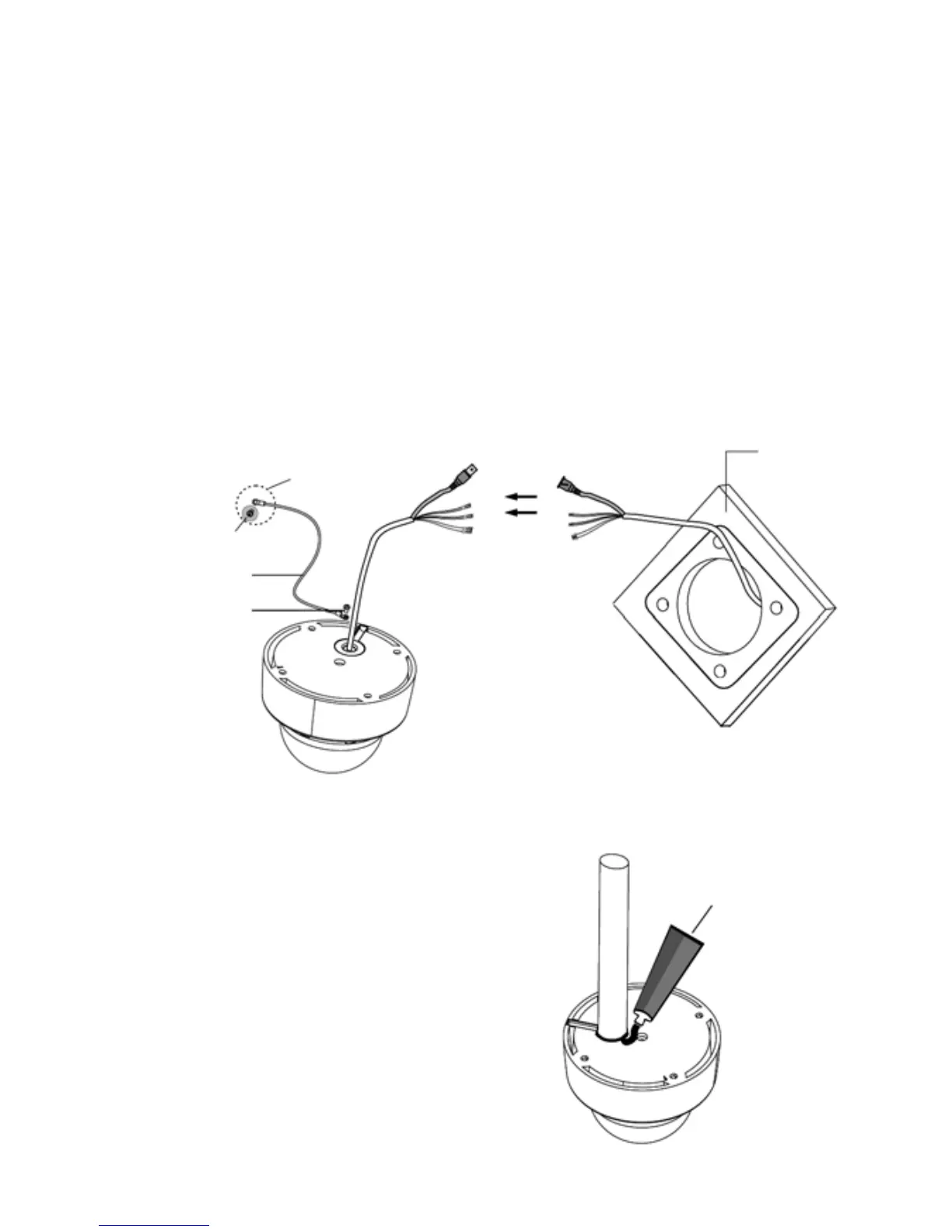
Silicon Sealant
(not supplied)
2. Extract each wire through the cable hole and wire the supplied power, RS-485
and alarm-in connector.
3. Attach the safety wire for securing the dome camera to ceiling or structure not to
fall.
4. Unlock 4 torx screws on the dome cover and lock the dome base firmly with
supplied 4 fixing screws.
WARNING: Fasten the fixing screws on the dome camera firmly, or the dome
camera could fall, causing injury.
5. Lock the housing cover with 4 torx screws.
Ceiling
M3x5 screw
Safety wire
(not supplied)
to ceiling
When using pipe or plug:
If you want to use a pipe or plug, you
should remove the hole grommet outside
and seal using sealant (not supplied) not
to be intruded water.


 To Next Page