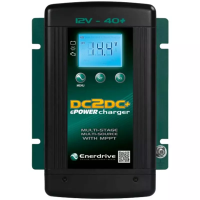
Button Functions:
•
During normal charging operation, press once to change the display to show
CH2 and CH3 voltage and press once more to go back to normal display.
• During normal charging operation, press and hold for more than 3 seconds
to enter Charger Function Setting Menu
•
When CH2 or CH3 is not available (voltage detect is below the sense voltage),
display will turn OFF. Press once will temporary trigger on the display and
it will automatically cycle through all three channels voltage, the software
revision and then turn o.
•
During the charger Setup Menu, this button is used to conrm the setting
and continuous to the next menu.
• Manual Override Mode: During normal operation, when the input source is
charging from CH2, press and hold for more than 10 seconds to turn mode
ON, ‘Priority’ icon on display will turn ON. It will force the charger from
being connected to CH2 and connect it to CH3 (subject to CH3 is within the
operating range specied on the spec). If CH3 is not connected or out of
override operating range, it will go back to CH2. This setting mode is used
when CH2 (Solar) is available but the charging current is too small due to
the availability of sunlight. Use the same procedure to turn o the ‘Manual
Override’ mode when not required.
•
Please Note: If Manual Override Mode is used and left on there is a risk of attening
the start battery. The preferred method is to use the automatic override method
by connecting the ignition source to the ignition terminal of the DC2DC charger.
•
With Flooded Battery Type setting, press and hold the “SET“ and “SEL“ buttons
together for more than 5 seconds will force the charger into Equalized Mode
and it will start equalizing the ooded battery. Please note; the battery has to
be set to ‘Flooded’ battery type in-order to have this function activated.
•
During the charger Setup Menu, this button is used to change the next
available setting.
•
‘Silent’ mode (Fan OFF mode): During normal operation, Press and hold for
more than 3 seconds will force the fan to turn OFF. ‘Auto’ icon will turn ON.
The charger current will reduce to about half the set current. The unit will go
back to normal after 8 hours and ‘Auto’ icon will turn OFF.
•
Note: Every time the “MENU“, “SET“ and/or “SEL“ buttons are pressed, the back
light will illuminate and will automatically turn o after 60 seconds.


 To Next Page