8
C048-725-30 Rev. B (01/2020)
4.2 4.2 Mechanical MountingMechanical Mounting
THIS PRODUCT MUST BE INSTALLED WITHIN A
RESTRICTED ACCESS LOCATION WHERE ACCESS IS
THROUGH THE USE OF A TOOL, LOCK AND KEY, OR
OTHER MEANS OF SECURITY, AND IS CONTROLLED
BY THE AUTHORITY RESPONSIBLE FOR THE
LOCATION� THIS PRODUCT MUST BE INSTALLED AND
MAINTAINED ONLY BY QUALIFIED TECHNICIANS�
NOTICE:
4.2.1 4.2.1 Rack Mount EarsRack Mount Ears
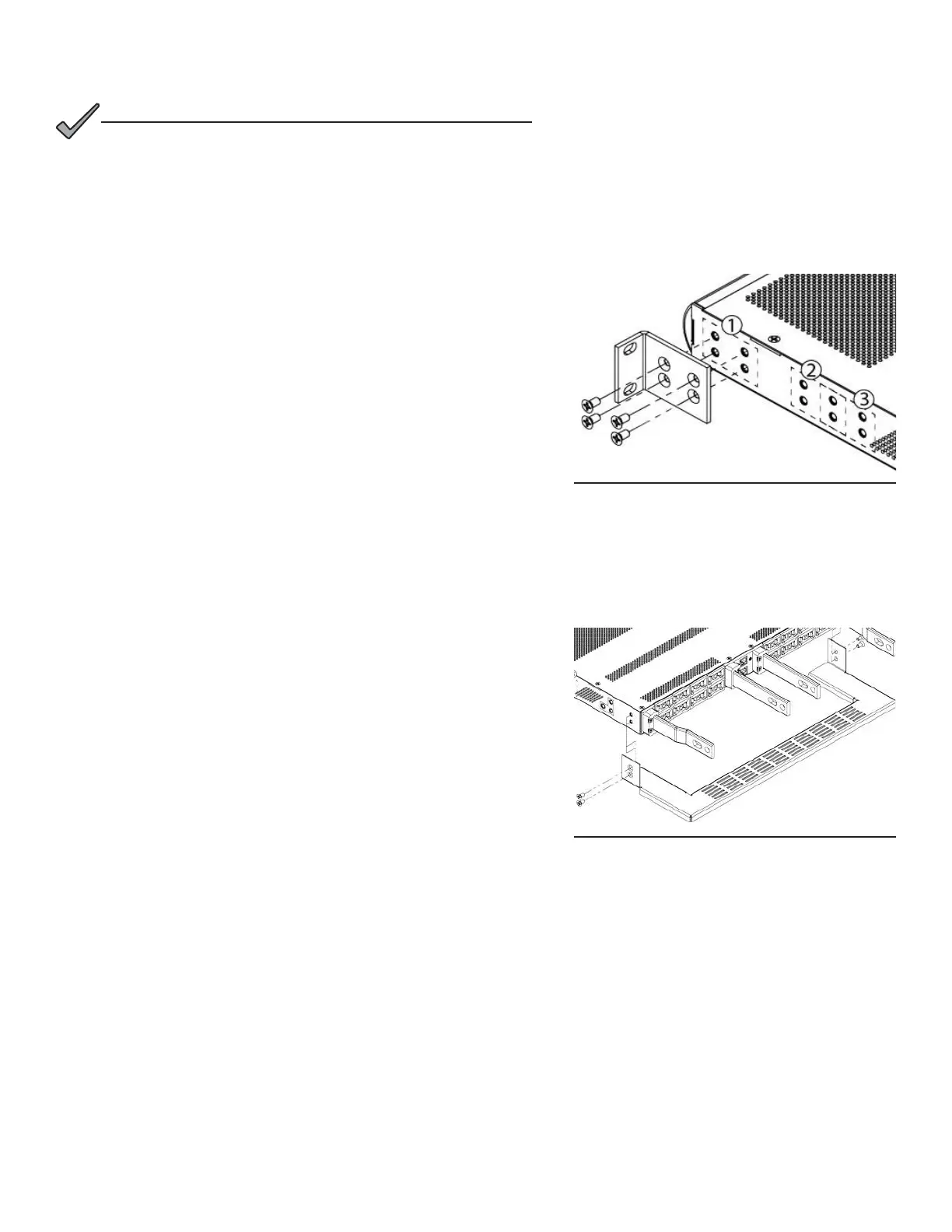
The Matrix C16 can be mounted in a 19in or 23in rack conguration,
in a front ush or oset mid-mount orientation.
Step 1. Depending on the size of the rack, select one of the following
sets of mounting ears:
y For 19” racks, use (2) C590-1936-10
y For 23” racks, use (2) C590-1937-10
Step 2. Attach the two (2) front mounting ears in the appropriate
conguration using the included #10-32 hardware as shown
in Figure 1�
4.2.2 4.2.2 Cable Lacing BarCable Lacing Bar
NOTE: Installation of the rear cable lacing bar is optional but highly
recommended to provide strain relief for connected cables�
NOTE: If using optional rear rack support kit (C750-284-10), skip to
Section 4�2�3
Step 1. Attach the lacing bar to the rear of the panel using the
included #10-32 hardware as shown in Figure 2.
Step 2. Insert the panel into the rack and secure the front mounting
ears to the rack using the included #12-24 hardware.
Figure 1. Mounting Ears
Figure 2. Cable Lacing Bar


 To Next Page