EasyManua.ls Logo

Engcon DC2 QSC - 3.3. QPM Control Panel Operation

Engcon DC2 QSC
92 pages
Print Icon
To Next Page IconTo Next Page
To Previous Page IconTo Previous Page
Loading...
3 Design and function
EXTRA
2A
Extra function
Direction A
EXTRA
2B
Extra function
Direction B
SHEAR
User function
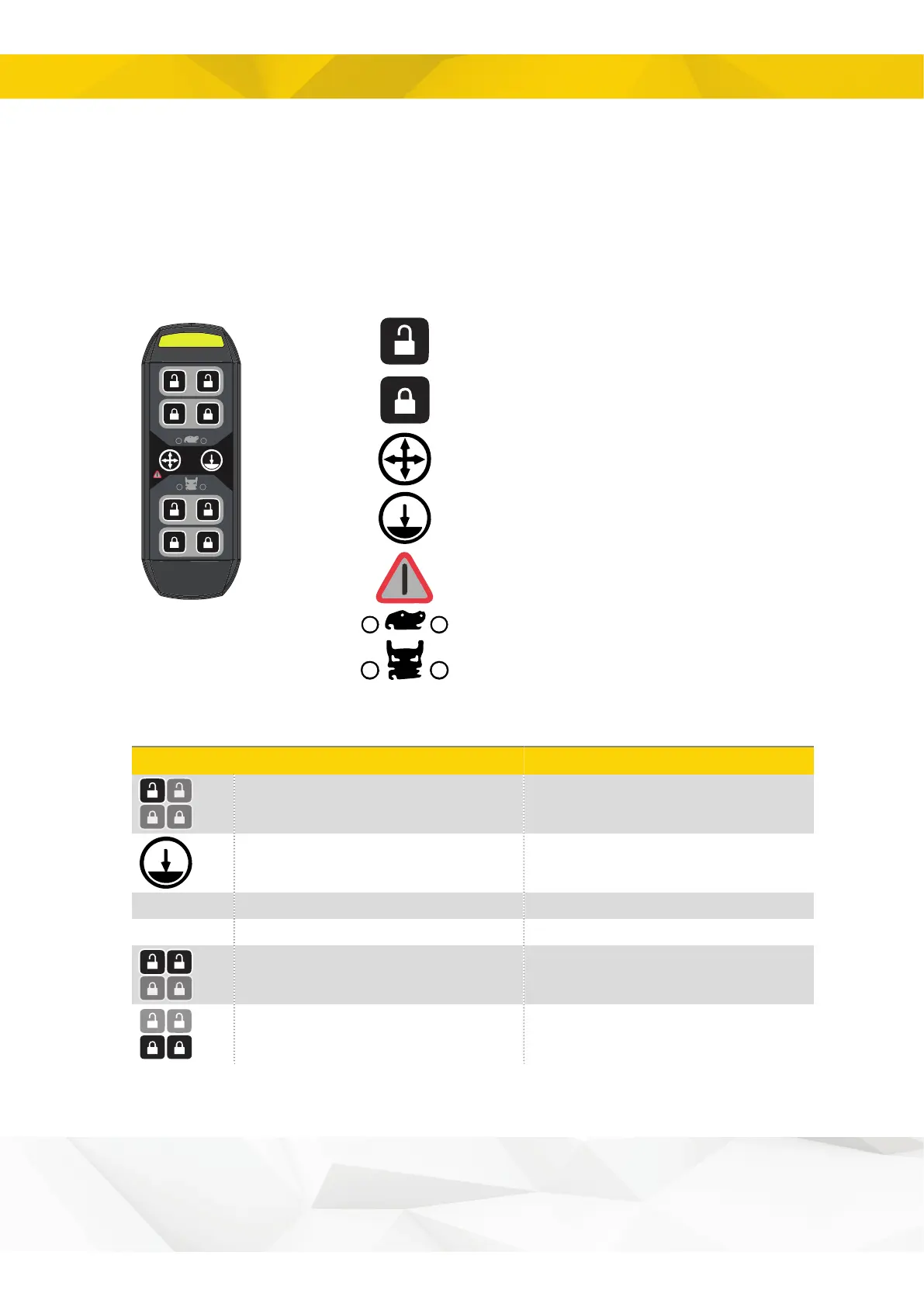
3.3. Control panel - QPM
3.3.1. Symbols on the Control Panel QPM
Opening the quick hitch
Closing the quick hitch
Swing/height restriction
Ground contact
Alarm indicator
Quick hitch for machine
Quick hitch for tiltrotator
3.3.2. Functions QPM - buttons
Symbol
Button press
Steady light indicates that
Initiates lock opening sequence
Lock opening sequence can be initiated
Ground contact is required
Or 1
Overrides ground contact
Or 2
Shows ground contact sensor status
The sensor detects pressure
Opens the lock
The lock can be opened
Closes the lock
The lock can be closed
13

Related product manuals