43
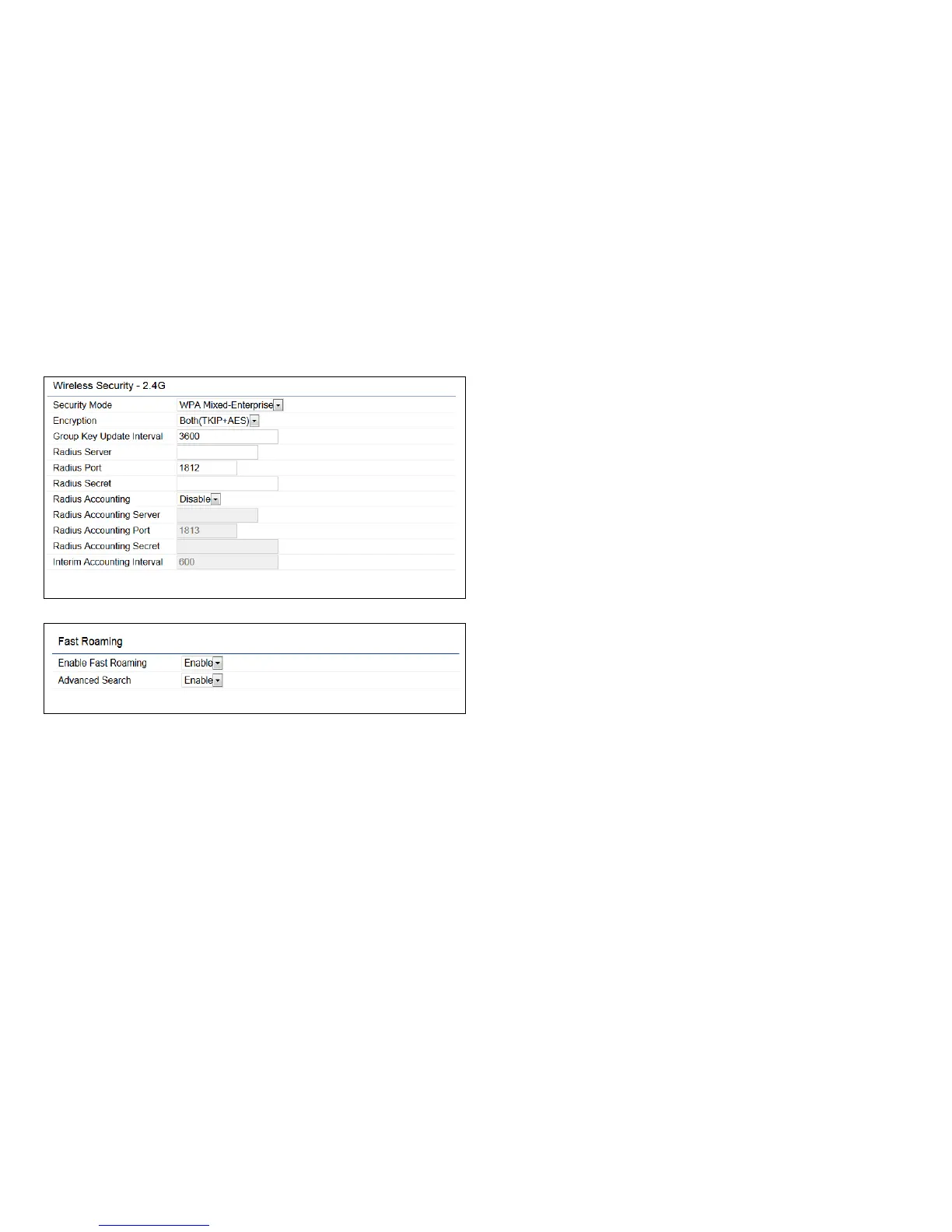
WPA Mixed-Enterprise: Access Point / WDS AP mode
Encryption: Select the WPA encryption type you would like.
Please ensure that your wireless clients use the same settings.
Radius Server: Enter the IP address of the Radius server.
Radius Port: Enter the port number used for connections
to the Radius server.
Radius Secret: Enter the secret required to connect to the
Radius server.
Group Key Update Interval: Species how often, in
seconds, the Group Key changes.
Radius Accounting: Enable or disable Radius accounting
feature.
Radius Accounting Server: Enter the IP address of the
Radius accounting server.
Radius Accounting Port Enter the port number used for
connections to the Radius accounting server.
Radius Accounting Secret: Enter the secret required to
connect to the Radius accounting server.
Interim Accounting Interval: Species how often, in
seconds, the accounting data sends.
Note: 802.11n does not allow WEP/WPA-PSK TKIP/
WPA2-PSK TKIP security mode. The connection mode
will automatically change from 802.11n to 802.11g.
Fast Roaming: Enable Fast Roaming to serve mobile client
devices that roam from Access Point to Access Point. Some
applications running on Client devices require fast re-
association when they roam to a different Access Point.
Voice application.



 To Next Page