10
MN-37072 • Rev 2 • 05/16 • Designer Series Blanket Warmer
Operation Instructions
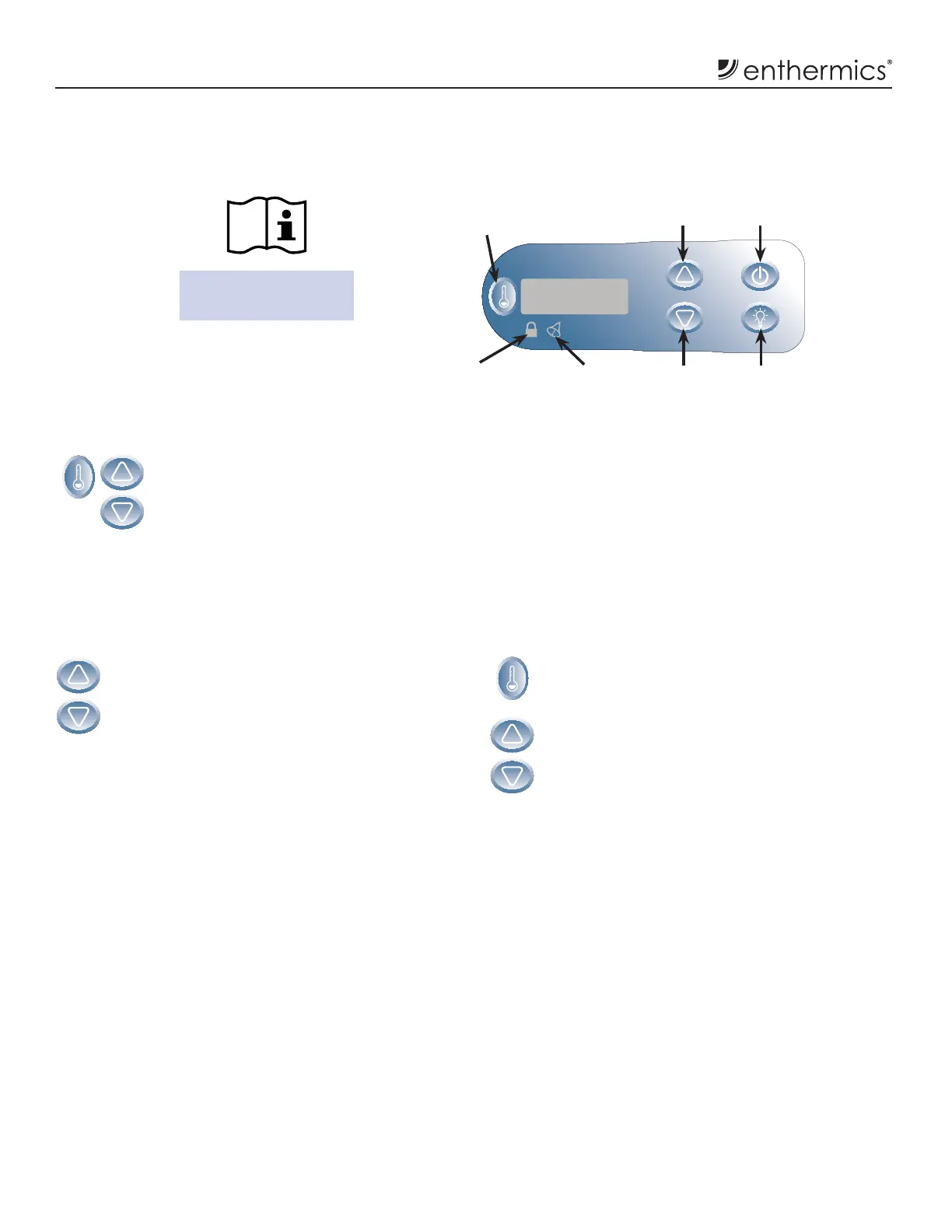
Electronic Control and LED Display
Blanket Electronic Control Features (continued)
Up Arrow
Button
Down Arrow
Button
On/Off
Button
Interior
Light Button
Button Lockout
Indicator Light
Error
Indicator Light
Temperature
Recall Button
Temperature Range:
32°C-71°C (90°F-160°F)
Temperature Format Selection
While the electronic control is in off
state, press and hold the Temperature
Recall button for four (4) seconds to
display the current temperature scale.
Press the Up Arrow or Down Arrow
buttons to switch between °F (fahrenheit)
or °C (celsius).
Sound Function
(Prior to September 2015)
The sound function can be turned on or off.
1. While the appliance is off, press and hold the
Down Arrow button for four (4) seconds.
2. The display will indicate the current sound
status, 0 (off) or 1 (on). Press the Up Arrow
or Down Arrow button to toggle between the
two choices.
(A er September 2015)
The sound volume can be changed:
1. While the appliance is on, press the
Temperature Recall button and the Down
Arrow button to display the current volume
setting. Release.
2. Press the Up Arrow or Down Arrow button to
adjust the volume. Volume settings range from
0 (mute)to 12 (loud).
NOTE: The alarm volume is set at the maximum
(12) and can not be disabled.



 To Next Page