12
MN-37072 • Rev 2 • 05/16 • Designer Series Blanket Warmer
Operation Instructions
Optional Timer Control Feature (continued)
Same Start and Stop Times for the Week
Note:
The timer option must be off to set the start time.
Activating this mode overrides all individual
day programming.
1. View and adjust start time
a. Press the Start Time button to view the start
time for that day.
b. Press and hold the Start Time button for four
(4) seconds to set the current day’s start time
as the same time for every day of the week.
The on/off indicator light will blink slowly.
c. Press the Up Arrow or Down Arrow button
to change the default start time minutes.
Press and hold the Up Arrow or Down Arrow
button to adjust the hour.
2. View and adjust stop time
a. Press the Stop Time button to view the stop
time for that day.
b. Press and hold the Stop Time button for four
(4) seconds to set the current day’s stop time
as the same time for every day of the week.
The on/off indicator light will blink slowly.
c. Press the Up Arrow or Down Arrow
button to change stop time. Press and
hold the Up Arrow or Down Arrow button
to adjust the hour.
3. When both times are set, allow the on/off indicator
light to extinguish and then press and hold the
Timer On/Off button until the on/off indicator
light stays on steadily.
Different Start and Stop Times for Each Day of
the Week
1. View and adjust specifi c day
a. Press and hold the Time button for eight (8)
seconds. The on/off indicator light will
blink rapidly. The display will show the
current day.
b. Adjust the day by pressing the Up Arrow or
Down Arrow button.
2. View and adjust start time for that day
a. Press the Stop Time button to display the
start time for that day.
b. Press the Up Arrow or Down Arrow button
to adjust the automatic start time.
3. View and adjust stop time for that day
a. Press the Stop Time button to display the
start time for that day.
b. Press the Up Arrow or Down Arrow button
to adjust the automatic stop time.
4. Repeat steps 1-3 for each day of the week
5. When all days and times are set, allow the on/off
indicator light to extinguish and then press and
hold the Timer On/Off button until the on/off
indicator light stays on steadily.
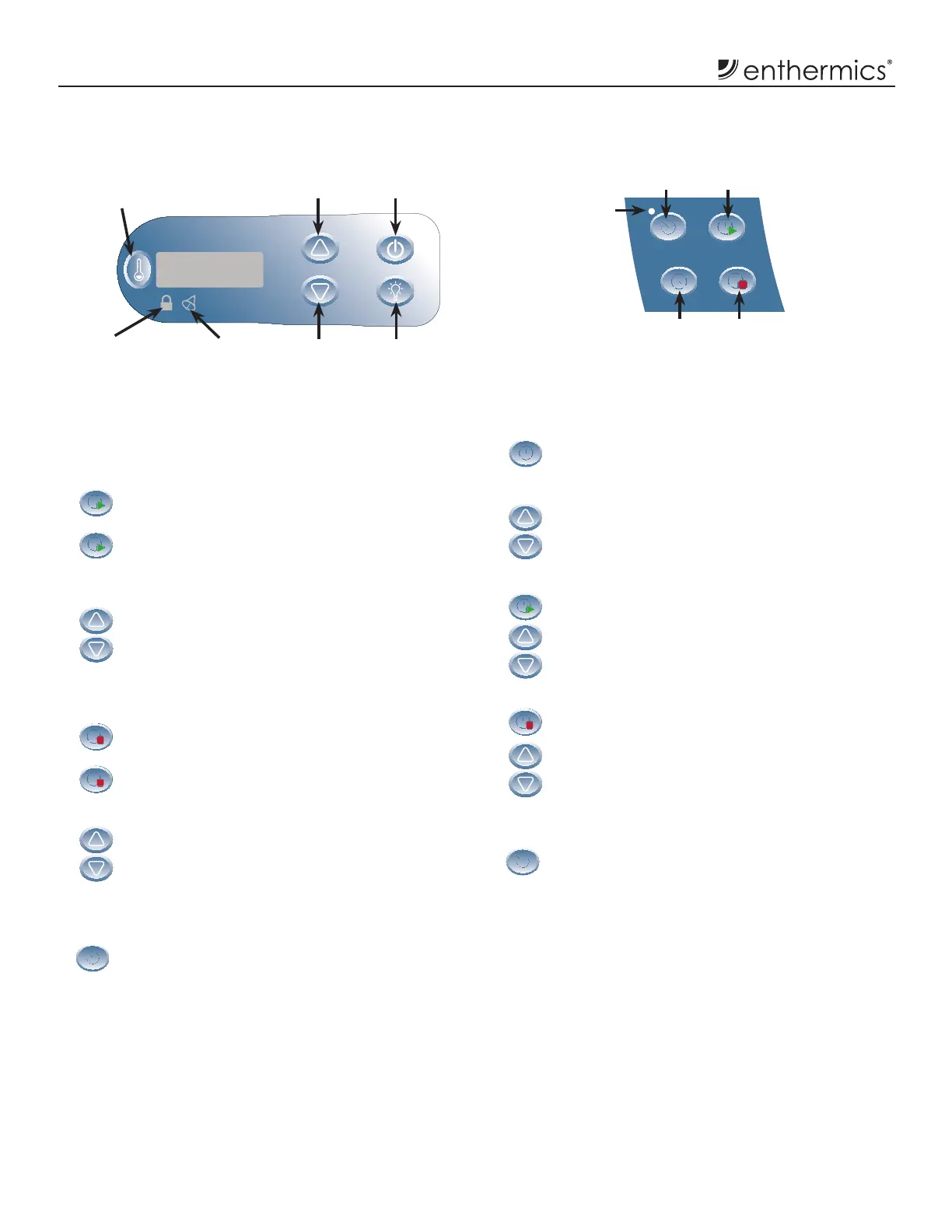
Timer On/Off
Button
Time Button
Set or View
Start Time Button
Set or View
Stop Time Button
Optional Timer Control
On/Off
Indicator
Light
Electronic Control and LED Display
Up Arrow
Button
Down Arrow
Button
On/Off
Button
Interior
Light Button
Button Lockout
Indicator Light
Error
Indicator Light
Temperature
Recall Button



 To Next Page