29
IP2266EN
EN
9.2 Status indication on the display
The display shows the different impulses that are active. The status viewing starts with showing
“ ” as for Status, then one or many numbers representing the different active impulses in to
the operator.
The different impulses are:
00= Key Impulse
01= Inner impulse
02= Outer impulse
03= Synchronisation
05= Presence impulse 1
06=Presence impulse 2
07= Side Presence impulse 1
08= Side Presence impulse 2
09= Stop impulse
10= Emergency open impulse
13= Close command
14= Nurse impulse
24= Push and Go impulse
25= Open-Close impulse
28= Fire impulse
47= Interlock Disable
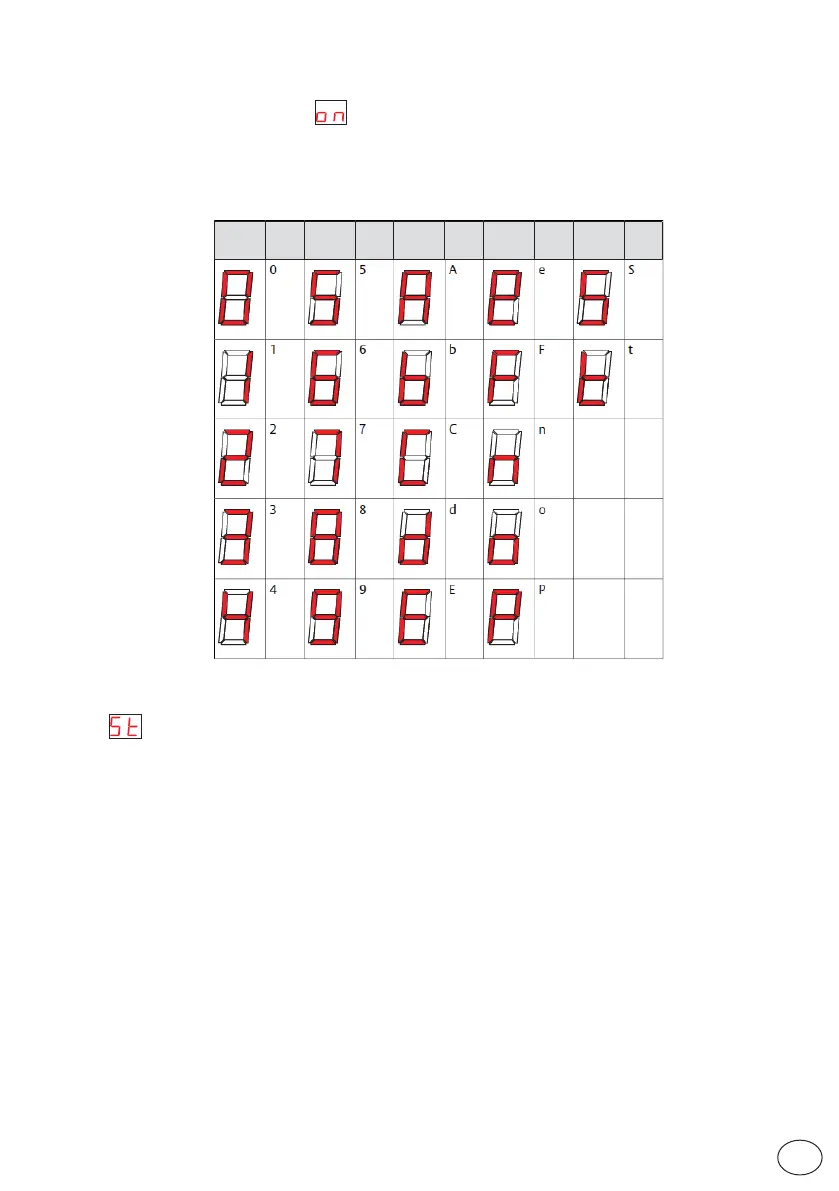
Display
Char
act er
Display
Char
act er
Display
Char
act er
Display
Char
act er
Display
Char
act er
9.1 Display test
a. When the display shows " ", push the SELECT button and each of the two display win-
dows make a rotating test pattern.
b. Verify that all seven segments of the two display windows are lit during the test. If not there is
a risk of misjudgment of the digits shown in a defective display.
c. When the display test is finalized the display shows two steady digits indicating the first parameter.


 To Next Page