31
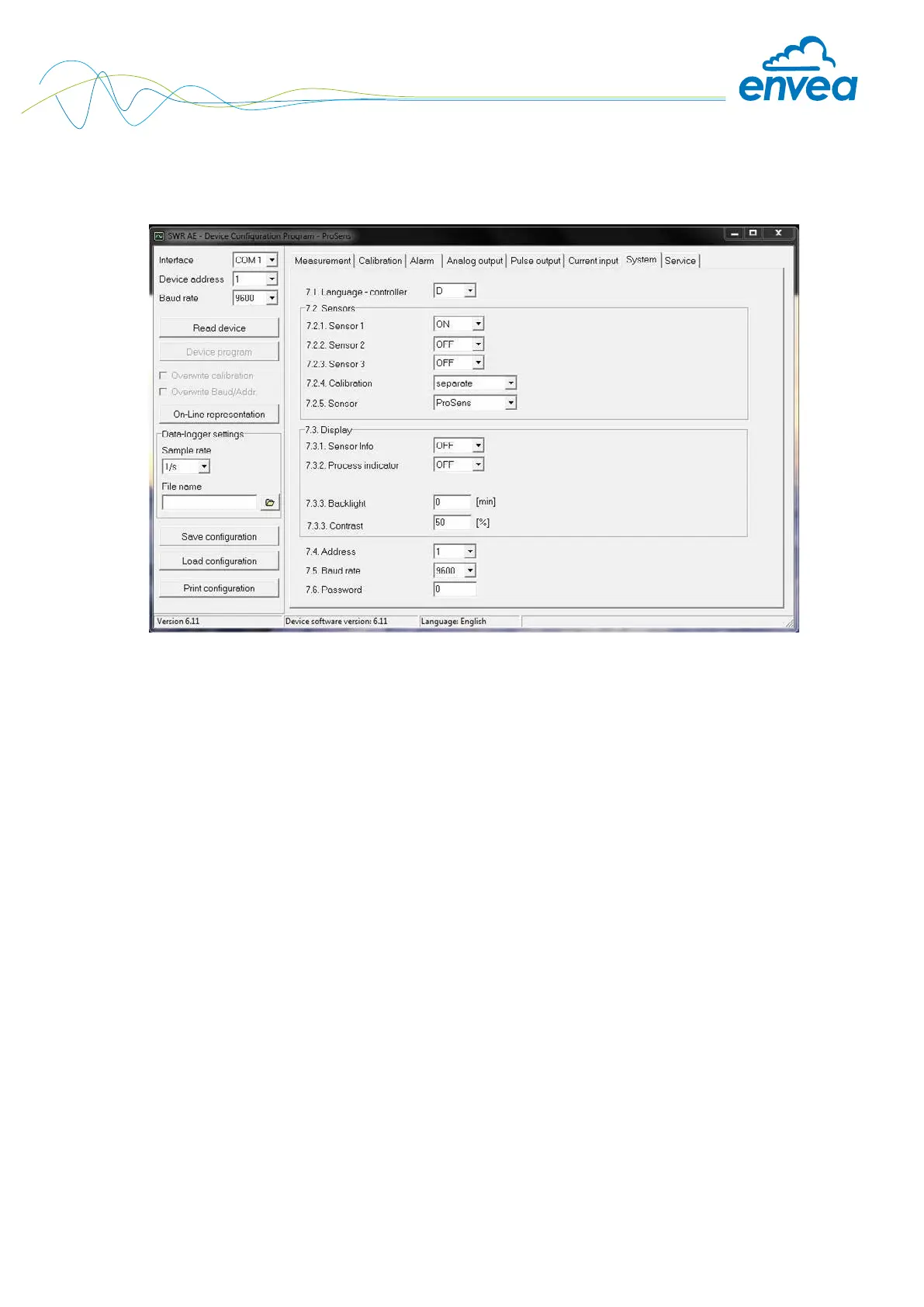
Tab 7: System
Basic settings of the system and Evaluation unit.
7.1 Language Selection: D / E / F Selection of the language on the display of
the Evaluation unit.
7.2 Sensors Special functions and calibration
7.2.1 Sensor 1 Selection: ON / OFF ON: Sensor is evaluated
OFF: Sensor is ignored
7.2.2 Sensor 2 Selection: ON / OFF ON: Sensor is evaluated
OFF: Sensor is ignored
7.2.3 Sensor 3 Selection: ON / OFF ON: Sensor is evaluated
OFF: Sensor is ignored
7.2.4 Calibration Selection:
Individual / Average value Function only for multiple sensor systems!
Individual: Each sensor is calibrated via an
individual calibration table.
This is followed by a throughput calculation
based on the throughput values of the
individual sensors.
(This function should only be used by
trained ENVEA Process personnel.)
Average value: The average value from all
sensors used is saved for calculating the
throughput in a common calibration table.


 To Next Page