Operations Manual
7. CONTROL UNIT OPERATION — TYPE 1 AND
TYPE 2
Envirotainer RKN e1 Container
7.1.5 FUNCTIONAL TEST
1. Disconnect the container from power supply (if connected).
2. Set temperature to +5°C (+41°F).
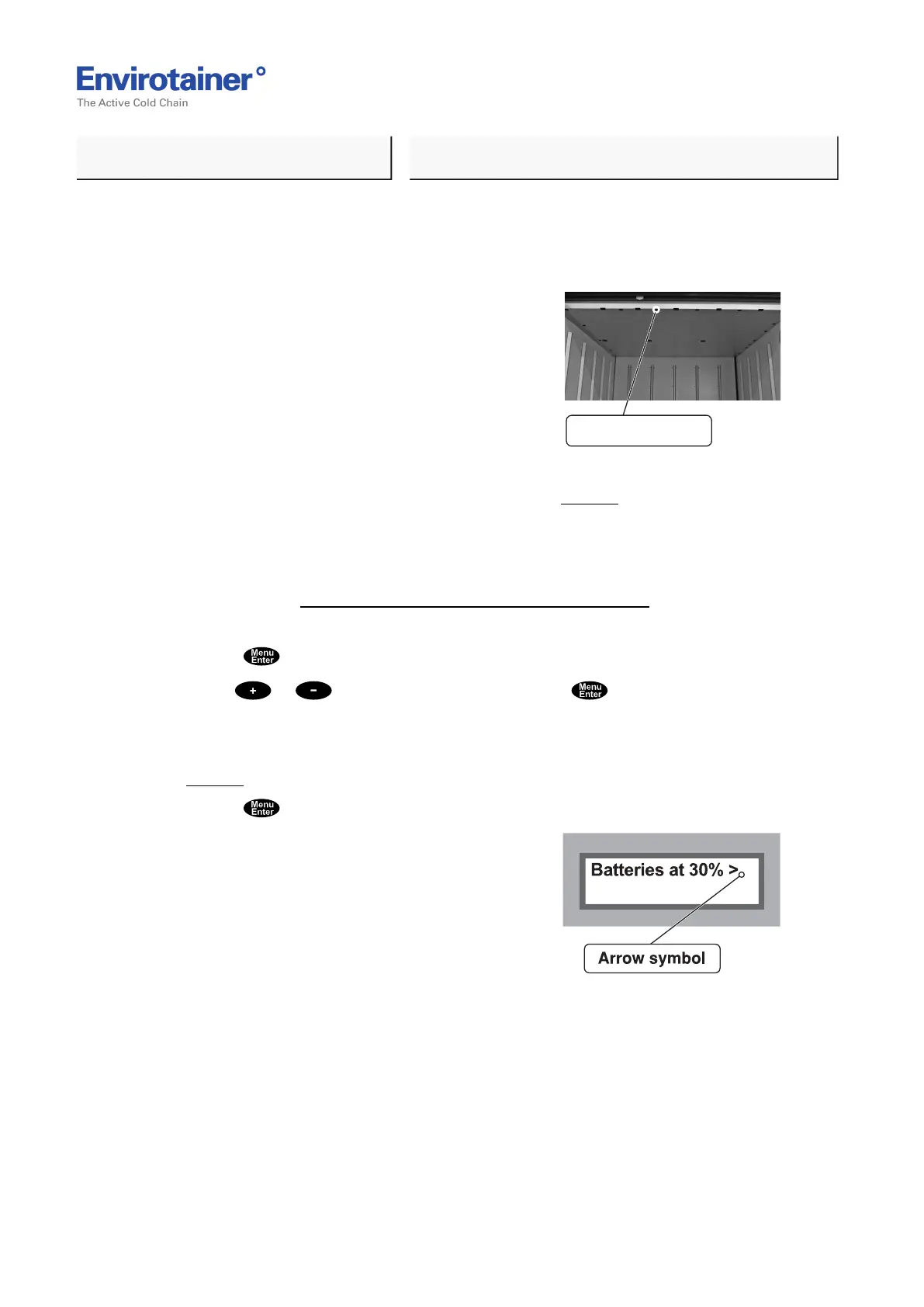
Fig. 12
3. Check for air discharge from air guide in the ceiling (Fig. 12 ).
4. Check that no alerts are activated. If any alert is activated the yellow alert indicator is
flashing and the alert is shown on the display. If so, check what alert has been activated and
perform recommended actions.
Refer to chapter 8. Operation Modes, Infos, Alerts And Alarms.
It is also possible to view activated alert in the control unit menu.
• Press to enter the main menu; the display shows "Battery status".
• Use or to step to "View alert" and press to confirm; the display shows
activated alerts.
If more than one alert is activated, an arrow symbol is shown in the top right corner
(Fig. 13 ).
• Press to scroll between activated alerts.
Fig. 13
(PROCEED ON NEXT PAGE!)
Doc No. MO-RKN-3009
Version 2.2: 2017-08-31 20 (42)



 To Next Page