ADAPT 360 | ADAPT 360 White Bluetooth
®
headset
Additional functions20
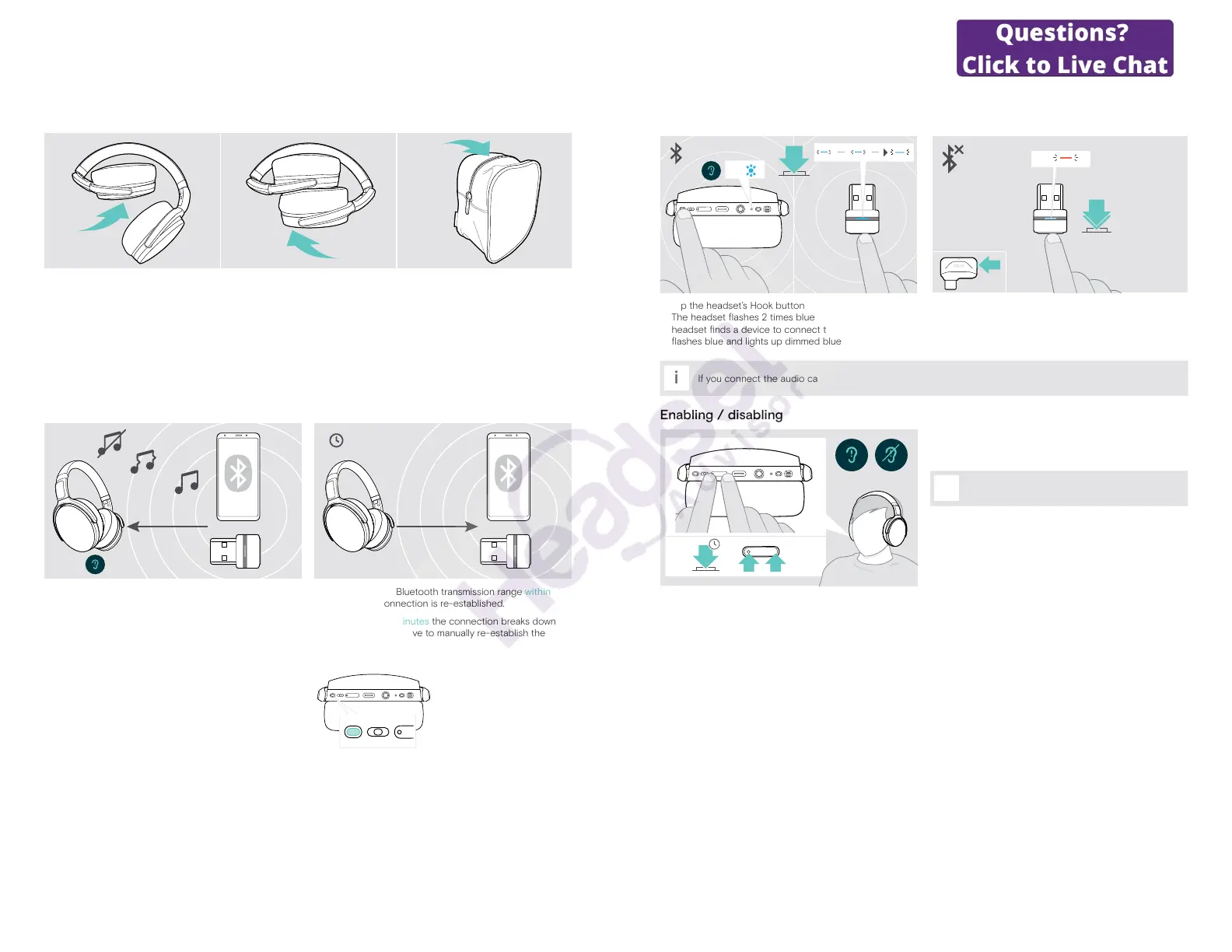
Storing and transporting the headset
To avoid nicks or scratches on the headset:
1 2 3
X Fold the ear cups inwards towards the headband.
X Store the headset in the case when not in use or when carrying it around. Keep it in a clean and dry environment.
If you do not use the headset for extended periods of time:
X Charge the built-in rechargeable battery every 3 months for about 1 hour.
If you leave the Bluetooth range
The range between headset and Bluetooth device is device dependent. The transmission range largely depends on
environmental conditions such as wall thickness, wall composition etc. With a free line of sight, the transmission range of
most Bluetooth devices is up to 25 meters.
~25 m
5 min
If the audio quality deteriorates e. g. during a call or the link
breaks down completely:
X Re-enter the radio range of the Bluetooth device.
If you re-enter the Bluetooth transmission range within
5 minutes, the connection is re-established.
After more than 5 minutes the connection breaks down
completely and you have to manually re-establish the
connection:
X Tap the Hook button.
ADAPT 360 | ADAPT 360 White Bluetooth
®
headset
Additional functions21
Reconnecting / disconnecting Bluetooth
Reconnecting Bluetooth Disconnecting Bluetooth
2x
3x
2x
X Tap the headset’s Hook button or the dongle’s button.
The headset ashes 2 times blue as soon as the
headset nds a device to connect to. The dongle
ashes blue and lights up dimmed blue.
X Double tap the dongle’s button.
Bluetooth will be disconnected. The LED ashes 3 times
red.
i
If you connect the audio cable to the headset, Bluetooth gets automatically deactivated.
Enabling / disabling voice prompts
4s
In idle mode (no active call or audio playback):
X Press and hold both Volume buttons until the headset
announces a voice prompt for on or o.
i
If the voice prompts are deactivated you hear
tones instead.




 To Next Page