EasyManua.ls Logo

EPS RS 232 - AI Pin Assignment; Analog Input Configuration

Default Icon
53 pages
Print Icon
To Next Page IconTo Next Page
To Previous Page IconTo Previous Page
Loading...
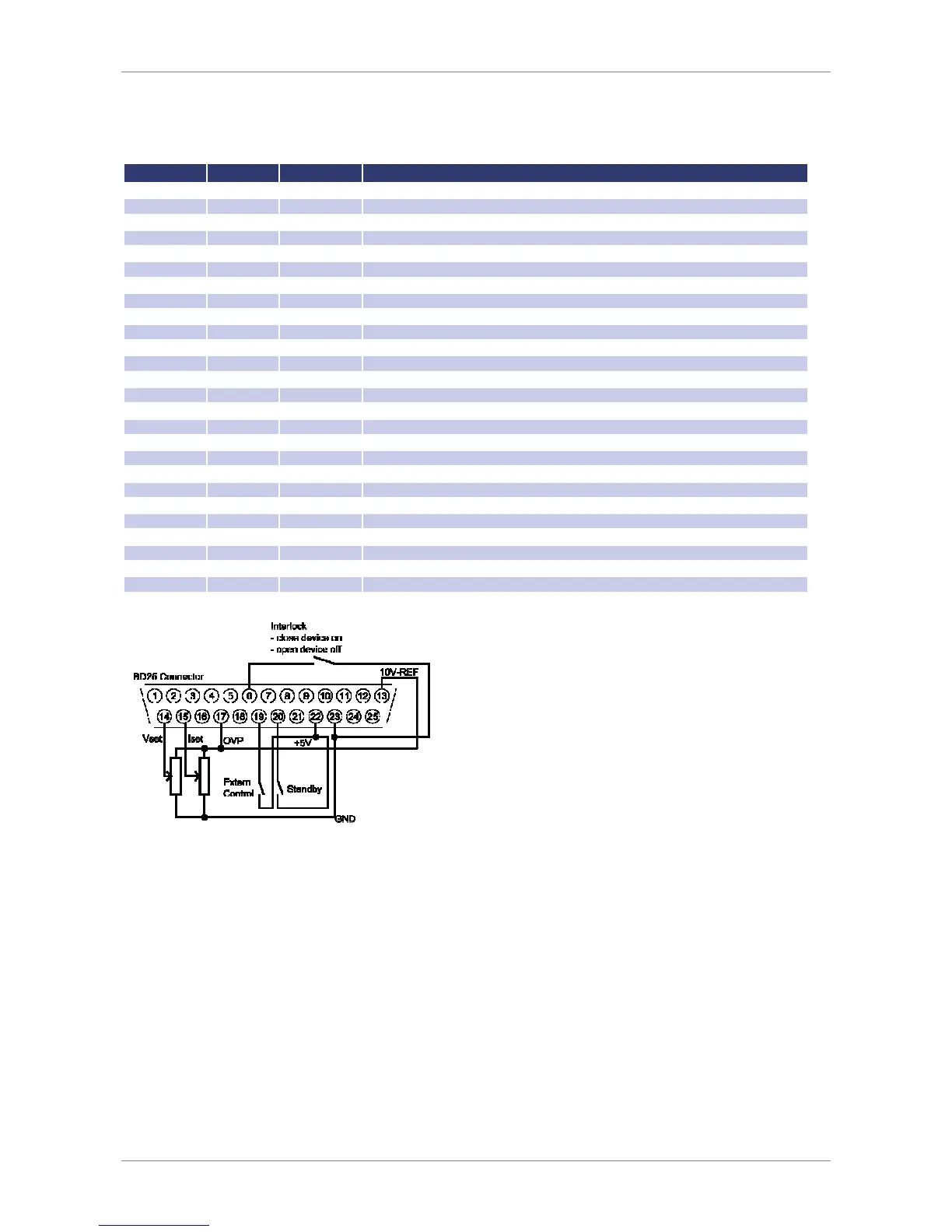
Ext. Control: AI Interface (Option)
30
P
IN
A
SSIGNMENT
AI
I
NTERFACE
No (BD25) Dir Name Function
1
analog out
U
mon
Monitor set point U
2
analog out
I
mon
Monitor set point I
3
analog out
P
mon
Monitor actual value P
4
analog out
OVP
mon
Monitor actual value OVP
5
digital in
Soft
-
Interlock
Interlock function (Caution: Interlock does not
correspond to the machinery directives)
6
-
nc
-
-
-
7
digital out
CV
Signals „Const. Voltage“ mode
8
analog out
U
istmon
Monitor output voltage
9
gnd
GND
-
10
digital out
Standby
Signals standby
11
gnd
GND
-
12
-
nc
-
-
-
13
REF10
10 V
-
V
ref
Output 10
V reference voltage
14
analog in
U
set
Set point U
15
analog in
I
set
Set point I
16
analog in
In 2
-
17
analog in
OVP
set
Set point OVP
18
analog in
In 4
-
19
digital in
Ext. Control
Activates analog control
20
digital in
Standby
Activates standby
21
analog out
I
istmon
Monitor output current
22
pwr
+ 5 V
Output 5 V supply voltage
23
gnd
GND
-
24
digital out
Error
Signals shut down by OVP
25
gnd
GND
-
26
-
nc
-
-
-
All digital outputs are OC outputs with a pull-up resistance after + 5 V. All analog inputs and outputs can be operated
in 0-5 V or in 0-10 V mode.
A
NALOG
I
NPUT
Set points are adjusted as dc voltage (0-5 V or 0-10 V) on the analog inputs. The voltage range can be chosen in the
configuration menu.
Set Point U (U
Set
)
Set point output voltage. The set point refers to the rated voltage of the unit.

Table of Contents