Note:
is chapter explains the Document Capture Pro feature on Windows. When you using Document Capture on Mac OS, see
the
soware
help for details.
Related Information
& “Dividing documents using a specied number of pages” on page 127
& “Dividing documents using blank sheets of paper” on page 130
& “Creating and saving folders using the barcode character information” on page 133
& “Creating two levels of folders using two types of barcode” on page 138
& “Saving les with le names using the barcode character information” on page 142
& “Creating and saving folders using OCR characters” on page 146
& “Saving
les
with
le
names using OCR characters” on page 151
& “Creating and saving folders for each form” on page 158
Dividing documents using a specied number of pages
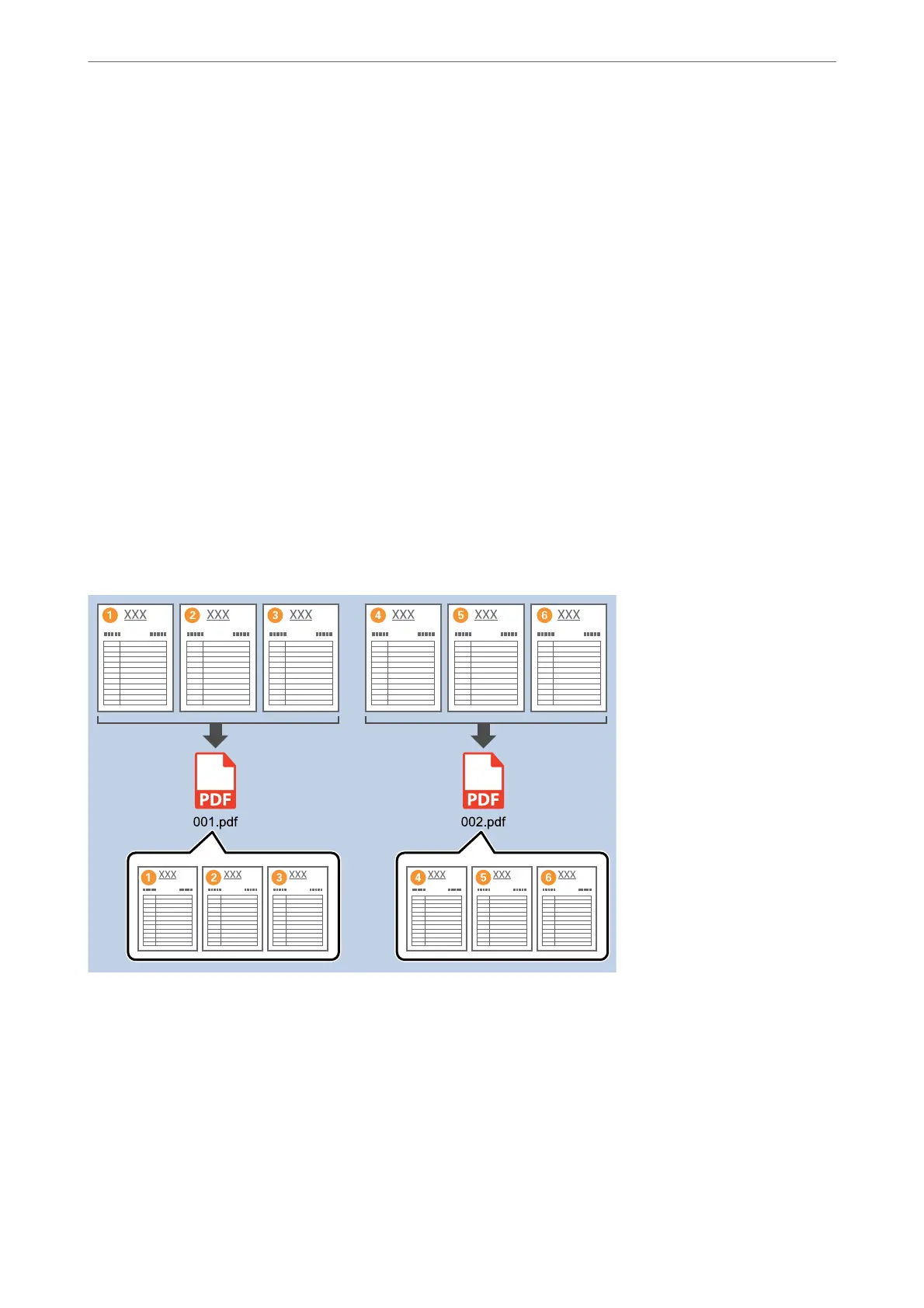
You can divide data based on a specied number of pages scanned, and save in a le or folder.
is section explains the job settings for "Dividing a document every three pages and saving as PDF les”.
Advanced Scanning
>
Various Scanning Settings for Document Capture Pro (for Windows Only)
>
Dividing docu
…
127



 To Next Page