Name Function
N
Vertical lens shift dial
Turn the dial to move the position of the projected image
up or down. s p.22
O
Horizontal lens shift
dial
Turn the dial to move the position of the projected image
left or right.
s
p.22
Base
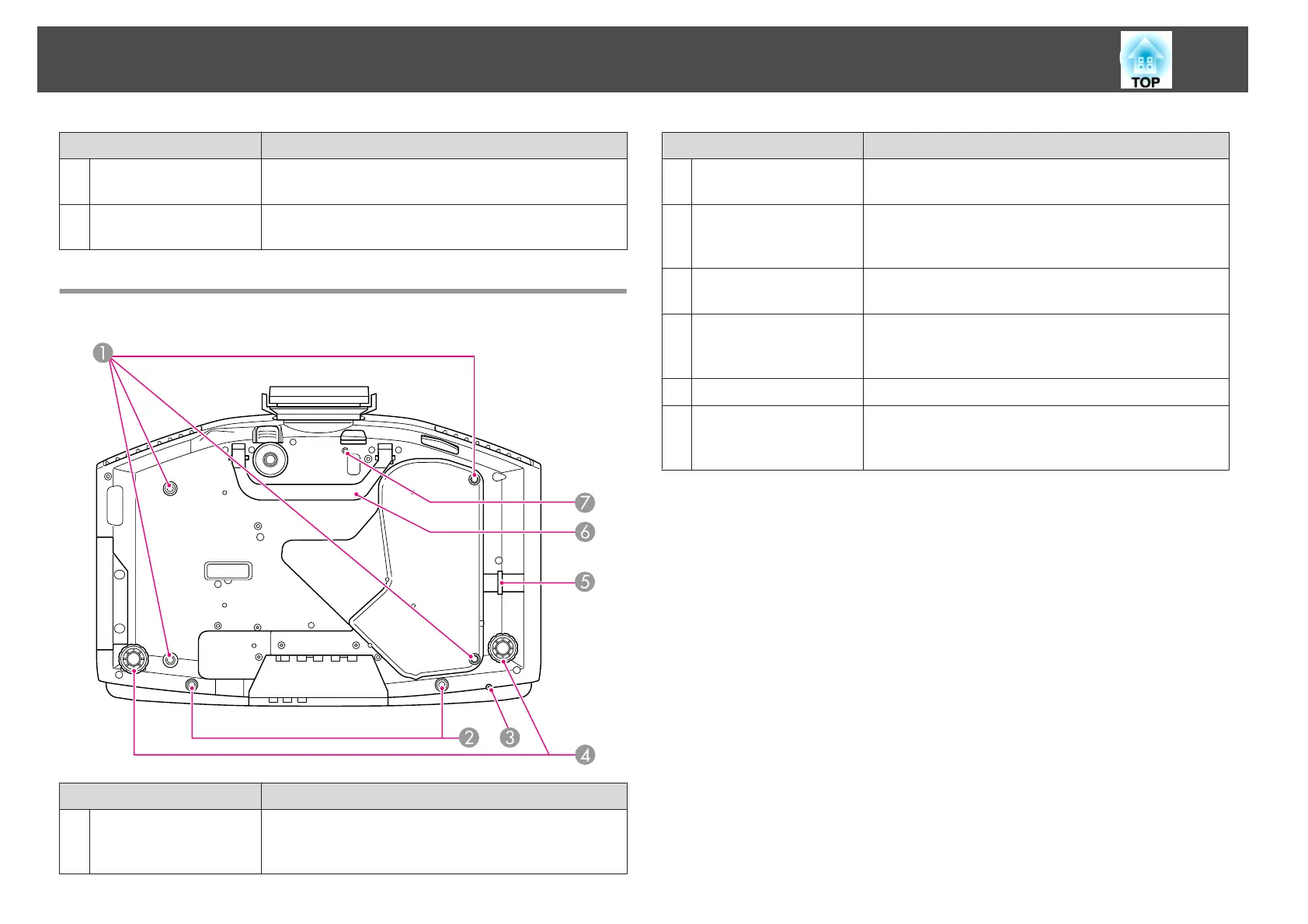
Name Function
A
Ceiling mount fixing
points
(4 points)
Attach the optional ceiling mount here when suspending
the projector from a ceiling. s p.147, p.131
Name Function
B
Screw holes to fix the
cable cover
Holes for screws to fix the cable cover in place.
s p.144
C
Screw hole to fix
Wireless LAN unit (EB-
G5950/G5650W only)
When installing the Wireless LAN unit, use this screw hole
to fix the unit in place to avoid loss and so on.
s
p.143
D
Rear foot
When setup on a desk, turn to extend and retract to adjust
the horizontal tilt. s Quick Start Guide
E
Security cable
installation point
Pass a commercially available anti-theft wire lock through
here when you want to secure the projector to a fixed
object.
s
p.52
F
Handle
Use these handles when carrying the projector.
G
Screw hole for the
screw to fix the lens
unit removal button
When installing a lens unit, use this screw hole to fix the
lens unit removal button using the screw supplied.
s p.52
Part Names and Functions
11


 To Next Page