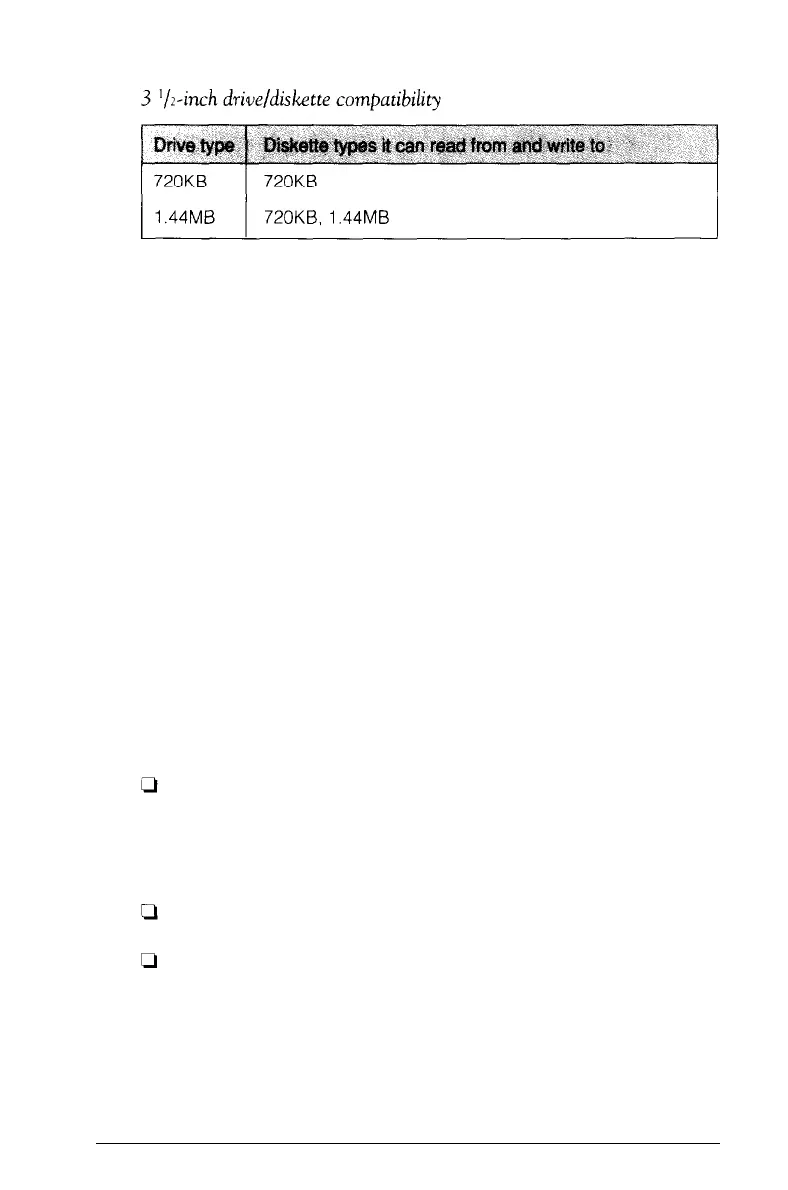
Because of these incompatibilities, always indicate the diskette
type and density when you label your diskettes. (Usually this
information appears on the manufacturer’s label.)
If you have any combination of the above drives (1.2MB,
360KB, l.44MB, or 720KB), you can copy files from one drive
to another-using the COPY or XCOPY command-as long as
the correct diskette type is in each drive. You can also use these
commands to copy files between a hard disk and any type of
diskette. However, you cannot use the DISKCOPY command to
copy from one diskette drive to another if the two drives are not
the same type. For more information on the MS-DOS COPY,
XCOPY, and DISKCOPY commands, see Chapter 4.
Caring for Diskettes and Diskette Drives
Follow these basic precautions to protect your diskettes and
avoid losing data:
Do not remove a diskette from the diskette drive or turn off
the computer while the drive light is on. This light
indicates that the computer is copying data to or from a
diskette. If you interrupt this process, you can destroy data.
Remove all diskettes before you turn off the computer.
Keep diskettes away from dust and dirt. Small particles of
dust or dirt can scratch the magnetic surface, destroy data,
and ruin the read/write heads in a diskette drive.
3-20
Using the Equity 386/25



 To Next Page