Adjustable Settings Using a Test Pattern
Parent topic: Using Basic Projector Features
Related tasks
Setting the Screen Type
Adjustable Settings Using a Test Pattern
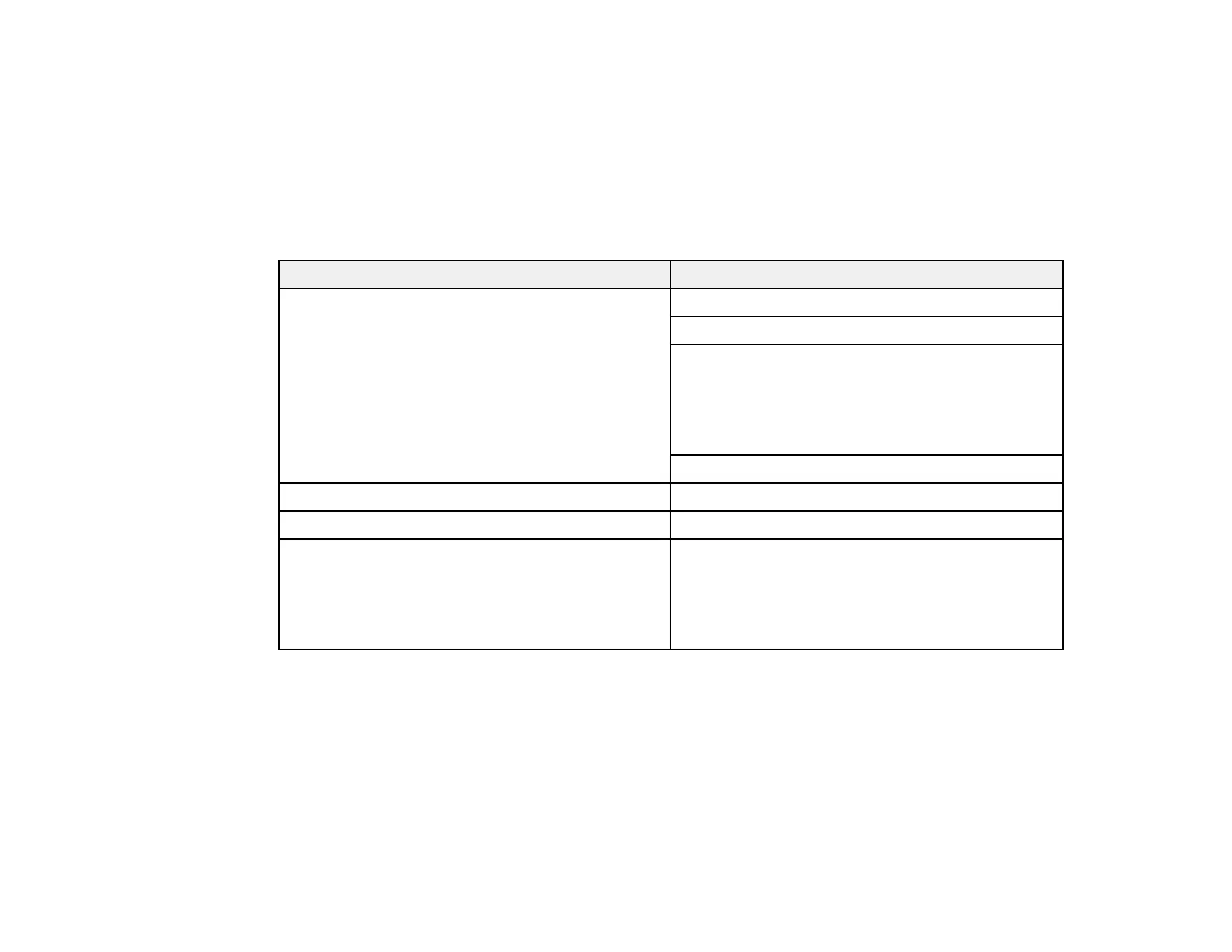
The following image adjustments can be made while the test pattern is displayed.
Top menu Submenu/Option
Image Color Mode
Abs. Color Temp.
Advanced
• Gamma
1
• RGB
• RGBCMY
Reset
Signal Auto Setup
Settings Geometric Correction
Extended Multi-Projection
• Brightness Level
• Edge Blending
2
• Multi-screen
1
Except for custom Gamma settings
2
Except for Black Level (PowerLite Pro G6800/G6900WU)
Parent topic: Displaying a Test Pattern
Adjusting the Image Height
If you are projecting from a table or other flat surface, and the image is too high or low, you can adjust
the image height using the projector's adjustable feet.
92




 To Next Page