Viewing Photos and Videos 27
Zooming an Image
You can zoom RAW images up to 100% and JPEG images
up to 400%.
❍ To zoom in on an image, press the button. Keep
pressing it to zoom in up to 400%.
❍ To zoom out, press the button. Continue pressing it
to zoom all the way out.
❍ To pan around a zoomed image, use the 4-way ring.
❍ To return to the normal full-screen view, press Back.
❍ To select an area to zoom in, press OK when a full-screen
image is displayed. Use the 4-way ring to move the red
box to the area you want to zoom, then press
OK again.
When you are viewing a zoomed-in image, you can display
the next or previous photo without changing the zoom.
Press
Menu to display the pop-up menu, then select Next
Photo or Previous Photo and press OK.
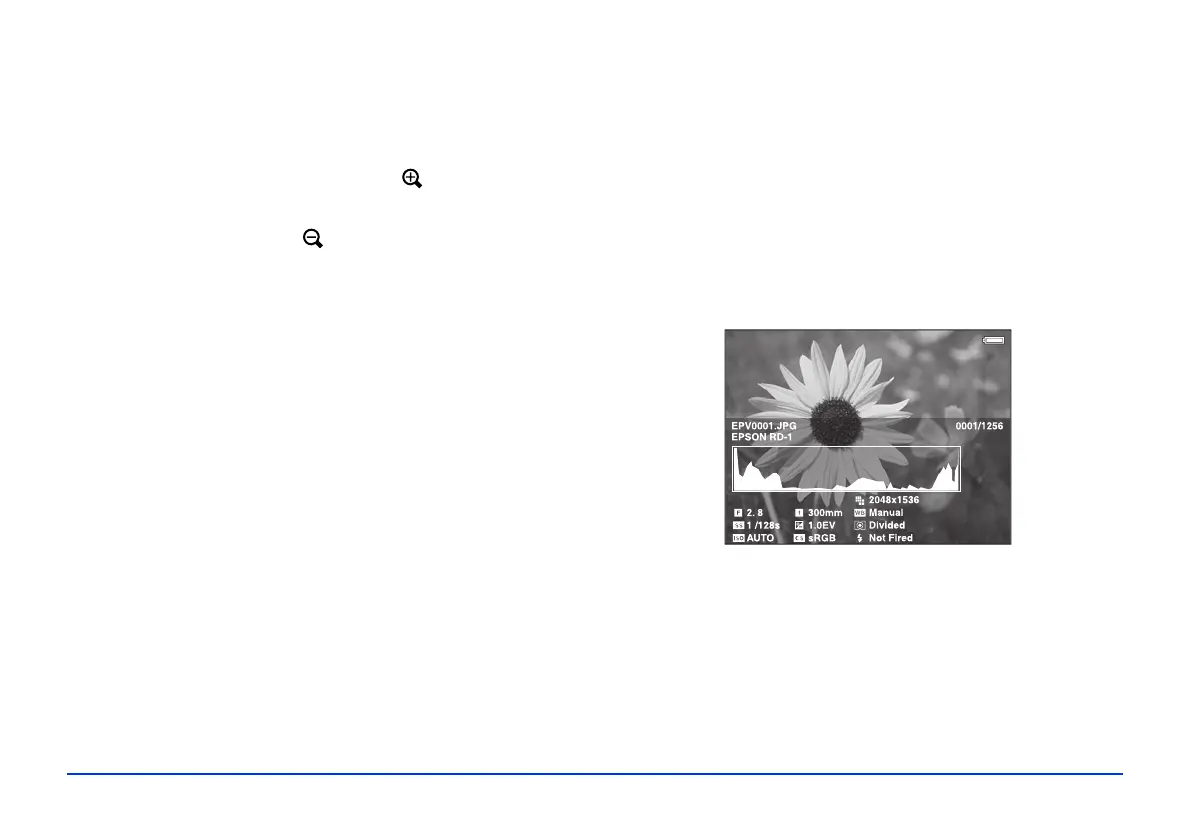
Displaying Information
You can view metadata and Exif information, a histogram,
and a visual alert indicating poorly exposed highlight and
shadow areas of your photos.
1 To view the file name and date for a full-screen image,
press the
Display button.
2 To view metadata, Exif information, and a histogram,
press
Display again:
28/12/2006 12:30:08



 To Next Page