Menu List
The items and options available in the menu are described below. See the reference pages for more details on each
item.
*1. SC-T7200D Series/SC-T5200D Series only
*2. SC-T7200 Series/SC-T5200 Series/SC-T3200 Series only
*3. When the optional hard disk unit or Adobe PostScript 3 Expansion Unit has been connected only
*4. When the optional Adobe PostScript 3 Expansion Unit has been connected only
,Print Queues menu
U “Print Queues menu” on page 139
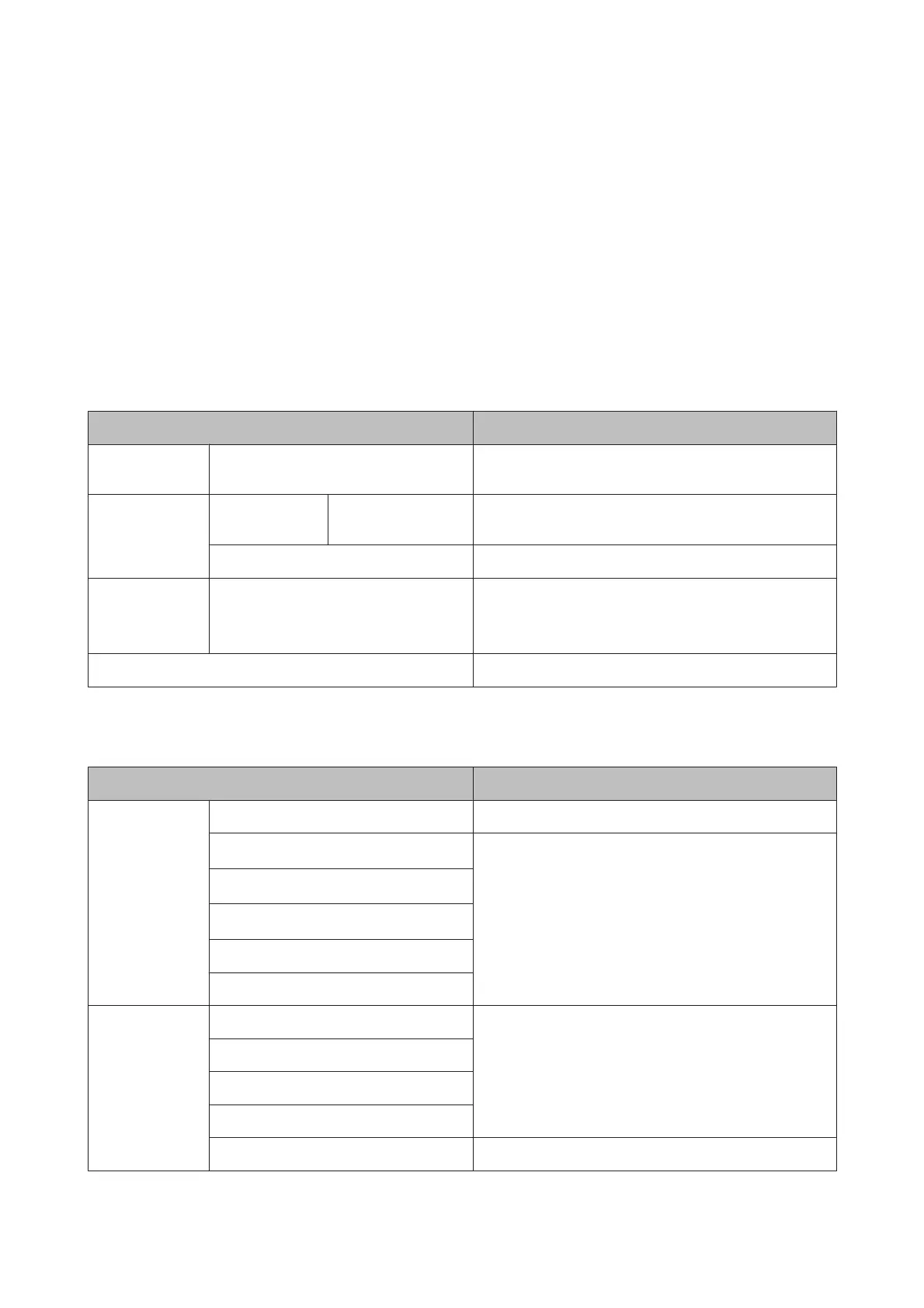
Menu item Description
Print Queue
*3
XXXXXXXXXXX (name of waiting print job) Lists the Waiting Job Name, User, Estimated Start Time,
Estimated Print Time, and Printing Availability.
Hold Queue
*2, *3
Check Held Jobs XXXXXXXXXXX
(name of paused job)
Lists the Paused Job Name, User, Paper Type, Source, Size,
and Reason For Hold.
Resume All Jobs
Press Z to start printing.
Savd Job
Queue
*3
XXXXXXXXXXX (name of stored print job) Lists the Stored Job Name, User, Length, Pages, Paper Type,
Copies, Source, Size, and Estimated Print Time.
Press Z to resume printing
Print Job Log Sheet
Press Z to start printing.
.Paper menu
U “Paper menu” on page 141
Menu item Description
Load/Remove
Paper
Remove Paper Not displayed when no paper is loaded
Roll Paper
*2
Displays instructions for loading the paper.
Roll 1
*1
Roll 2
*1
Cut Sheet (up to 0.8 mm thick)
Poster Board
Select Paper
Type
Plain Paper Lists supported Epson media.
Photo Paper
Matte Paper
Others
Custom Paper Lists the names of user-defined custom paper types.
SC-T7200 Series/SC-T5200 Series/SC-T3200 Series/SC-T7200D Series/SC-T5200D Series User's Guide
Using the Control Panel Menu
132


 To Next Page
 Loading...