Loading Roll 2
(SC-T7200D Series/SC-T5200D
Series only)
Buttons that are used in the following settings
A
Lower the paper basket to the horizontal
position.
U “Adjusting the Position” on page 49
B
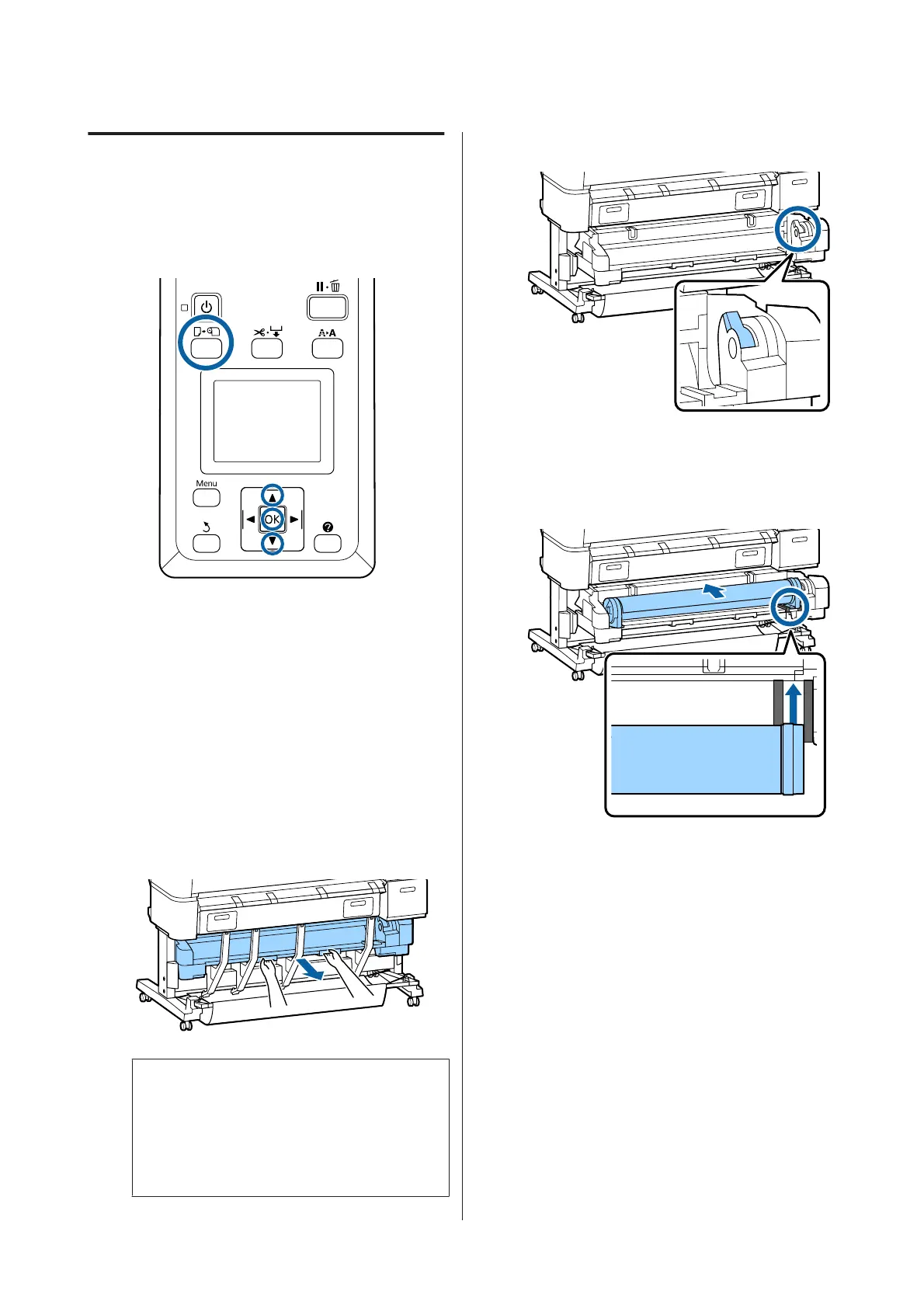
Press the ( button on the control panel.
Use the d/u buttons to select Roll 2 and press the
Z button.
C
Hold the drawer handles of Roll 2 unit, and then
pull the unit out.
c
Important:
Do not pull out the Roll 2 unit unless you are
instructed to do so by the control panel
screen. If the unit is carelessly pulled out
while paper is loaded, paper jams or paper
damage may occur.
D
Confirm that the roll paper lock lever is raised.
E
Place the roll paper adapters on the adapter
guides so the flat surfaces of the adapters is facing
down. Next, following the adapter guides, slide
the roll slowly inside.
SC-T7200 Series/SC-T5200 Series/SC-T3200 Series/SC-T7200D Series/SC-T5200D Series User's Guide
Basic Operations
31


 To Next Page
 Loading...