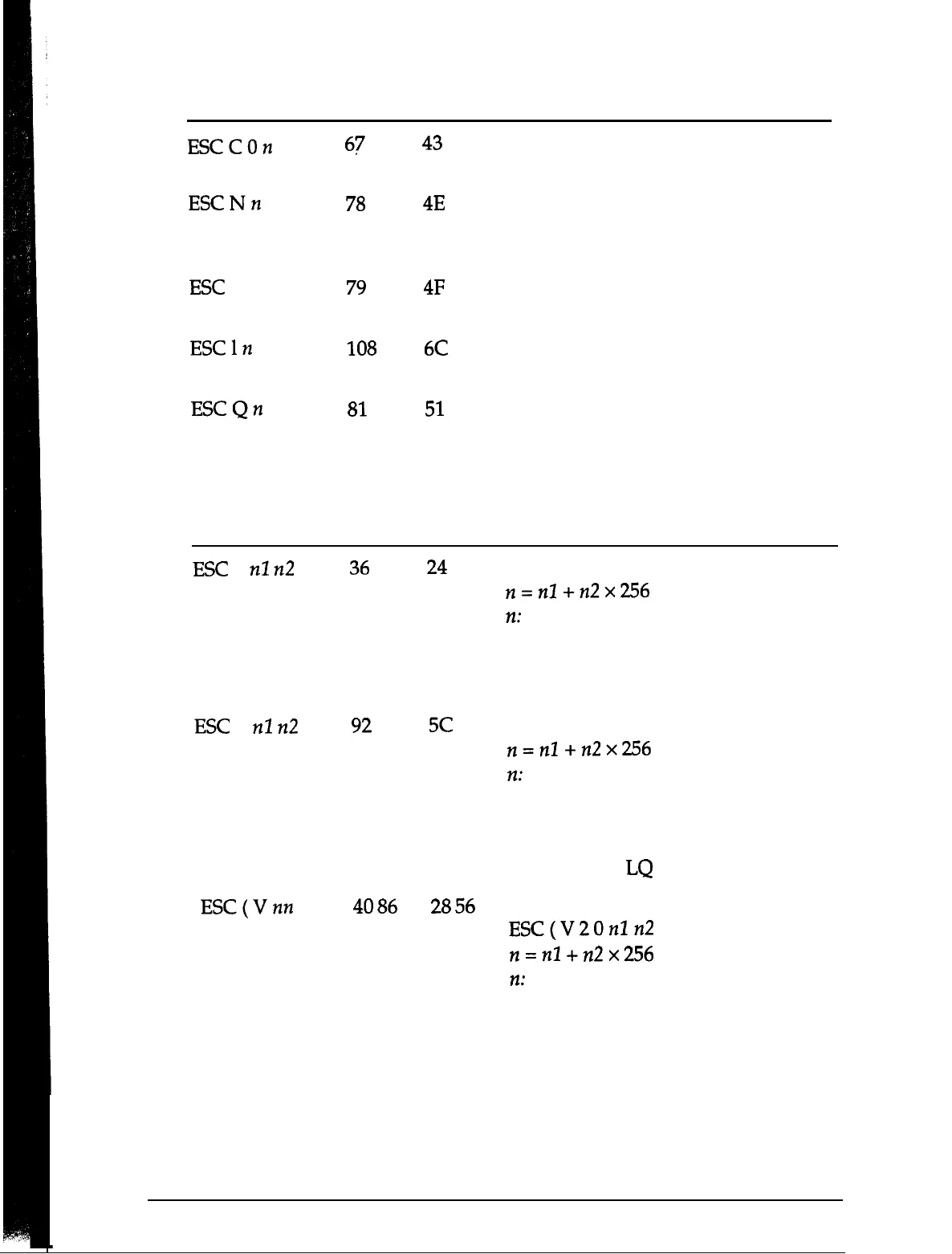
ASCII
Dec.
Hex.
Description
ESCCOn
67
ESCNn
78
ESC 0
79
ESCln
108
ESCQn
81
Print position motion
43
Set Page Length in Inches
n = Number of inches
4E
Set Bottom Margin for
Continuous Paper
n = Number of lines
4F
Cancel Top/Bottom Margin for
Continuous Paper
6C
Set Left Margin
n = Left margin column
51
Set Right Margin
n = Right margin column
ASCII
ESC $
nl
n2
Dec.
Hex.
Description
36
24
Set Absolute Horizontal Print Position
n=nl
+n2x256
n:
Specifies print position from left
margin in defined units
* Before you define the unit, the
default is l/60 inch for this command.
ESC
\
nl
n2
92
5c
Set Relative Horizontal Print Position
n=nZ+n2x256
n:
Moves current print position in
defined units
+ Before you define the unit, the
default is l/120 inch in draft and
l/180 inch in
LQ
for this command.
ESC(Vnn
40
86 28
56
Set Absolute Vertical Print Position
ESC(V20nln2
n=nl
+n2x256
72:
Specifies print position from top
margin in defined units
A-14 Appendix





 To Next Page