28
Adjusting the Roll Paper Near-End Sensor
Adjust the roll paper near-end sensor in the following situations:
To adjust the detection position according to the thickness of the roll paper core that is used
To adjust the detection position for remaining roll paper amount
Use the following procedure to adjust the roll paper near-end sensor.
1
Open the Roll paper cover, and remove the roll paper.
2
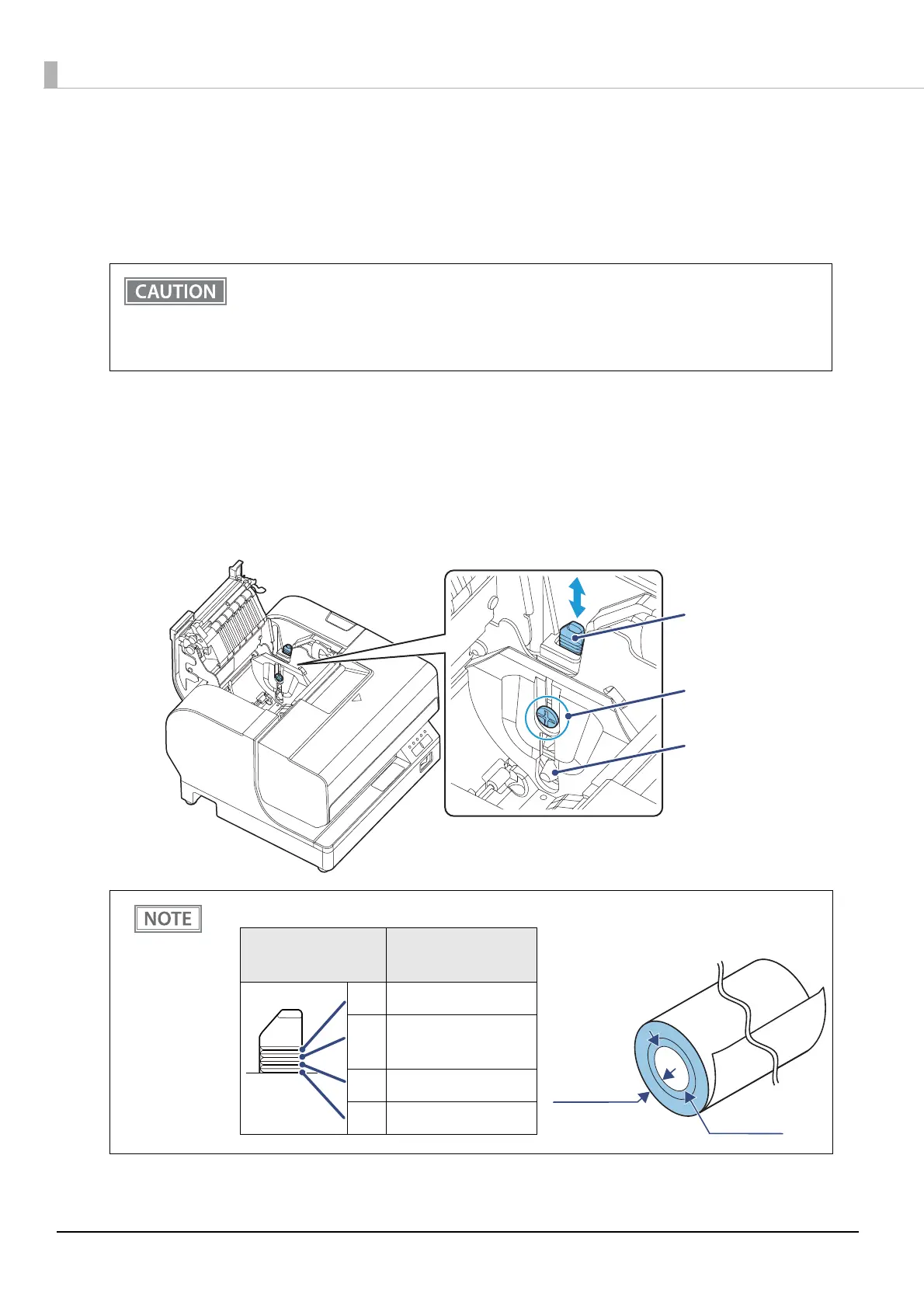
Loosen the adjustment screw fastening the sensor.
3
Set the position of the sensor by moving the its tab.
The near end cannot be detected precisely, because the core shape varies slightly with each roll
paper.
In order for the roll paper near-end sensor to correctly detect the amount of paper remaining,
use roll paper with an inner core diameter of 10 mm {0.39"} or larger.
If the roll paper is loose due to the paper quality, false detections could occur.
The remaining roll paper amount will change depending on the slit location on the tab.
Tab
Adjustment screw
Detection lever
Slit location on
the tab
Remaining roll
paper amount
#4 Approx. 5 mm {0.20"}
#3 Approx. 7 mm {0.28"}
(Default setting)
#2 Approx. 8.5 mm {0.33"}
#1 Approx. 10 mm {0.39"}
Remaining roll
paper amount
Inner core
diameter


 To Next Page