BEA--220265-EN-04 BPage13
CCDarraycameraOptoLineOL80..
Devicenumbe
ExampleCANaddress01:
Cameraonrightoronlyonecamera
overthewebcenter
Enter CAN address:
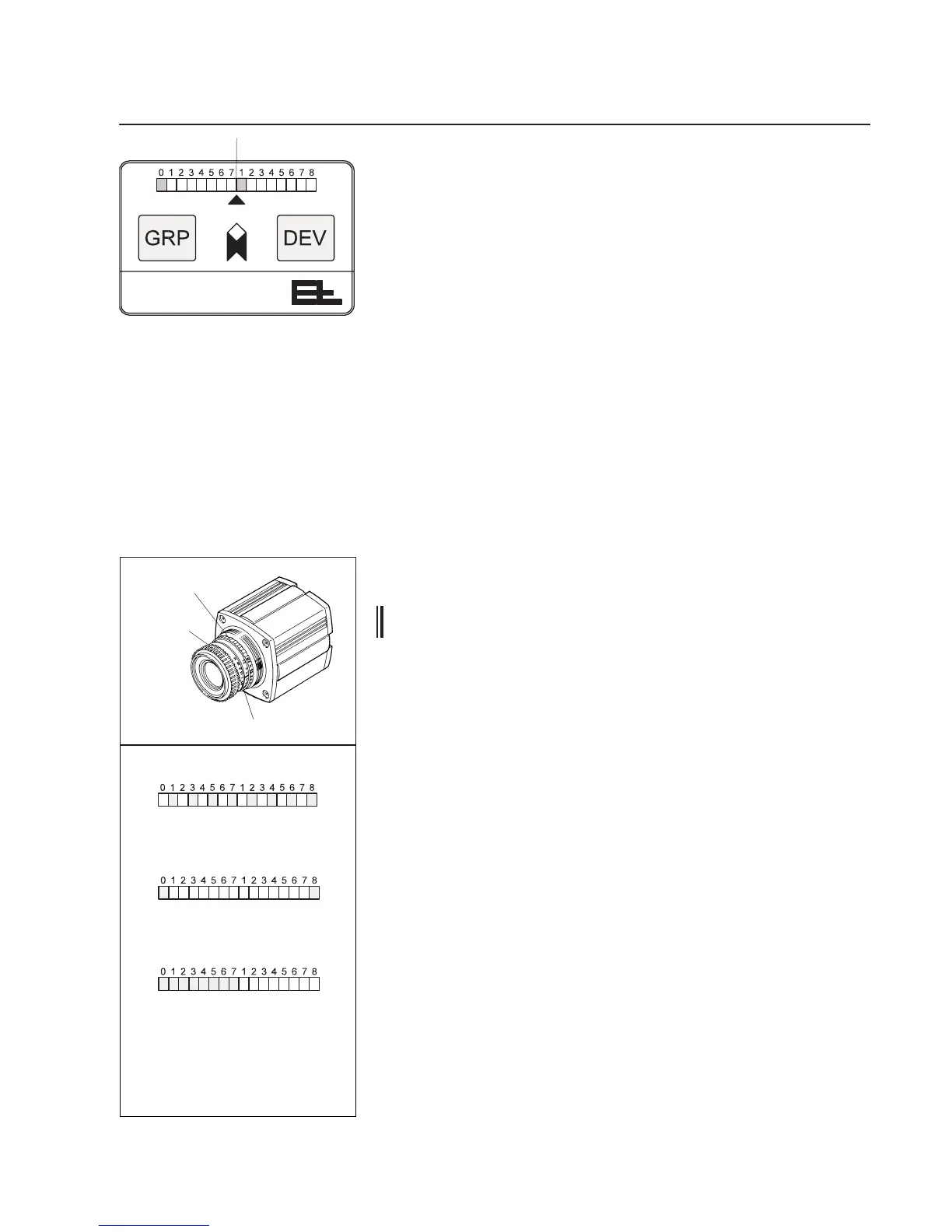
➜PressandholddowntheGRPandDEVkeysonthecameraop-
eratingpanelatthesametime.Afterapprox.10seconds,theset
CANaddresswillashontheLEDdisplay(seeg.opposite).
Afterafurther20secs,thecamerawillswitchtothemodeforset-
tingtheCANaddress.Theashingbecomesapermanentlight.
➜LetgotheGRPandDEVkeys.
➜SetthegroupnumberwiththeGRP(0-7)keyandthedevicenum-
berwiththeDEV(0-4)key.
Terminating address entry:
Addressenteringisterminatedafterapprox.20secsifnokeyhas
beenpressedwithinthisperiod.Aresetisautomaticallyperformed
oncethistimehaselapsedandthenewCANaddressadopted.
➜Positionthewebedgeinthecamerameasuringrange.Theweb
mustlieonthesamelevelasitwillsubsequentlyrunthroughthe
machine.Heightuctuationsdistortthemeasuringresult.
➜Screwofftheprotectivecylinderonthelens.
TheapertureonOL 80 camerasisfocusedlikeanormalcamera
byadjustingthefrontring,theapertureontherightbehind.See
g.opposite.
If the lens is secured against twisting by an O-ring, the latter
should be moved to the side during setting procedure.
7.6.1 Setting the aperture
➜Turntheringforsettingtheaperturetotheleftstop.
➜Turntheringinapprox.5sec.intervalsslowlyfromlefttoright.
WatchtheLEDdisplayonthecameraoperatingcontrolswhiledo-
ingso.Ifthecameraisinadequatelyexposed,everysecondLED
ashes.Ifthecameraisover-exposed,everysecondLEDlights
up,seegtopleft.
TheaperturehasbeencorrectlysetwhenthetwoouterLEDs
only(0and8)ashorthepositionofthewebedgeinthecamera
visualrangeisshownintheLEDdisplay,seeg.opposite.The
latterwillbethecaseif,byaccident,thecameraisalsocorrectly
focused.
Ifthereareseveralaperturesettingstochoosefrom,always
selectthemiddlesetting.
➜Ifthecameracannotbefocused,youmustrepositionthecamera
andlighttransmitter,see7.1.Thecameramaybereceivingtoo
muchortoolittlelight.
Groupnumber
7.5 Position the web edge in
the camera visual range
7.6 Set the camera aperture
and focusing
Focusing
Aperture
Cameraisunder/over-exposed,
everysecondLEDgoeson
Cameraisfocusedcorrectly,
theLEDdisplayshowsthe
positionofthewebedge
inthecameravisualrange.
Example:thewebedgeisposi-
tionedinthecenterofthecamera
visualrange
Cameraisfocusedcorrectly,
LED0and8ash
O-ring
Setthecameraapertureandfocusing



 To Next Page