34
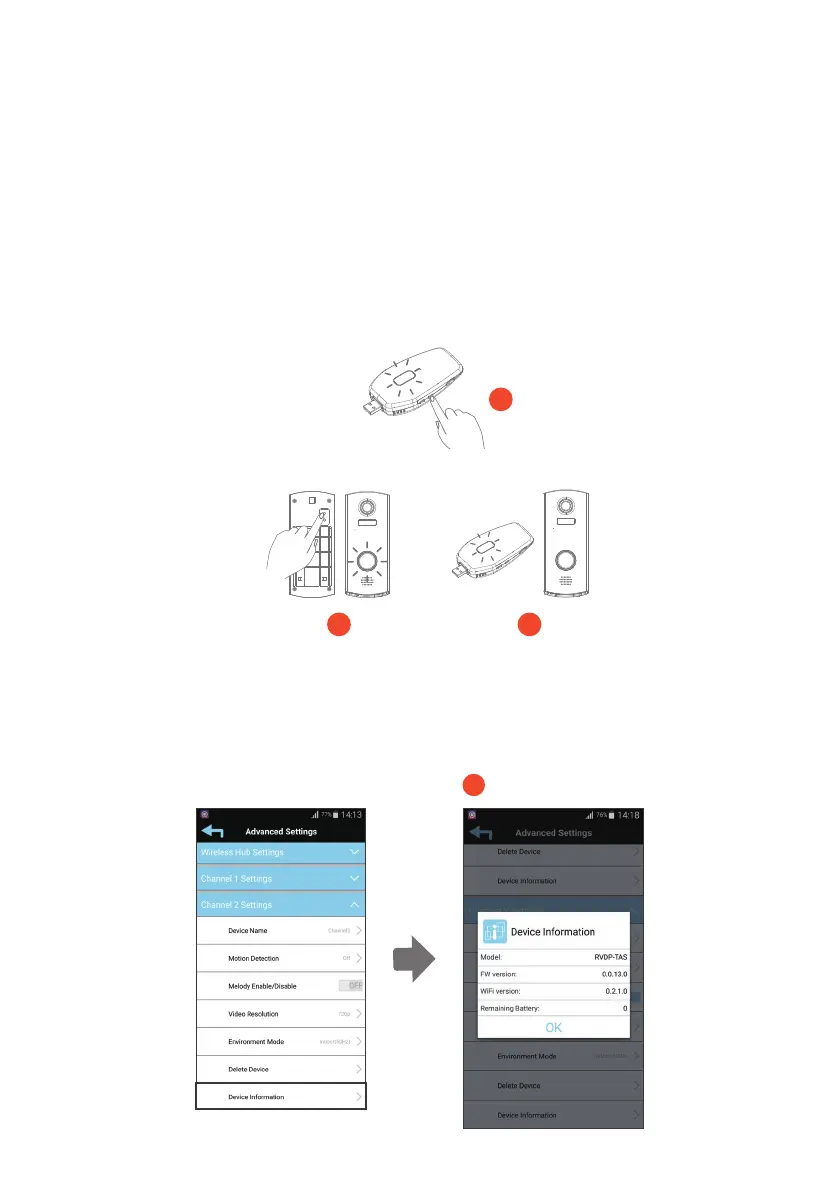
(2-7) Device Information
This section shows the IP cameras FW Version, Total capacity and Available Capacity of
SD card.
2-7
(Please follow the steps and recheck it in case the hub in the advanced setting is
delected accidentally)
1. Press and hold the pair button for 3 seconds. Wireless Hub will enter to pairing mode. You
will hear a voice prompt “Waiting for Device Pairing”. The LED status light will quicky flash.
2. Press and hold the pair button for 3 seconds, The Video Door Phone will enter pairing mode
and the LED status indicator will quickly flash.
3. Once pairing complted, you will hear a voice prompt “Device Pairing Successful”. The
wireless hub status indicator will turn to solid light.
Pairing
Key
Power
ON/OFF
1
2 3



 To Next Page