MAGDUO Control Panel Engineering and Commissioning Manual
59
Zones – ‘Confirmation Delay’ for Dwelling Areas
Dwelling zones are those covering apartments or private living areas. The activation of any smoke
detector in these areas generates an ‘Alarm Confirmation Warning’ in that area but no indication shows
on the control panel. The internal buzzer will sound at a very slow rate. At the end of every minute of
the ‘Alarm Confirmation’ time the system will check the detector again to see if the activation has
cleared. If so then the sounders will silence and no further action need be taken.
If, however, the detector is still activated at the end of the confirmation time, then the entire system will
go into alarm, operating all the sounders and fire outputs on the system. The system can also be set
such that any detector on another dwelling zone can confirm the alarm, see confirmation type below.
The zones in confirmation can be viewed at access level 2 or 3 in the warnings menu option.
Note: If the Zone Mode is set to CP/DET then a heat detector alarm will operate in the same way as a
smoke detector alarm and use the ‘Alarm Confirmation Delay’. In order for a heat detector alarm to
override the ‘Alarm Confirmation Delay’ the zone mode must be set to CP/SM/HT.
Caution – Setting a delay of greater than 1 minute is outside the scope of EN54-2.
Local or Zonal Alarm Confirmation
Whilst a detector is in the ‘Confirmation State’ it may be configured to give an alarm confirmation
warning at just that detector / sounder (Local Alarm Confirmation), or across that entire zone (Zonal
Alarm Confirmation). This continues until the situation is confirmed, automatically cancelled or the panel
is reset. If the device is still in fire after a reset, then a new confirmation time will start.
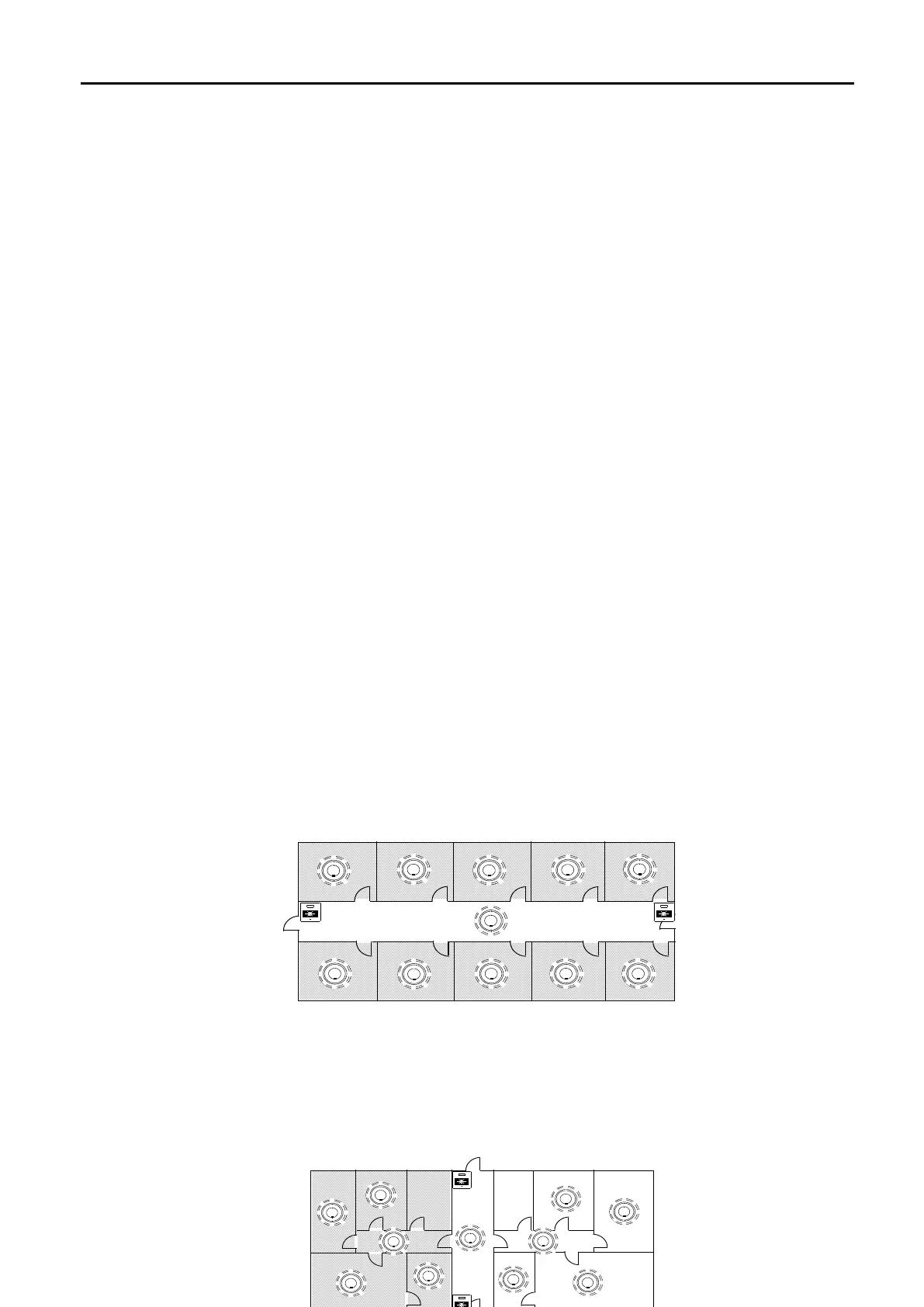
The drawing below shows a number of small Bed-Sit type apartments shaded; these are on one zone
with just one FlexiPoint detector with sounder in each apartment. This area should be set as a ‘Dwelling
Zone’.
The Alarm Confirmation should be set to operate the sounders in a local manner, so that in the event of
an unwanted alarm, only the one apartment is alerted, this is done by setting DIL switch 2 to ON.
The activation of any Manual Call Point in a delayed (Dwelling) zone generates an immediate alarm and
operates the sounders in all areas.
The Drawing below shows a larger apartment with several FlexiPoint detectors. The apartment should
be cabled on its own zone and the Alarm Confirmation Alarm should be set to operate the sounders in a
Zonal manner, so that all persons within the apartment are alerted, this is done by setting DIL switch 2
to OFF.
CORRIDOR
FLAT
FLAT
FLAT
FLAT
FLAT
FLATFLATFLATFLAT
FLAT
CORRIDOR
FLAT
FLAT
FLAT
FLAT
FLAT
FLATFLATFLATFLAT
FLAT
Twinflex3 CPPlusPlans
BED
BED
BED
BED
LOUNGE
KIT
HALL
CORRIDOR
KIT
LOUNGE
HALL
BATH
BATH
CORRIDOR
FLAT
FLAT
FLAT
FLAT
FLAT
FLATFLATFLATFLAT
FLAT
CORRIDOR
FLAT
FLAT
FLAT
FLAT
FLAT
FLATFLATFLATFLAT
FLAT
Twinflex3 CPPlusPlans
BED
BED
BED
BED
LOUNGE
KIT
HALL
CORRIDOR
KIT
LOUNGE
HALL
BATH
BATH


 To Next Page