6. IOL MEASUREMENT FUNCTION
When measuring the IOL (intraocular lens) implanted eye, the eye with a cataract, or the eye with the
scratches on the cornea, the measurement errors may occur and it is difficult to complete the measurement
with REF measurement.
In this case, it is easier to measure if moving the device closer to the examinee. Also these can be measured
with IOL mode.
1. Activate the IOL function by pressing the IOL switch on the front panel of the main unit and switch to the
IOL measurement mode.
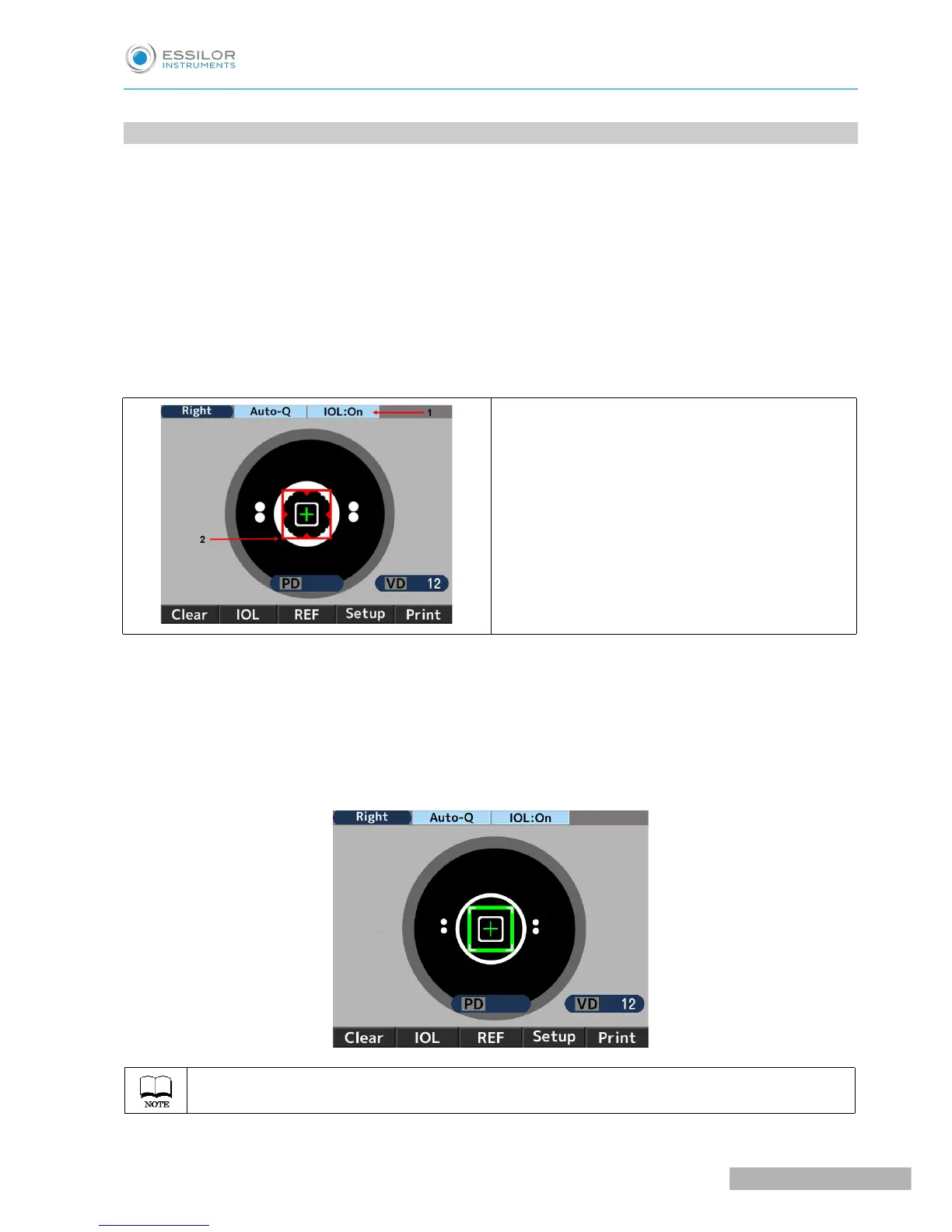
At this time, the icon of the IOL measurement mode is indicated on the top of the monitor.
1. Indication of IOL measurement mode
2. Focus indicator
2. Catch the subject eye on the monitor by operating the joystick. As bringing the subject eye into focus, the
Kerato ring, the alignment mark “+” and the focus indicator appear.
3. Operate the joystick by following the guidance of the focus indicator and move the main unit to bring the
subject eye into focus.
4. It is in focus when the focus indicator turns to green. When it turns to green, take a measurement by
pressing the measurement switch.
Measurement is started automatically when the setting of Start is either Auto-Quick or Auto.



 To Next Page
 Loading...


