18 | Commissioning
ETAS ES582.2 | User Guide
3.3 Verifying the Installation of the USB Driver
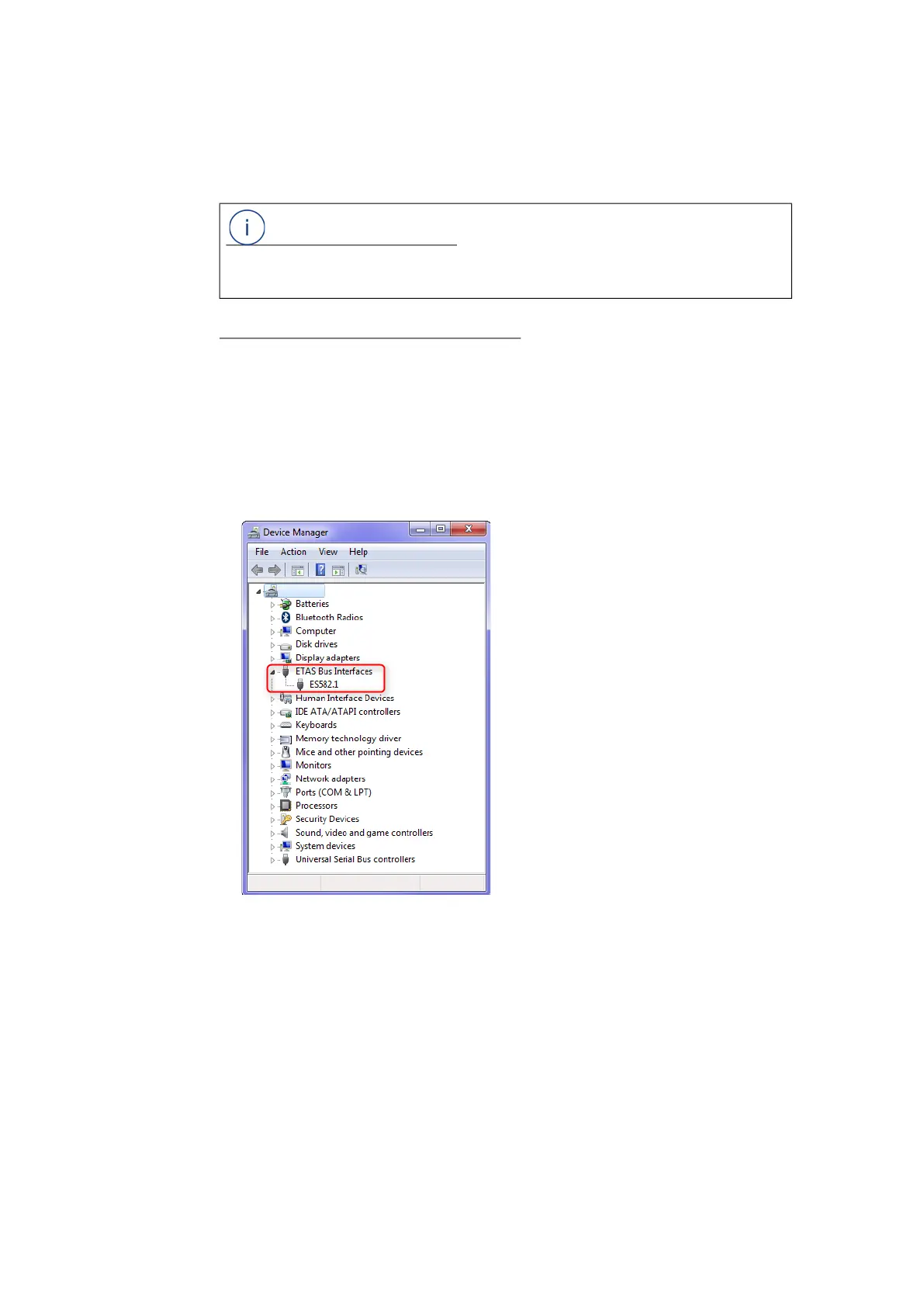
In the Device Manager of Windows, you can check which hardware drivers are
installed and which status they have.
Verifying the installation of the USB driver:
1. Connect the ES582.2 module with the USB port of the PC or the drive
recorder.
2. Select Start Control Panel Device Manager.
The Device Manager window opens.
3. Select ETAS Bus Interfaces.
4. Check whether the ES582.2 module not shows the new entry ES582.2 CAN-
USB.
Fig. 3-1 Device Manager of Windows
If the ES582.2 USB driver was not correctly installed/uninstalled, and Windows rec-
ognizes the module as connected, a symbol with an exclamation mark is shown
next to the device. Execute the installation program for the driver again to correct
this problem.
NOTE
For compatibility reasons, the ES582.2 is displayed in the device manager as
"ES582.1".


 To Next Page