8 Navis 100 Installation Guide
Use of Third-Party Drivers with Daisy-Chained
Luminaires
Note:
Navis 100 RGBW luminaires can only be controlled by the
F-Drive series of drivers by ETC.
Navis 100 White and Fade to Warm luminaires can be controlled by
third-party Class 2 or Low Voltage Limited Energy (LVLE) drivers that
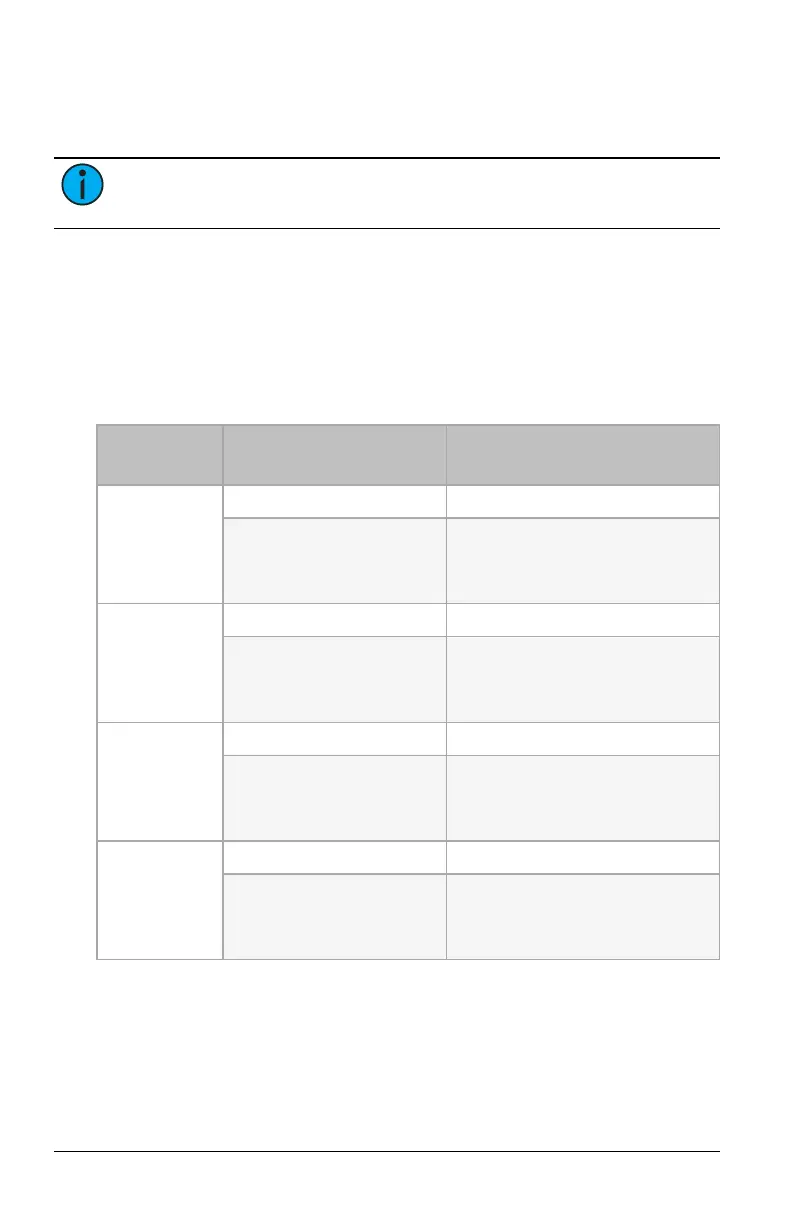
provide a maximum of 48 VDC. To daisy-chain luminaires and still have
independent channel functionality, you must wire the first luminaire in
the chain as described below. (The RJ45 outputs on F-Drive series
Constant Current (CC) and Fade to Warm drivers natively support this
wiring configuration.)
Channel
Input Pins for First Fixture in
Daisy-Chain
Description
1
(first fixture)
1 Ground/Earth
5
Constant current
White: 600 mA maximum
Fade to Warm: 450 mA maximum
2
(second fixture)
2 Ground/Earth
6
Constant current
White: 600 mA maximum
Fade to Warm: 450 mA maximum
3
(third fixture)
3 Ground/Earth
7
Constant current
White: 600 mA maximum
Fade to Warm: 450 mA maximum
4
(fourth fixture)
4 Ground/Earth
8
Constant current
White: 600 mA maximum
Fade to Warm: 450 mA maximum
After wiring the first fixture as noted above, you can daisy-chain up to
three additional luminaires following the cable connection information in
Wiring the Luminaires on page6
.



 To Next Page