ETC Quick Guide
Source 4WRD II Version 1.1.2
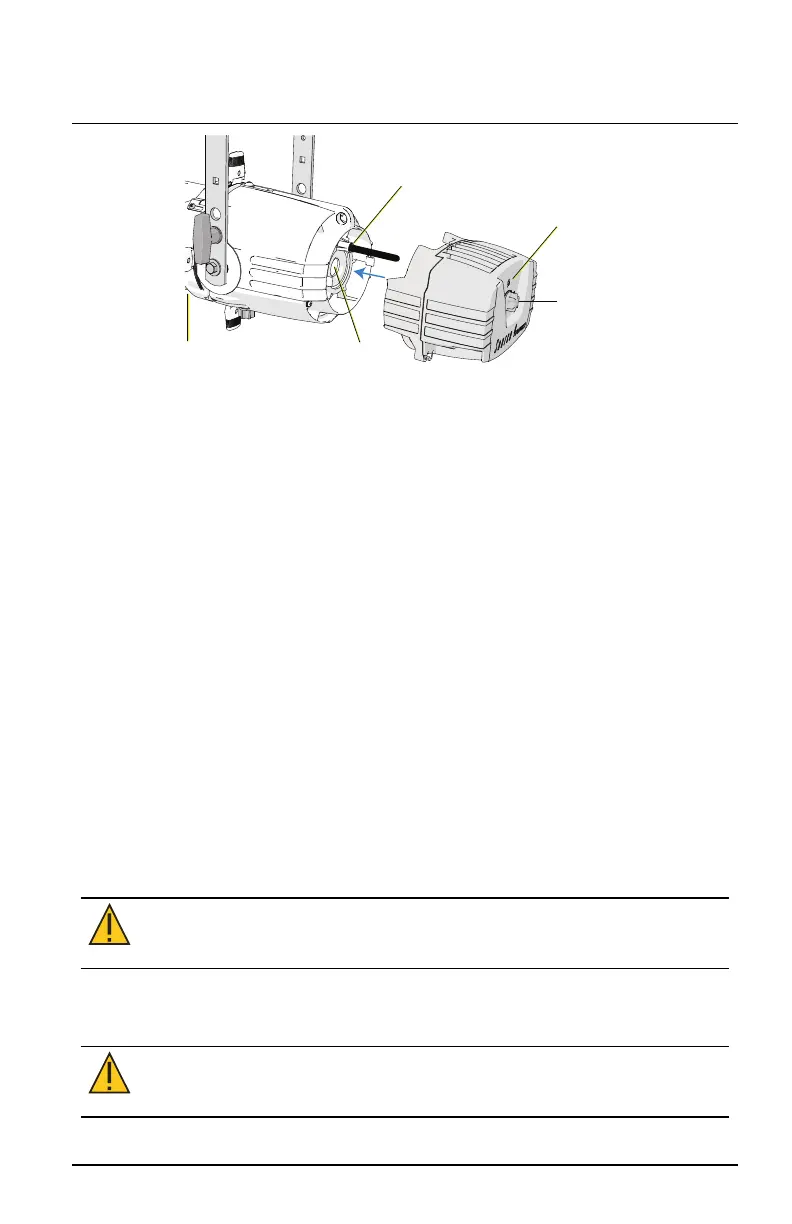
Insert threaded
post here
Tighten
screw
Z-adjustment
knob
Source Four
fixture body
Lamp
housing
hole
4. Use a #2 Phillips screwdriver to tighten the screw located on the back
end of the Source 4WRDII LED, directly above the Z-adjustment knob.
5. Pull gently to verify secure attachment.
6. Set the Z-adjustment using the Z-adjustment knob. See
Set the Z-
adjustment on page8
.
Attach C-clamp and Safety Cable
The C-clamp attaches the fixture to the mounting pipe and allows you to
adjust the position of the mounted fixture. ETC recommends using 1.5in
schedule 40 pipe.
1. Tightly fasten the C-clamp to the yoke with the provided yoke bolt and
lock washer.
2. Place the C-clamp on mounting pipe, and then tighten the pipe bolt to
secure it.
3. Loosen the C-clamp pan screw and rotate the yoke to the desired
position.
4. Tighten the pan screw to lock the fixture.
5. Connect the safety cable.
6. Tighten the C-clamp pipe bolt to 15–20 ft-lb (20–27 Nm),
approximately finger tight plus up to one-quarter turn.
CAUTION:
Do not exceed 25 ft-lb (33 Nm) while tightening the
C-clamp pipe bolt. Do not use excessive force.
7. Tighten the yoke pivot bolt to 5–10 ft-lb (6–7 Nm), approximately
finger tight plus up to one-eighth turn.
CAUTION:
Do not exceed 15 ft-lb (20 Nm) while tightening the
yoke pivot bolt. Do not use excessive force.
Source 4WRD II Page 5 of 8 ETC














 To Next Page