Generator G11 20
Generator G11 Operator’s Manual
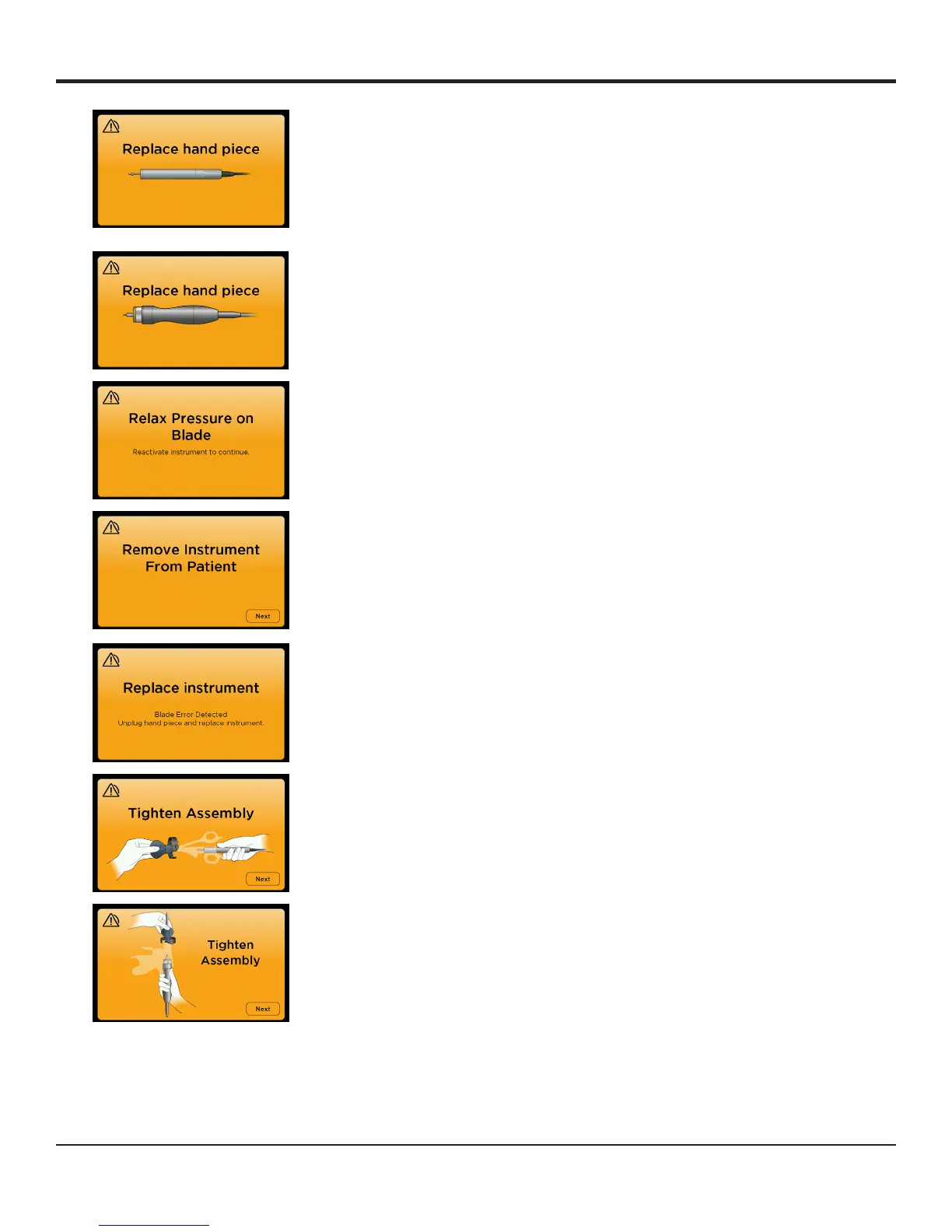
The hand piece has failed to perform
the internal diagnostic routines and the
generator will not be able to operate the
hand piece reliably�
Replace the hand piece� Contact the
Ethicon Customer Service Department (call
1-877-ETHICON, +1-513-337-8901 (English)
or contact your local sales representative to
discuss local waste disposal solutions and
processes�
The instrument has been loaded to the
point where output has stopped�
Relax pressure on the instrument or reposition
so there is less tissue in the jaws� Release the
activation switch and reactivate the instrument
to continue�
This screen is a prelude to further
diagnostics� To avoid inadvertent tissue
damage during diagnostics the surgeon is
guided to remove the instrument from the
incision before proceeding�
Remove the instrument from the incision� When
the instrument is clear, touch the ‘Next’ button
for further diagnostic guidance�
The HARMONIC instrument may be
damaged and cannot be activated�
Unplug the hand piece and replace the
instrument�
The instrument may not be properly
assembled to the hand piece�
Press the ‘Next’ button to continue�
Re-tighten the instrument� Ensure that one hand
is holding the appropriate torque wrench and
the other hand is holding the hand piece (not the
instrument)�


 To Next Page