EN 9
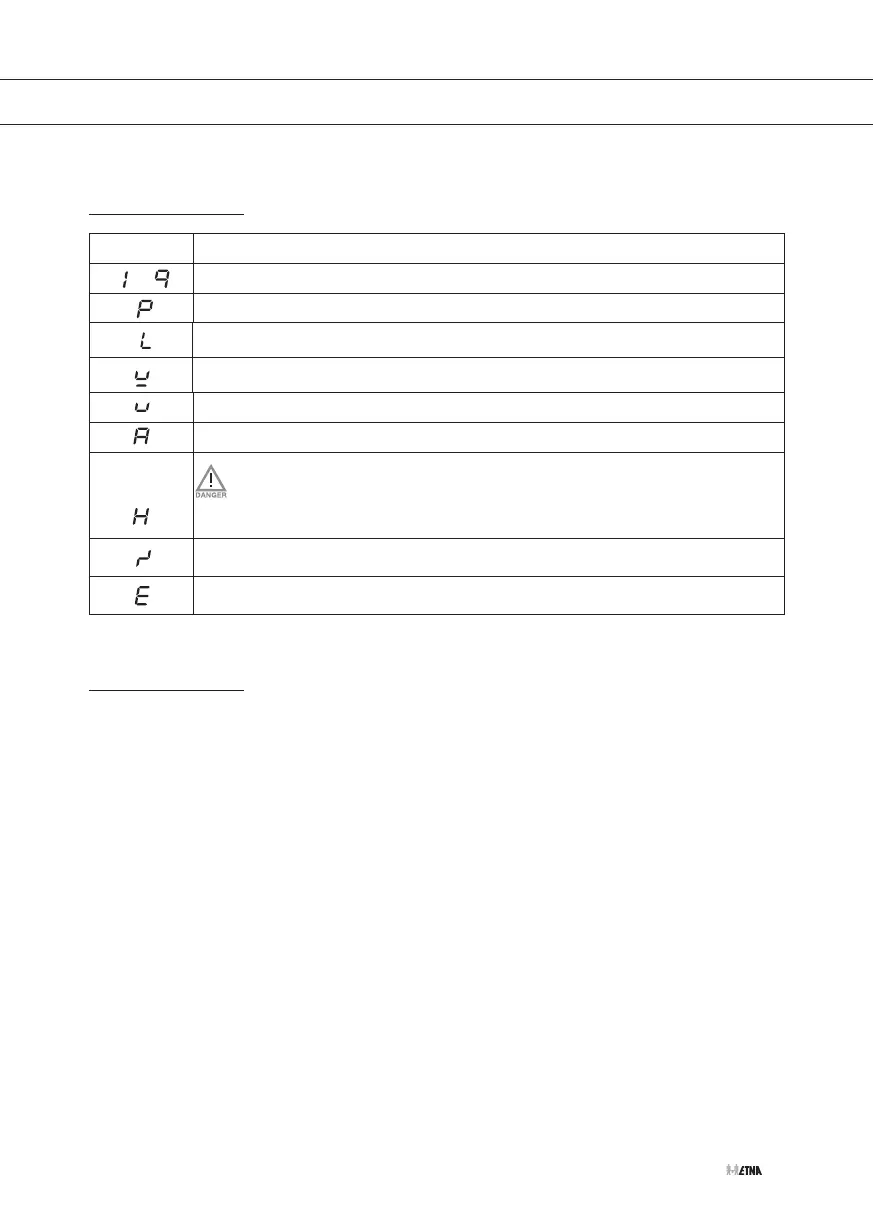
Indications in the display
In display
Status
Power setting cooking zone; 1 = low setting / 9 = high setting
Boost-function active
Child proof lock function selected
No (suitable) pan on cooking zone (pan detection symbol)
Keep warm function selected
Automatic heat-up function selected
Residual heat indicator; The hob has a residual heat indicator for each
cooking zone to show those which are still hot. Although the hob is switched
off, the indicator ‘H’ will remain on for as long as the cooking zone is hot!
Avoid touching them when this indicator is lit. Danger! Risk of burns.
Fault code; See ‘Troubleshooting table’
Fault code; See ‘Troubleshooting table’
Cooking settings
Because the settings depend on the quantity and composition of the contents and the used pan,
the table below is intended as a guideline only.
Use setting ‘boost’ to:
• bring the food or liquid to the boil quickly;
• ‘shrink’ greens;
• heat oil and fat;
• wok.
Use setting 9 to:
• sear meats;
• cook fish;
• cook omelettes;
• fry boiled potatoes;
• deep fry foods.
USE


 To Next Page