17
2096580-16-11/22 (translation of the original operating instructions)
Operating Instructions
Non-Contact Safety Switch CES-A-.5
EN
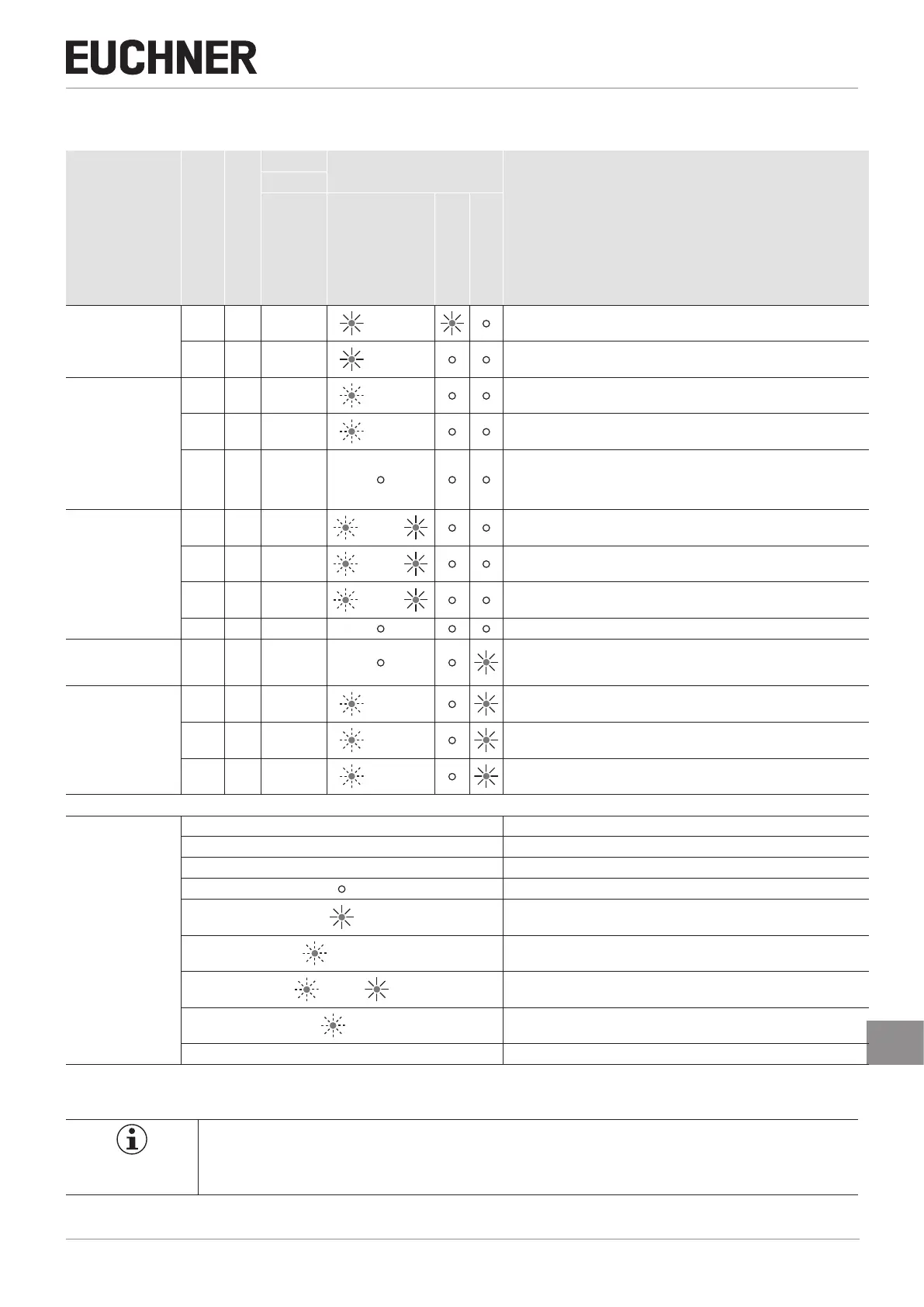
11. System status table
Operating mode
Actuator/door position
Safety outputs LA and LB
PLC
LED indicator
Output
State
Output
OUT (status signal)
STATE (green)
OUT/ERROR
(yellow)
OUT/ERROR (red)
Normal operation
closed on 1 Normal operation, door closed
open off 0 Normal operation, door open
Teach-in operation
(only unicode)
open off 0 4 Hz Initial setup after delivery, ready for rst teach-in operation
closed off 0
1 Hz
(60 s)
Teach-in operation
closed off 0
Positive acknowledgment of completion of teach-in operation
To activate the actuator code from the teach-in operation in the evaluation
unit, the operating voltage must then be switched off at the evaluation unit for
min. 3 seconds.
Status indication
(only unicode)
X off 0
3 x +
Indication after 1st to 5th teach-in operations
X off 0
2 x +
Indication of the remaining teach-in operations after the 6th teach-in operation
X off 0
1 x +
Indication of the remaining teach-in operations after the 7th teach-in operation
X off 0 Device cannot perform any further teach-in operation
Fault display X off 0
Internal component failure or
excessively high interference (EMC) or short circuit/external power at the LA/
LB safety output
Operating fault
(only unicode)
closed off 0
1 x
Incorrect 9th teach-in operation (only unicode)
closed off 0
2 x
Incorrect teach-in operation for an old actuator (only unicode)
closed off 0
3 x Negative acknowledgment for teach-in operation. Actuator was held in front
of the read head for less than 60 s
Key to symbols
N 0 V or not connected
1 24 V
0 0 V
LED not illuminated
LED illuminated
15 Hz (8 s)
LED ashes for 8 seconds at 15 Hz
3 x +
LED ashes three times and then illuminates continuously
3 x
LED ashes three times, and this is then repeated
X Any state
After the cause has been remedied, faults can generally be reset by opening and closing the guard. If the fault is still displayed
afterward, briey interrupt the power supply. Please contact the manufacturer if the fault could not be reset after restarting.
Important!
If you do not nd the displayed device status in the system status table, this indicates an internal device
fault. In this case, you should contact the manufacturer.




 To Next Page