EasyManua.ls Logo

Eumig MARK-S SUPER 8 - Adjusting the Running Speed

Eumig MARK-S SUPER 8
34 pages
Print Icon
To Next Page IconTo Next Page
To Previous Page IconTo Previous Page
Loading...
Adjusting
the
running
speed
When
you
want
to
show
films
which
were
not
shot
at
the
standard
running
speed
of
18
frames
per
second,
but
at
24
frames
per
second
(such
as
commercially
available
feature
films),
you
can
change
the
running
speed
of
the
projector.
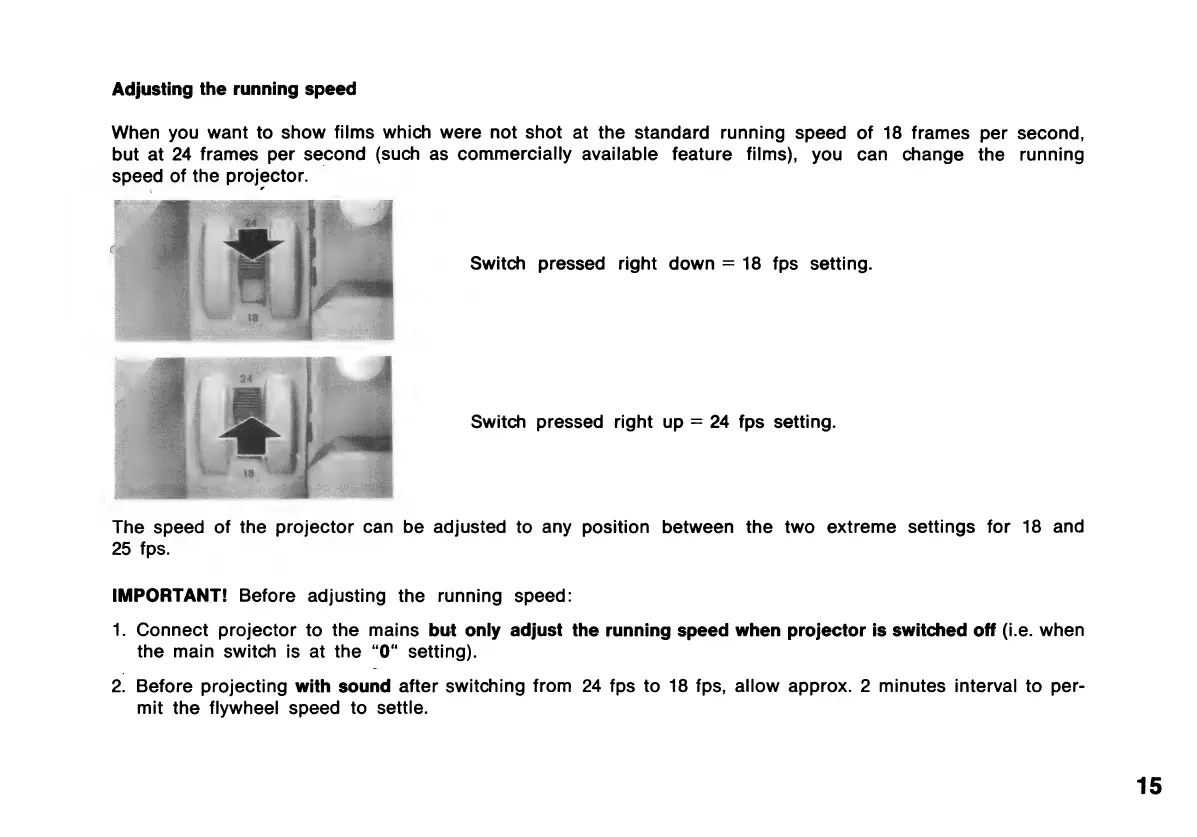
Switch
pressed
right
down
=
18
fps
setting.
Switch
pressed
right
up
=
24
fps
setting.
The
speed
of
the
projector
can
be
adjusted
to
any
position
between
the
two
extreme
settings
for
18
and
25
fps.
IMPORTANT!
Before
adjusting
the
running
speed:
1.
Connect
projector
to
the
mains
but
only
adjust
the
running
speed
when
projector
is
switched
off
(i.e.
when
the
main
switch
is
at
the
“O“
setting).
2.
Before
projecting
with
sound
after
switching
from
24
fps
to
18
fps,
allow
approx.
2
minutes
interval
to
per-
mit
the
flywheel
speed
to
settle.
15

Related product manuals