EasyManua.ls Logo

Eumig MARK-S SUPER 8 - Adding Sound; Recording through a Microphone

Eumig MARK-S SUPER 8
34 pages
Print Icon
To Next Page IconTo Next Page
To Previous Page IconTo Previous Page
Loading...
16
Adding
sound
Important:
Disconnect
the
sound
unit
during
silent
projection
(by
raising
the
sound
head).
According
to
the
manufacturer,
the
sound
head
has
a
life
of
approximately
200
hours,
and
it
should
only
be
called
into
play
when
sound
projection
is
ac-
tually
required.
Recording
through
a
microphone
1.
Insert
the
film
in
the
normal
manner.
Following
the
traced
out
film
path
exactly
assures
accurate
synchronisation
of
picture
and
sound.
(Standard
picture
to
sound
separation
is
18
frames).
.
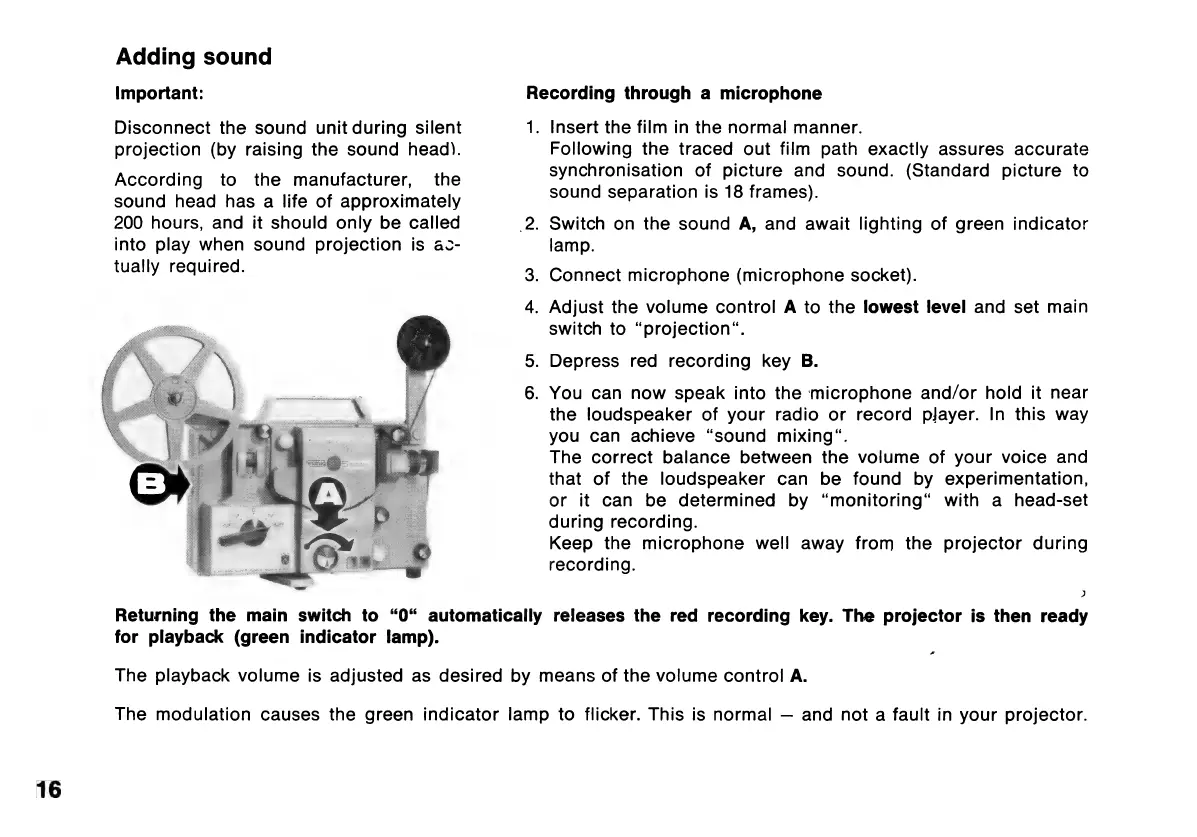
Switch
on
the
sound
A,
and
await
lighting
of
green
indicator
lamp.
3.
Connect
microphone
(microphone
socket).
4.
Adjust
the
volume
control
A
to
the
lowest
level
and
set
main
switch
to
“projection.
5.
Depress
red
recording
key
B.
6.
You
can
now
speak
into
the
microphone
and/or
hold
it
near
the
loudspeaker
of
your
radio
or
record
pjayer.
In
this
way
you
can
achieve
“sound
mixing“.
The
correct
balance
between
the
volume
of
your
voice
and
that
of
the
loudspeaker
can
be
found
by
experimentation,
or
it
can
be
determined
by
“monitoring“
with
a
head-set
during
recording.
Keep
the
microphone
well
away
from
the
projector
during
recording.
>)
Returning
the
main
switch
to
“0“
automatically
releases
the
red
recording
key.
The
projector
is
then
ready
for
playback
(green
indicator
lamp).
s
The
playback
volume
is
adjusted
as
desired
by
means
of
the
volume
control
A.
The
modulation
causes
the
green
indicator
lamp
to
flicker.
This
is
normal
and
not
a
fault
in
your
projector.

Related product manuals