46
English
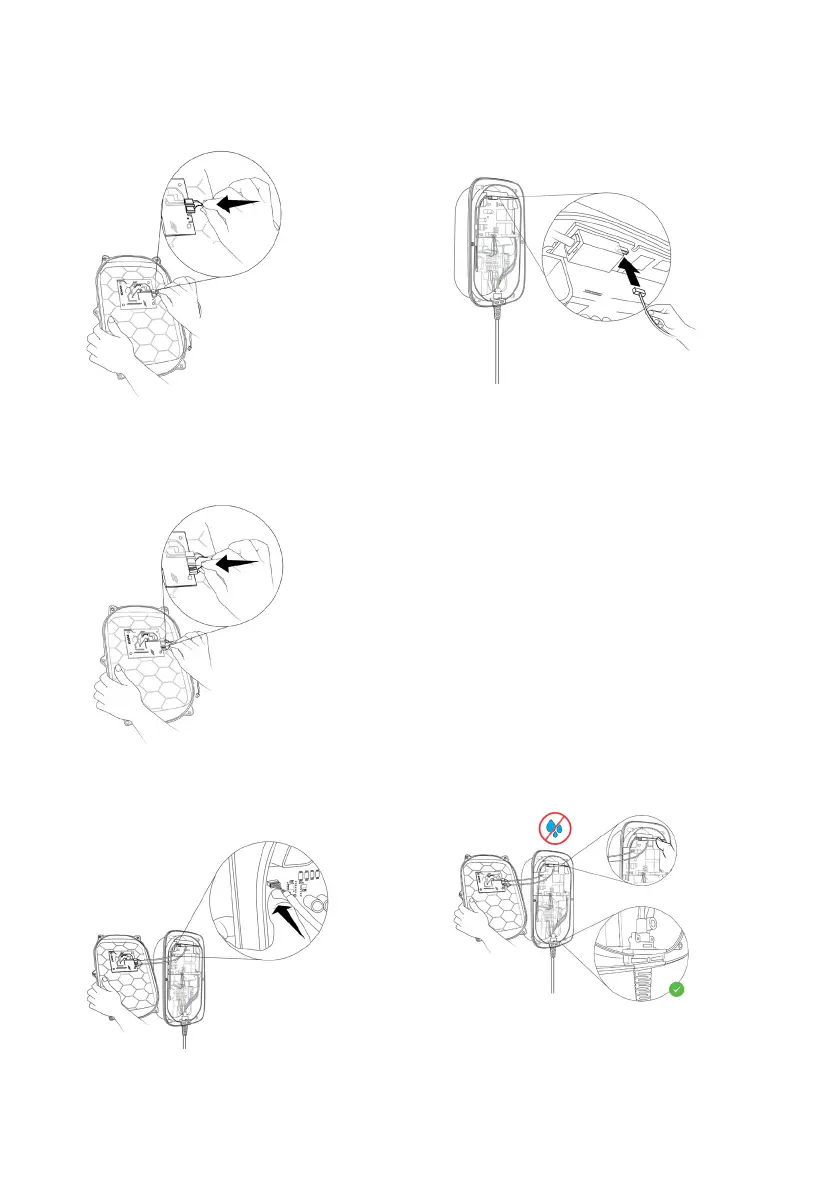
8. Mount front cover:
a. Connect the HMI cable to the HMI
board.
b. Connect the RFID cable to the HMI
board. (for Audi Wallbox plus and Audi
Wallbox pro only)
c. While holding the front cover next to
the main assembly, connect the HMI
cable to the power board.
d. While holding the front cover next to
the main assembly, connect the RFID
cable to the communication board. (for
Audi Wallbox plus and Audi Wallbox pro
only)
e. Before closing the wallbox, check and
ensure the following:
I. All cables are connected properly.
II. The communication board is in the
correct position. Check by pressing
on it gently. (for Audi Wallbox plus
and Audi Wallbox pro only)
III. The charging cable holder is aligned
with the edges of the main enclosu-
re.
IV. The rubber seal of the charging ca-
ble and the rubber seal of the front
cover are in the correct position,
clean and not damaged.
V. There is no risk for the cables to be
trapped between main assembly
and front assembly.
VI. The DIP-switches are set correctly.


 To Next Page