EPA6220 / EPA6236
6
2.4 Ceiling Mounting
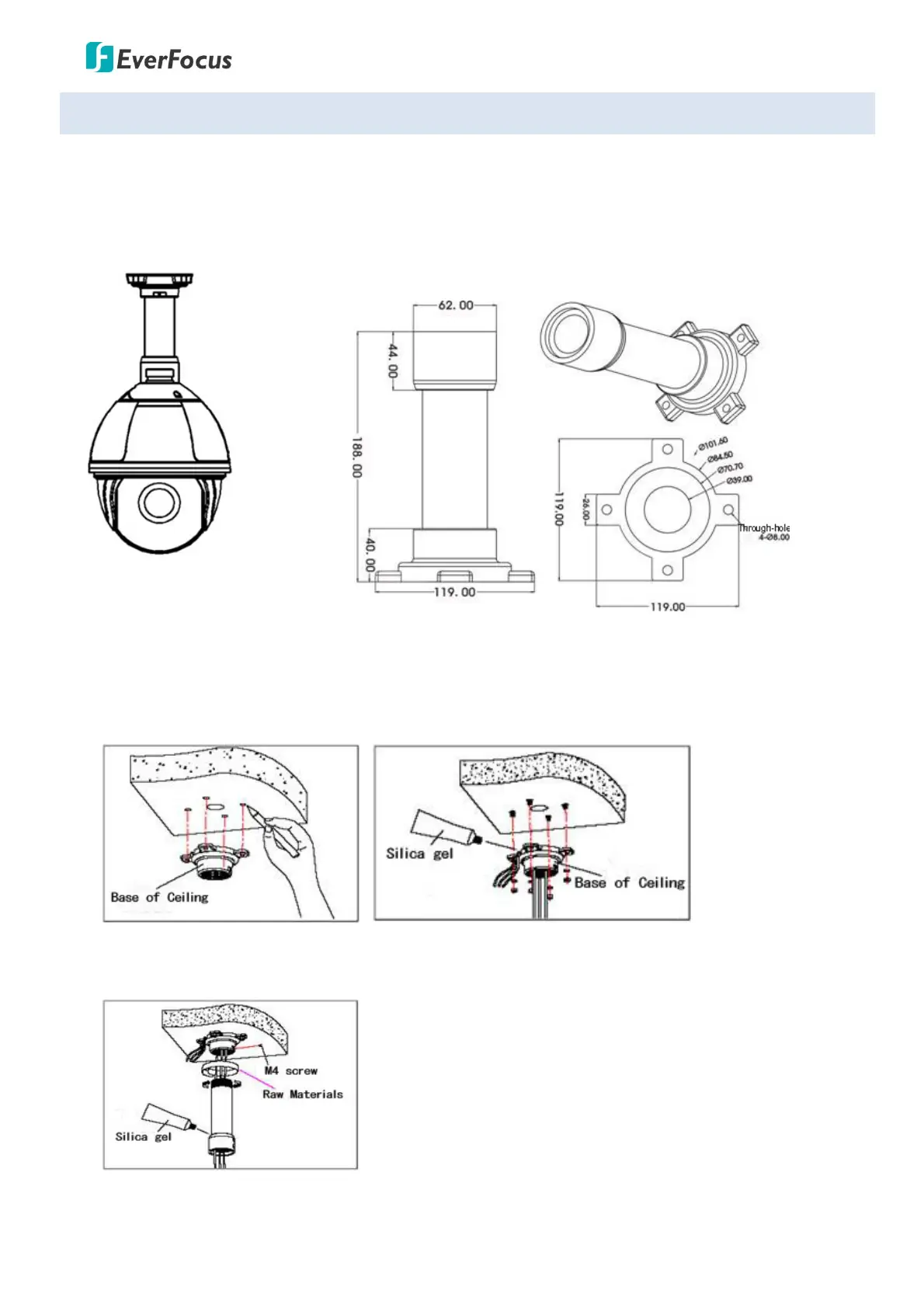
You can purchase the Ceiling Mount Bracket (please refer to 1.4 Optional Accessories) to install the speed
dome camera to the ceiling. Note that the ceiling should be withstood at least 4 times the weight of the
speed dome camera.
Ceiling Mount Bracket
1. Unscrew the M4 screws to remove the Bracket Base from the Ceiling Mount Bracket. Mark the
screw holes on the ceiling based on the Bracket Base, drill the screw-depth holes and then screw the
Bracket Base to the ceiling with M6 screws. You can optionally apply the silica gel to the faying
surface between the Bracket Base and ceiling for water proofing.
2. Run the cables through the Ceiling Mount Bracket, and then screw the Ceiling Mount Bracket to the
Bracket Base. You can optionally apply the silica gel to the joint sleeve for water proofing.
3. Screw the speed dome camera to the Ceiling Mount Bracket.









 To Next Page