EPA6220 / EPA6236
22
B. Troubleshooting
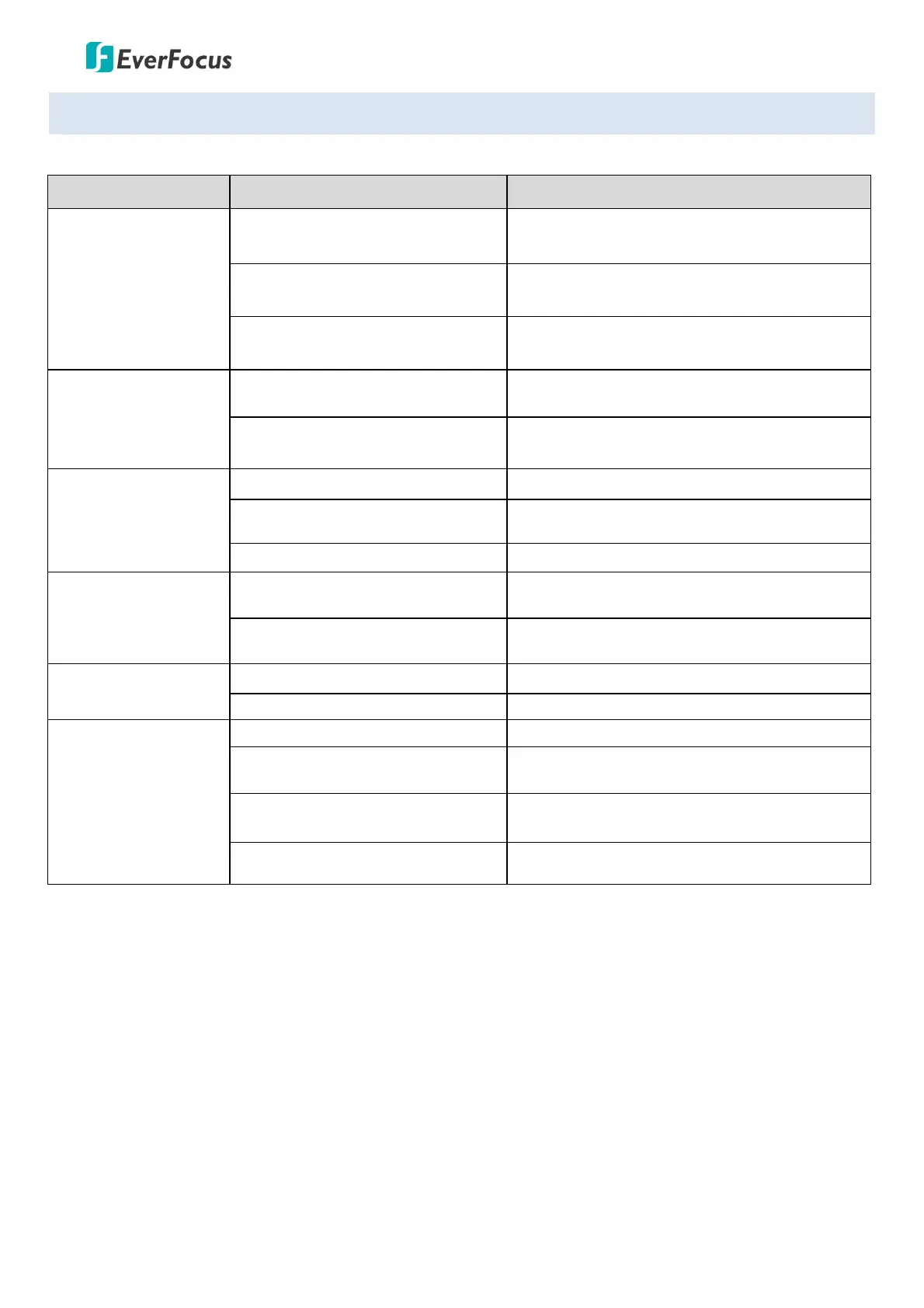
Issue Possible Reason Solution
After power is
applied, there is no
motion (self-test) and
no video image
Cable harness is improperly
connected
Verify that the orientation of the connector
input
Input power voltage is too low Verify the voltage of the input power
Power supply is not working Change a new power supply
Self-test is normal,
but cannot control
dome
Wrong communication settings
Set the correct protocol, baud rate and
address of dome
Improper connection of control
cable (polarity)
Verify the polarity of the RS485 connection as
per the instruction manual
Noise after
self-testing
Mechanical obstruction Verify and correct it
Camera module is not installed
correctly
Check the module installation
Low power Change the correct power supply
Image is not stable
Low power
Check the power supply or make sure the
power input
Video cable is improperly
contacted
Verify the contact of the video cable
Image is blurring
Camera is on manual focus Change to auto focus
The lens is dusted Clean the lens
Control to the dome
is not smooth
Power is too low Change the DC 12V Power supply
Communication distance is too far
Make sure the distance is in the allowed
range
RS485 cable is not properly
connected
Make sure the RS485 is properly connected
Too many domes connected
Make sure the quantity of the connected
domes are allowed









 To Next Page