3 Description
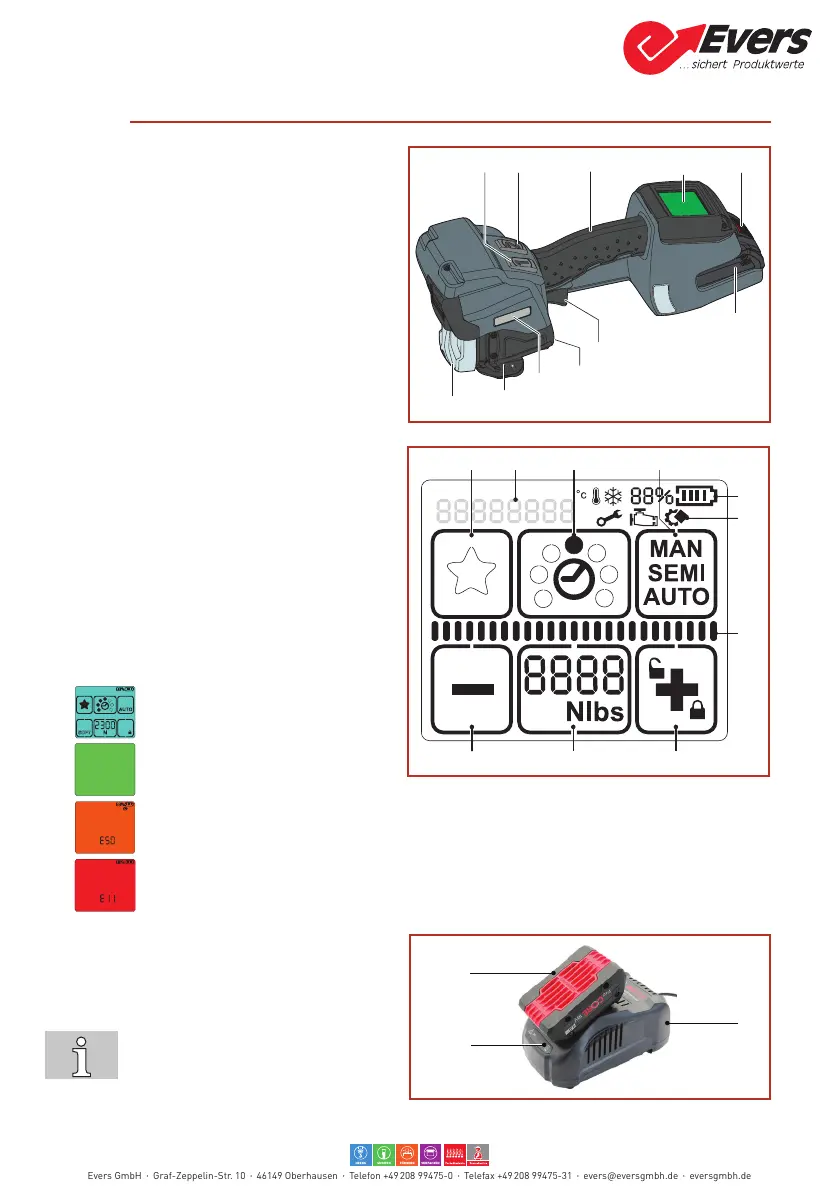
3.1 Design
1 Button “1” = Tensioning button
2 Button “2” = Sealing button
3 Handle
4 Operating panel
5 Unlock button, battery
6 Battery
7 Trigger
8 Serial number (XJJMMYYYY)
X L=BPT-L19
JJ Year
MM Month
YYYY consecutive number
9 Type designation
10 Tensioning device
11 Sealing device
Operating panel
1 Keypad "Favourite"
2 Keypad “Operating mode”
3 Keypad “Plus & Keylock”
4 Keypad “Tensioning force”
5 Keypad “Minus”
a Display “Information symbols”
b Status indicator “Sealing”
c Display “Battery charge status”
d Display “Messages”
e Status indicator bar “Tensioning“
Background lighting
● Display activated.
● Tension force reached or sealing
process completed
● Applicationerror:temporarysystemerror,canberectiedbytheoperator(Section6.6).
● Toolfault:staticsystemerror,rectifyerror(Section6.6).Iftheerrorcannotberectied
Service department.
Battery and charger
1 Charger
2 Battery
3 LED indicator
For detailed information, refer to the
operating instructions for the battery
and the charger.
c
d
e
6
7
8
9
10
11
1
3
2
Evers GmbH Graf-Zeppelin-Str. 10 46149 Oberhausen Telefon +49 208 99475-0 Telefax +49 208 99475-31 evers@eversgmbh.de eversgmbh.de


 To Next Page