The standard code (factory setting) can be changed by your service centre to any four-
digit code if desired.
The favourite mode (Section 4.5) can be switched on even when the key lock is activated.
If the adjustment of the settings is not desired, the favourite level should be set in the
same way as the normal level.
4.5 Select Favorite
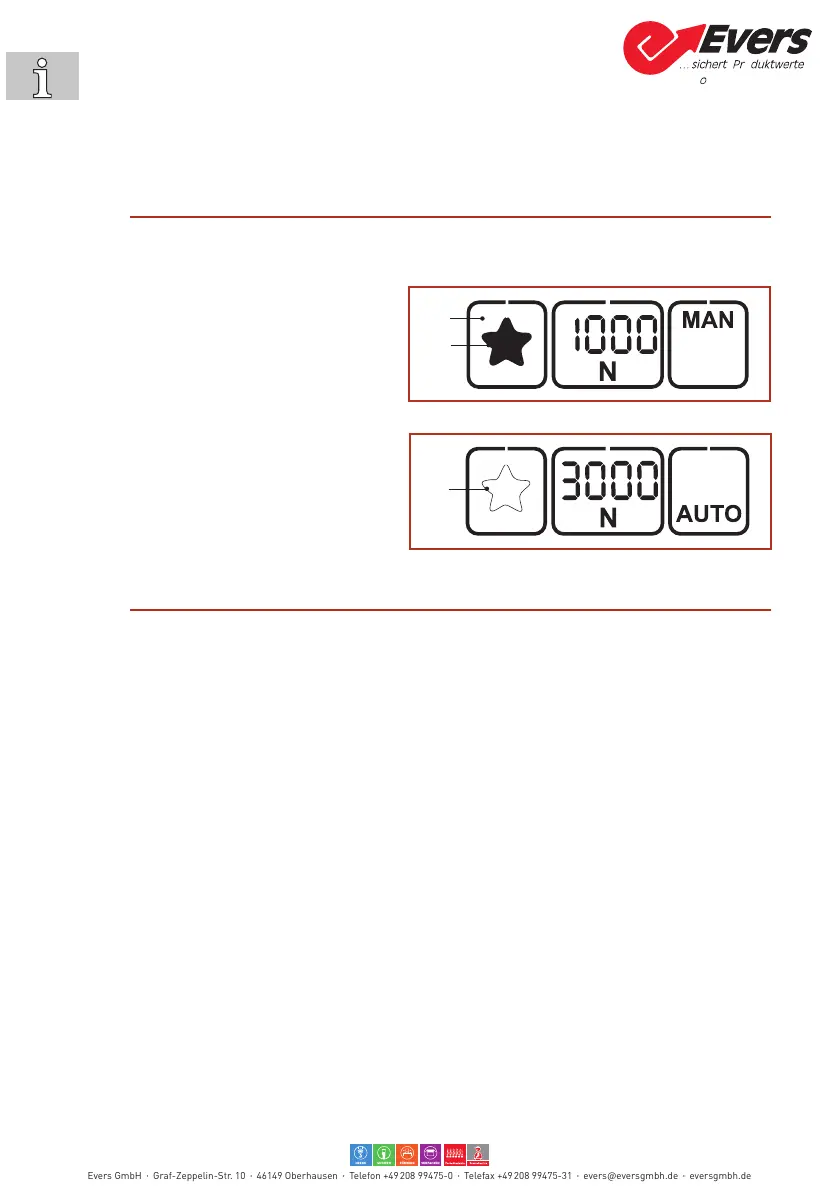
The “Favorite” function activates a second setting level whose parameters can be set freely as at the
main level. This allows the user to switch quickly from one tool setting to another.
Activating Favorite:
► Press the “Favorite” button (1).
– The star (2) changes from outlined to
lled.
– All parameters change to the values pre-
set at this setting level.
Deactivating Favorite:
► Press the “Favorite” button (1).
– Thestar(3)changesfromlledtoout-
lined.
– All parameters change to the values pre-
set at this setting level.
4.6 Sleep mode
To avoid unnecessary battery discharge, the tool switches to energy-saving mode within short time.
– The operating panel becomes dark (not Illuminated).
► Pressingtheoperatingpanelswitchestheenergy-savingmodeoagain.
After approx. two minutes without operation the tool switches to sleep mode.
– Theoperatingpanelisswitchedo(black).
► Actuatingthetriggerswitchesthesleepmodeoagain.
2
Evers GmbH Graf-Zeppelin-Str. 10 46149 Oberhausen Telefon +49 208 99475-0 Telefax +49 208 99475-31 evers@eversgmbh.de eversgmbh.de


 To Next Page