EasyManua.ls Logo

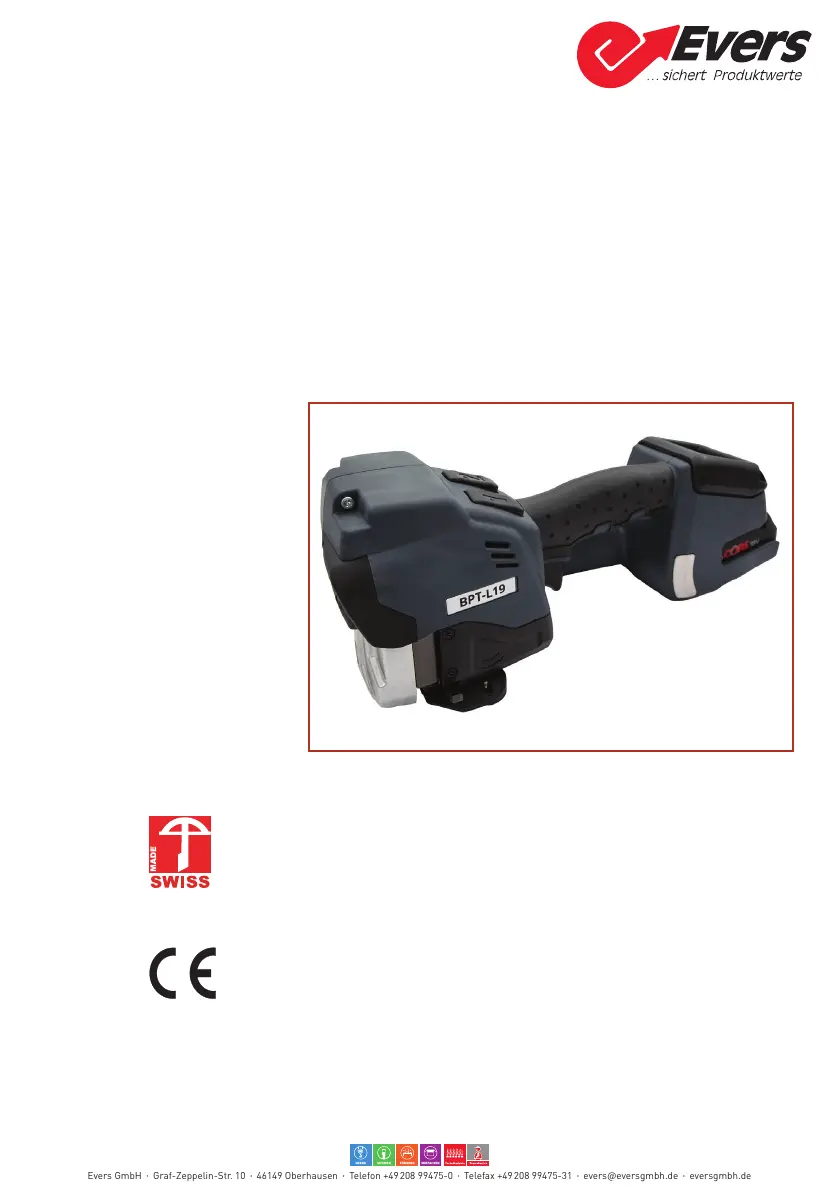
Evers BPT-L19 - User Manual

Evers BPT-L19
48 pages
Go to English
Print Icon
To Next Page IconTo Next Page
Loading...
BPT-L19
Betriebsanleitung
Operating and safety instructions
Deutsch
Seite 2
English Page 25
Akku-Handgerät zum Umreifen mit Stahlband
13, 16, 19 mm
Battery-operated strapping tool for steel strapping
13, 16, 19 mm (
1
/
2
,
5
/
8
,
3
/
4
″)
Patent angemeldet
Patent pending
Evers GmbH Graf-Zeppelin-Str. 10 46149 Oberhausen Telefon +49 208 99475-0 Telefax +49 208 99475-31 evers@eversgmbh.de eversgmbh.de

Other manuals for Evers BPT-L19

Questions and Answers

  • K
    Kelly McdonaldAug 18, 2025
    What to do if my Evers Packaging equipment displays E27 with a red display and pulsating symbol?
    • M
      manuel32Aug 18, 2025
      If your Evers Packaging equipment shows error E27 with a red display and a pulsating symbol, it indicates that the battery undervoltage limits have been reached or the battery is empty. In this case, you should charge the battery, and if the problem persists, consider replacing it.
  • A
    Ashley JacobsAug 21, 2025
    What does it mean when my Evers Packaging equipment displays E20, a red display, and a pulsating symbol?
    • K
      Kelly MeyersAug 21, 2025
      If your Evers Packaging equipment displays error E20, a red display, and a pulsating symbol, it means the battery is too hot (over 60°C/140°F). Allow the battery to cool down. You might also need to charge or replace the battery.
  • A
    amy89Aug 23, 2025
    What should I do if my Evers Packaging equipment displays E37 with an orange display and pulsating symbol?
    • J
      Julia AyalaAug 23, 2025
      If your Evers Packaging equipment displays error E37, indicated by an orange display and pulsating symbol, it could be due to overcurrent or the tool jamming during the welding process because of a dirty welding mechanism or a foreign object. You should clean the tool.
  • J
    Jeffrey HawkinsAug 25, 2025
    What does it mean if my Evers Packaging equipment shows E57 with an orange display and flashing tension force?
    • J
      James MooneyAug 26, 2025
      If your Evers Packaging equipment displays error E57, shown as an orange display with a pulsating symbol and flashing tension force, it indicates that the strap has slipped or broken. Try reinserting the strap. Also, check the tension force, the strap for dirt, whether you are using the right strap, and the state of the tension wheel/tooth plate.
  • H
    hoffmanedwardAug 27, 2025
    What to do if my Evers Packaging equipment displays E33 with a red display and pulsating symbol?
    • N
      nayalaAug 27, 2025
      If your Evers Packaging equipment displays error E33, indicated by a red display and pulsating symbol, it means the electronics are experiencing overtemperature or the controller is too hot. Allow the tool to cool down.
  • S
    Sue RogersAug 30, 2025
    Why does my Evers Packaging equipment display remain dark?
    • Q
      qbyrdAug 30, 2025
      If the display of your Evers Packaging equipment remains dark, it could be due to a faulty or fully discharged battery. Charge or replace the battery. Another possibility is that the battery is not properly inserted, so check that it is completely inserted and the unlocking device is engaged.
  • F
    fletcherloriSep 1, 2025
    What does it mean when my Evers Packaging equipment displays E24 with a red display and pulsating symbol?
    • T
      tinamclaughlinSep 1, 2025
      If your Evers Packaging equipment displays error E24, indicated by a red display and pulsating symbol, it could mean the battery is not properly inserted. Ensure the battery is correctly inserted. Alternatively, it might indicate the wrong battery is being used; in that case, charge the battery, and replace it if necessary.
  • M
    Michael WangSep 3, 2025
    What should I do if my Evers Packaging equipment displays E25 with a red display and pulsating symbols?
    • H
      Heather RomeroSep 3, 2025
      If your Evers Packaging equipment displays error E25, indicated by a red display and pulsating symbols, it could be due to the battery not being properly inserted. Make sure the battery is correctly inserted. Another cause could be a faulty temperature sensor, which would need replacing.
  • E
    Emily BrownSep 6, 2025
    What to do if my Evers Packaging equipment shows E50 with an orange display?
    • J
      James WatkinsSep 6, 2025
      If your Evers Packaging equipment displays error E50, indicated by an orange display and pulsating symbol, it means that the welding or cooling process was aborted by lifting the operating lever. Repeat the strapping process.
  • J
    Jessica KirbySep 8, 2025
    What does it mean when my Evers Packaging equipment displays E55/56 with an orange display?
    • K
      Kayla MilesSep 8, 2025
      If your Evers Packaging equipment displays error E55/56, shown as an orange display with pulsating symbols, it indicates that the tensioning process was aborted, or there is a performance limitation or timeout. You should repeat the tensioning process.

Summary

General Information

Warning Symbols and Conventions

Explains hazard symbols, their meanings, and standard conventions used in the manual.

Disposal and Environmental Protection

Details proper disposal methods and environmental compliance for the tool and batteries.

Safety

General Safety Warnings for Power Tools

Provides essential safety advice for power tool operation, including work area and personal safety.

Intended Use and Potential Misuse

Clarifies correct applications and warns against improper uses to prevent hazards.

Safe Working Practices

Emphasizes wearing PPE, maintaining focus, and adhering to safety protocols during operation.

Specific Safety Instructions

Addresses critical hazards like jamming, crushing, strap breakage, and explosion risks.

Description

Tool Design and Components

Identifies and illustrates the main parts of the tool, operating panel, and battery system.

Operational Modes and Function

Explains how the tool functions and describes the available operating modes (Manual, Semi-Automatic, Automatic).

Scope of Delivery

Lists the items included in the tool kit and their respective part numbers.

Accessories

Describes optional accessories available for the strapping tool, including part numbers.

Preparing for Operation and Settings

Battery Management

Covers battery charging procedures, insertion, removal, and checking the charge status.

Setting the Operating Mode

Guides on selecting and configuring the tool's operating modes (Manual, Semi-Automatic, Automatic).

Setting Strap Tension

Details how to adjust the strap tension force using the control panel and buttons.

Touch-Pad Lock Function

Explains how to activate and deactivate the touch-pad lock for preventing unintended setting changes.

Favorite Settings Selection

Describes the function for saving and quickly accessing preferred tool settings.

Sleep Mode Operation

Explains the tool's energy-saving feature and how it engages and disengages.

Operating Instructions

Strapping Procedure

Provides a step-by-step guide on how to perform the strapping operation with the tool.

Checking the Seal Quality

Details the visual inspection process for ensuring a proper and secure strap seal.

Preventive and Corrective Maintenance

Maintenance Schedule

Outlines recommended tasks and intervals for routine tool maintenance and upkeep.

Cleaning the Tool

Provides instructions for cleaning the strapping tool to ensure optimal performance.

Re-greasing the Tool

Details the procedure for lubricating critical components to maintain tool stability and function.

Tension Wheel Maintenance

Covers the cleaning and replacement process for the tension wheel, a key wear part.

Jaws, Notcher, and Cutter Maintenance

Instructions for cleaning and replacing wear parts like jaws, notchers, and cutters.

Troubleshooting Guide

Lists common error codes, their probable causes, and recommended corrective actions.

Technical Data

EC Declaration of Conformity

Evers BPT-L19 Specifications

General IconGeneral
BrandEvers
ModelBPT-L19
CategoryPower Tool
LanguageEnglish