EVINRUDE ICON REMOTE CONTROL SYSTEM
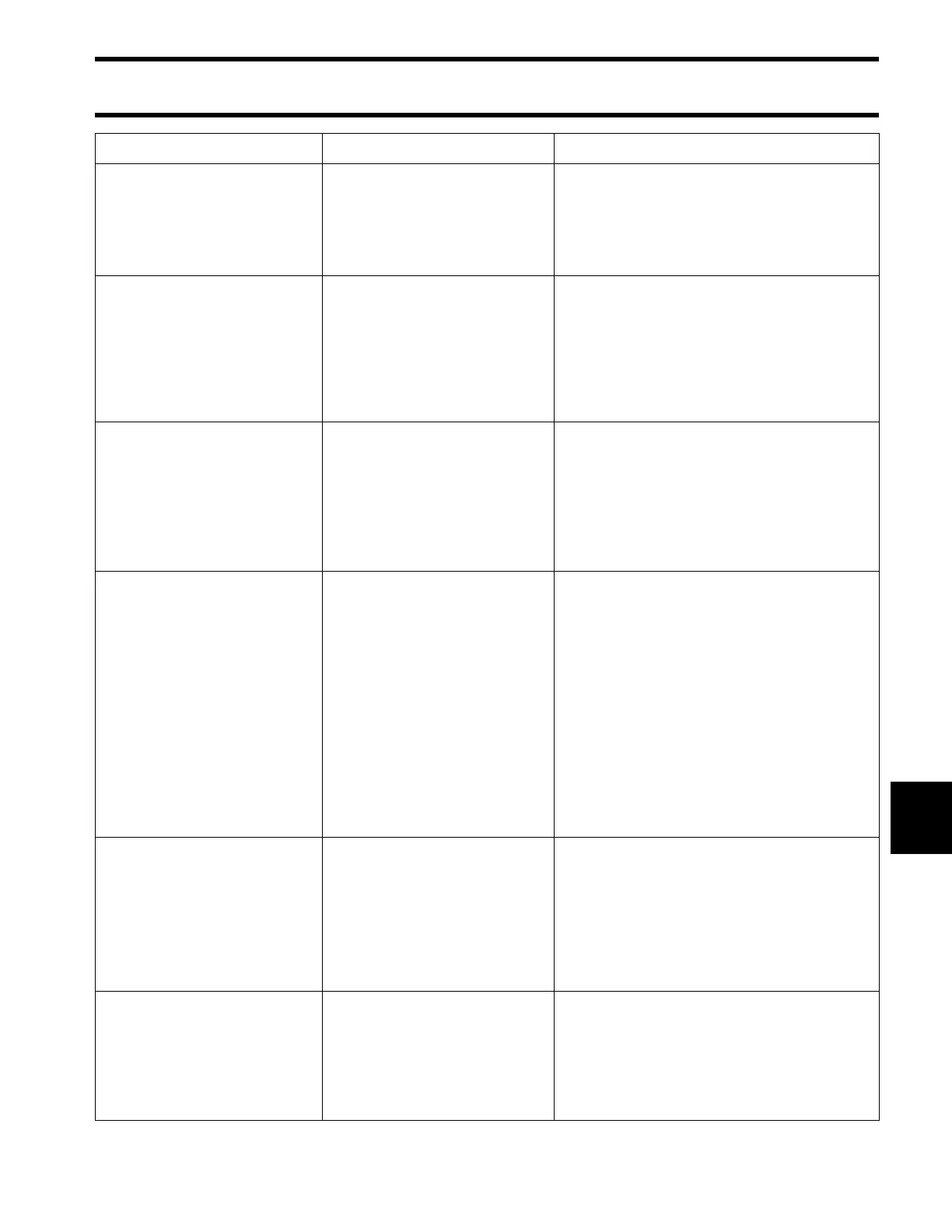
ICON REMOTE CONTROL SYSTEM TROUBLESHOOTING CHART
209
10
Master trim and tilt switch
does not operate power trim
and tilt system of outboards.
Remote control is ON.
Individual trim and tilt
switches operate.
Master trim and tilt switch or
harness is faulty
Remote control is faulty.
• Check master trim and tilt switch.
• Check harness from master trim and tilt
switch to remote control.
• Swap a known good remote control.
Individual trim and tilt
switches do not operate
power trim and tilt system of
outboards (dual lever binna-
cle control only).
Remote control is ON.
Master trim and tilt switch
operates.
Remote control is faulty.
• Swap a known good remote control.
Trim and tilt switch panel (3,
4 or 5 outboards only) does
not operate power trim and
tilt system of outboards.
Outboards must have ICON–
compatible engine manage-
ment software installed in the
Engine Management Module
(EMM).
Trim and tilt switch harness
or switch panel is faulty
• If this problem has occurred after install-
ing an ICON conversion kit, make sure
updated engine management software
has been installed in EMM.
• Check harness from trim and tilt switch
panel to remote control.
• Swap a known good trim and tilt switch
panel.
NMEA 2000 network/
I-Command gauges are
OFF.
Remote control is ON.
Gateway module is OFF.
Gateway power harness is
not connected or faulty.
NMEA 2000 buss cable from
gateway module to NMEA
2000 network is not con-
nected or faulty.
Buss cable from ICON hub to
gateway module is not con-
nected or faulty.
Gateway module is faulty.
• Check power cable and connections
from master power/key switch to gate-
way module.
• Check NMEA 2000 buss cable and t-
connector.
• Check buss cable connection from gate-
way module to ICON hub.
• Check ICON hub LED is ON. Swap
known good hub.
• Check Gateway module LED is ON.
Confirm 12V power and ground to gate-
way module.
• Swap a known good gateway module.
NMEA 2000 network/
I-Command gauges are ON,
but do not display engine
data.
Remote control is ON.
Gateway module LED is ON.
NMEA 2000 buss cable or
t-connector is not connected
or is damaged.
Gauge is faulty.
Gateway module is faulty.
• Check NMEA 2000 buss cable and t-
connector.
• Swap a known good NMEA 2000 buss
cable or t-connector.
• Check I-Command gauge set up for cor-
rect engine instance.
• Swap a known good gauge.
• Swap a known good gateway module.
NMEA 2000 network/
I-Command gauges are ON,
but do not display engine
data.
Remote control is ON.
Gateway module LED flash-
ing.
Gateway module is not
receiving data from ICON
remote control system.
Buss cable from ICON hub to
gateway module is faulty.
• Check buss cable and connections from
gateway module to ICON hub.
• Swap a known good ICON hub or buss
cable extension.
• Swap a known good gateway module.
Observation Possible Cause
Troubleshooting Procedure





 To Next Page