41
1. Hard disk installation
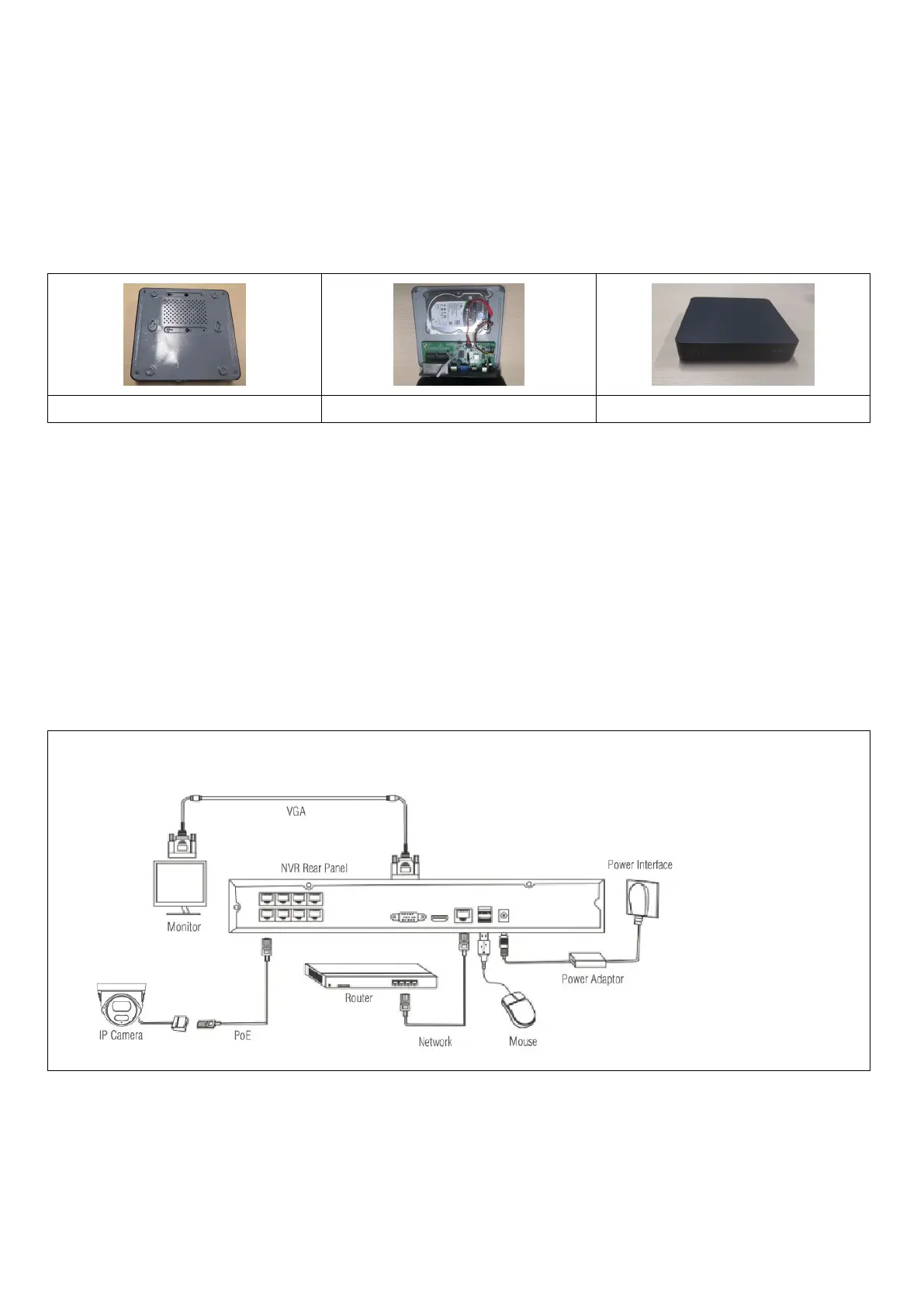
Caution: turn off the power to the device before installation. Can use 3.5" or 2.5" HDDs up to 8TB capacity
Step 1: Unscrew the screws on the cover and remove the top cover, picture below.
Step 2: Align the screw holes on the bottom of the HDD and the case and screw in the screws one by one.
Connect the USB HDD cable and power cable to the motherboard, and connect the other end to the HDD.
Step 3: Cover the top cover and fix it with the screws.
Installation notes:
1. Keep the instrument out of humid, high temperature and highly magnetic environments, place it in a
well-ventilated area.
2. Please use HDDs purchased from verified suppliers.
3. Ensure that the device is properly grounded and that the power supply does not exceed the operating
voltage range, we recommend using the supplied power supply.
4. Do not shut down the device directly when it is running, first shut it down through the software system and
disconnect it to avoid damaging the hard disk.
2. Connection method


 To Next Page