Machine description – quick overview
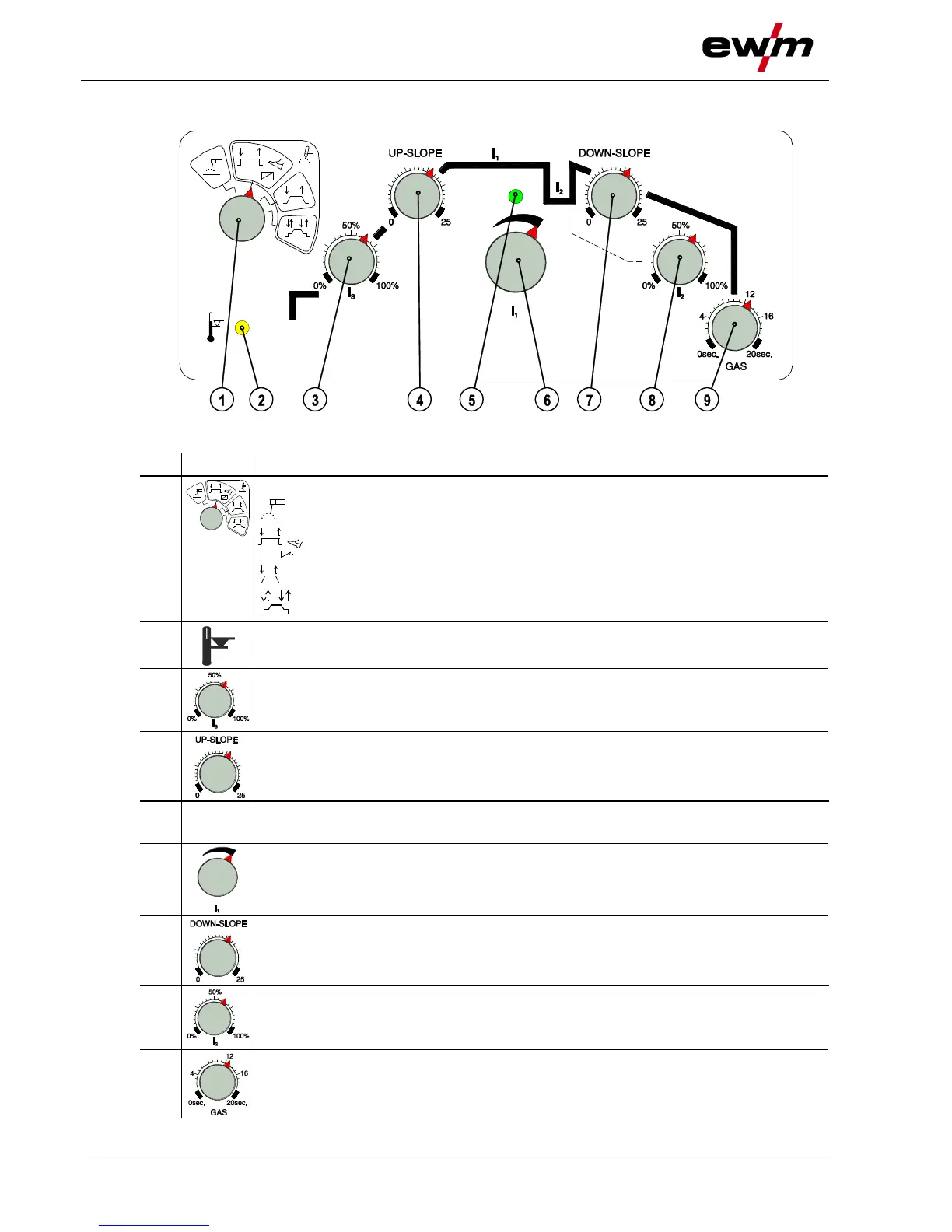
Machine control – Operating elements
099-007010-EW501
07.09.2016
3.3 Machine control – Operating elements
Figure 3-4
Operating mode rotary switch
------ not available
-- Operating mode non-latched
------ Operating mode non-latched with Up- and Downslope
---- Operating mode latched with Up- und Downslope
Excess temperature signal light / Welding torch cooling failure
For error messages > see 6 chapter
Ignition current
Setting range 0% to 100% depending on the main current.
Rotary dial Upslope time
Setting range 0 s to 25 s
Torch trigger signal light
Illuminates immediately torch trigger 1 is activated.
Welding current setting rotary dial
Infinite setting of the welding current across the whole power range.
Rotary dial Downslope time
Setting range 0 s to 25 s
Rotary dial Secondary current
Setting range 1% to 100% depending on the main current.
Gas post-flow time dial
Setting range 0 s to 20 s








 To Next Page