Design and function
Machine configuration menu
099-005149-EW501
11.08.2016
5.6 Machine configuration menu
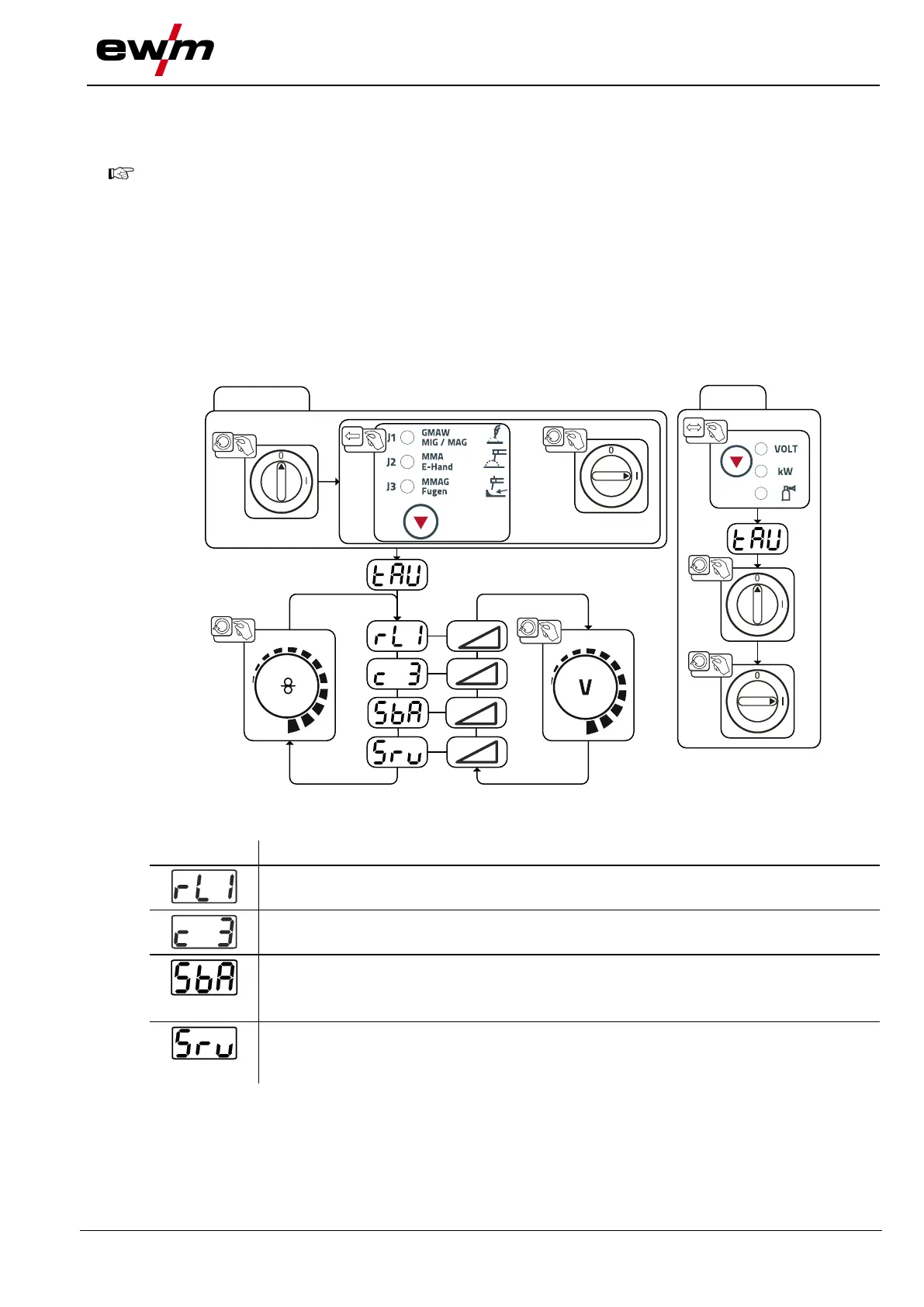
5.6.1 Selecting, changing and saving parameters
ENTER (Enter the menu)
• Switch off the machine at the main switch.
• Press and hold down the "Welding procedure" push-button and switch the machine on again
at the same time.
NAVIGATION (Navigate the menu)
• Select parameters by turning the "Welding parameter setting" rotary knob.
• Set or change the parameters by turning the "Welding voltage" rotary knob.
EXIT (Exit the menu)
• Press the "Push-button, parameter selection right" push-button (switch machine off and on
again).
Figure 5-25
Lead resistance 1
Lead resistance for the first welding circuit 0 mΩ–60 mΩ (8 mΩ ex works).
Only qualified service personnel may change the parameters!
Time-controlled power-saving mode > see 5.7 chapter
• ----------- 5 min.–60 min. = time until activation of power-saving mode when inactive.
• ----------- off = switched off
Service menu
Modifications to the service menu may only be carried out by authorised maintenance
staff!






 To Next Page