EasyManua.ls Logo

Excell 320S - Interface Settings Summary; Transmission Conditions and Polling Address; BCD and Analogue Output Interface Settings

Excell 320S
84 pages
Print Icon
To Next Page IconTo Next Page
To Previous Page IconTo Previous Page
Loading...
04012XXX
EXCELL PRECISION CO., LTD
ZSME400000011
70
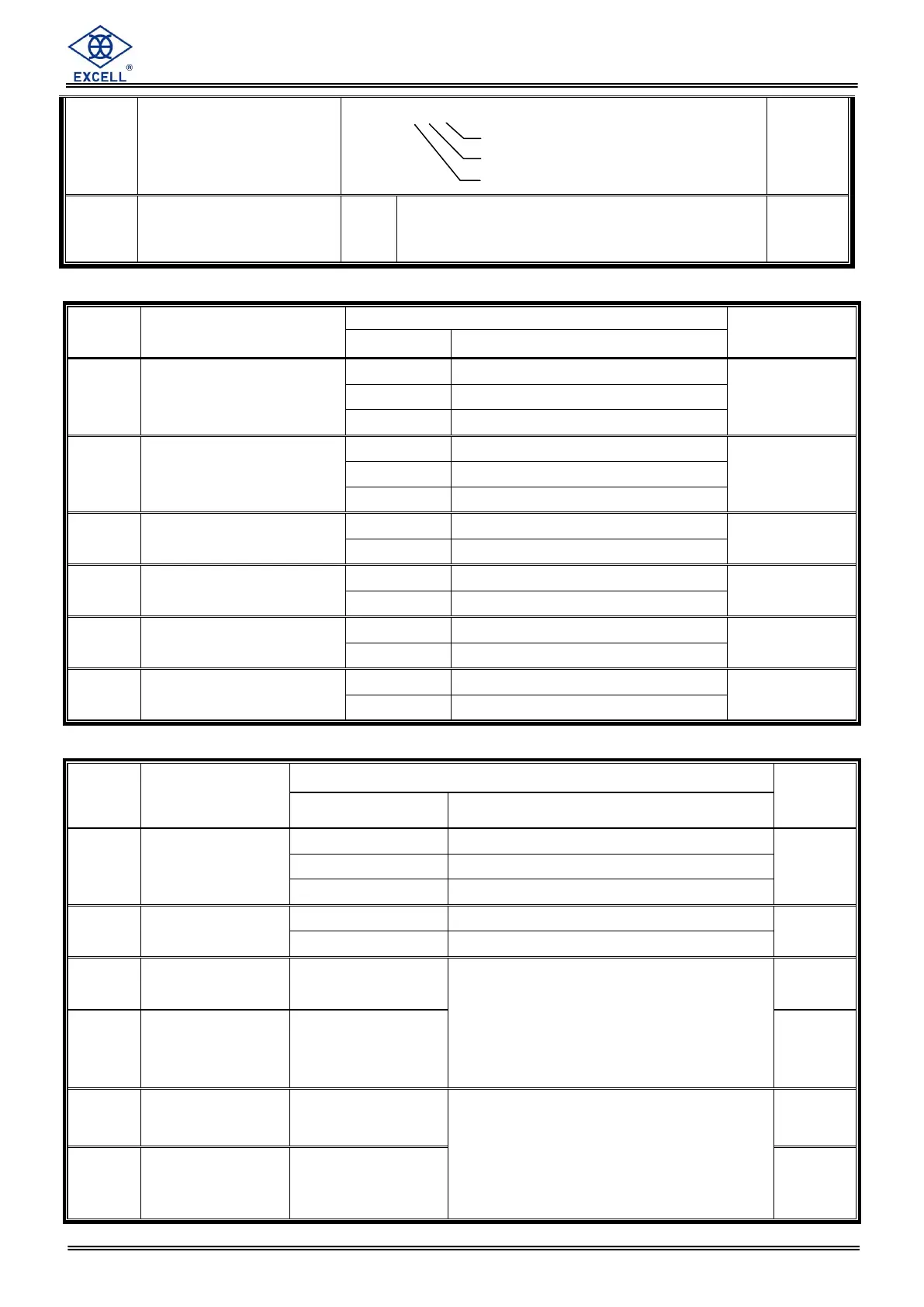
BCD Parallel Output Interface (OP 02)
Item
Function
Setting value
Default
Parameter
Description
bCd- 01
Data type
0
As display
0
1
Gross
2
Net
bCd- 02
Transmit mode
0
Transmit continuous
0
1
Auto transmit
2
Manual transmit
bCd- 03
Output Logic
0
Positive logic action
0
1
Negative logic action
bCd- 04
Data ready
Signal logic
0
Positive logic action
0
1
Negative logic action
bCd- 05
OL output code
0
FFFFFF
0
1
999999
bCd- 06
Data code
0
BCD Code
0
1
Hex. Code
Analogue Current/Voltage Output Interface (Op - 03)
Item
Function
Setting value
Default
Parameter
Description
AnL- 01
Data type
0
As display
0
1
Gross
2
Net
AnL- 02
Signal output
0
Current output
0
1
Voltage output
AnL- 03
Weight in Lo
000000 ~ 999999
When the weight reaches the value of
that in AnL-03(the Max. weight is the
max setting value (refer to CSP-04 ),
the current / voltage(refer to AnL-02)
output is changed to that configured in
AnL-04
0
AnL- 04
Current / Voltage
in Lo
4.0 mA ~ 20.0 mA
or
0.0 V ~ 10.0 V
4.0
AnL- 05
Weight in Hi
000000 ~ 999999
When the weight reaches the value of
that in AnL-05(the Max. weight is the
max setting value (refer to CSP-04 ),
the current / voltage(refer to AnL-02)
output is changed to that configured in
AnL-06
30000
AnL- 06
Current / Voltage
in Hi
4.0 mA ~ 20.0 mA
or
0.0 V ~ 10.0 V
20.0
RS1- 06
RS2- 06
RS3- 06
Transmission conditions
0 0 0 0 0 0
000000
RS1- 07
RS2- 07
RS3- 07
Indicator poling address
00
99
When set to 0, Indicator addressing is not
used
0
Negative (Net Wt.)
Weight unstable
Overload (OL)
0 transmit cont.
1 Stop transmit

Table of Contents

Related product manuals