Speedtest
28 EXFO EX1
Expandable Status Bar
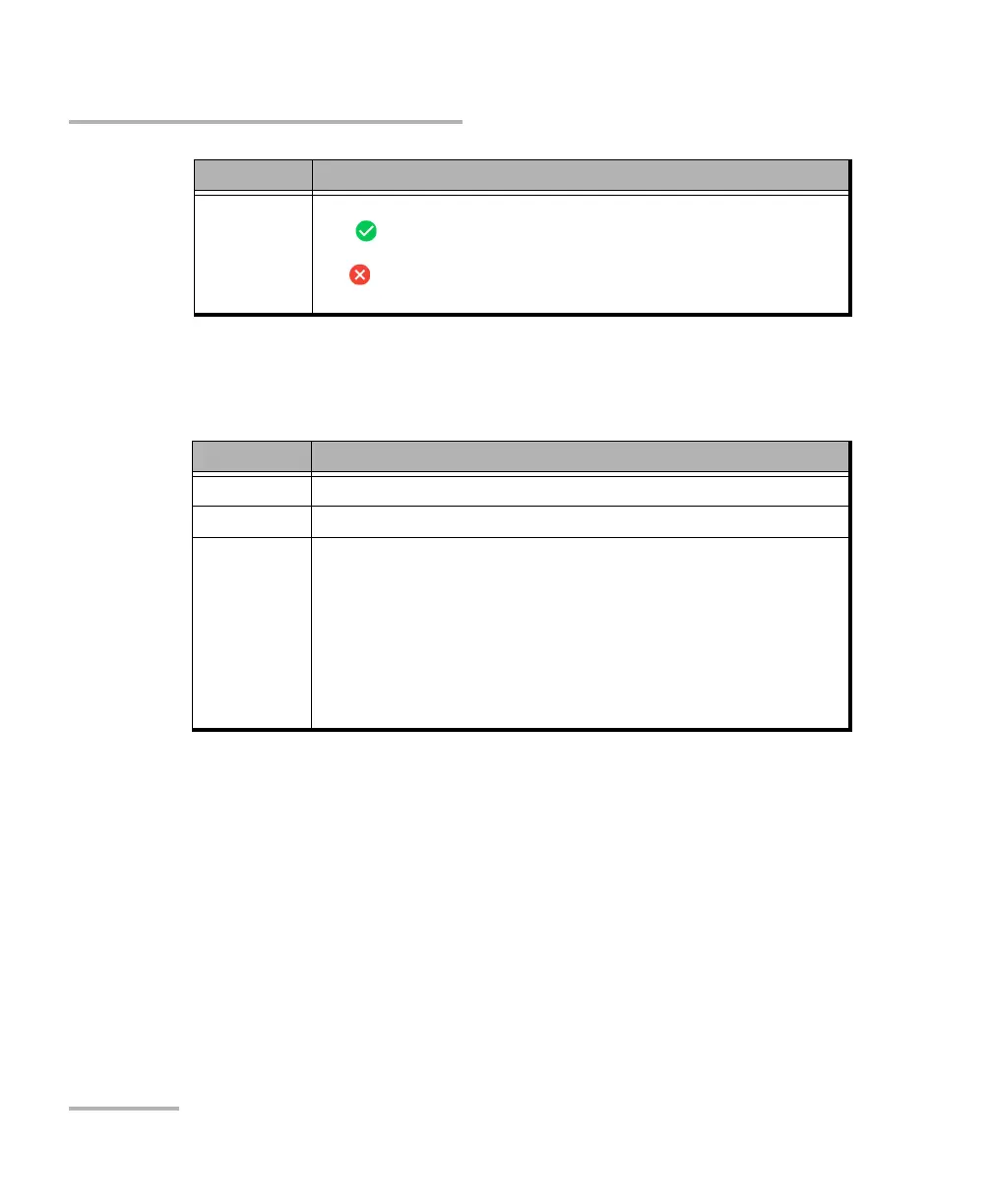
Once the test is completed, the status bar is automatically expanded. The
expanded view displays the following additional information:
To expand the status bar:
1. Tap on the status bar.
OR
2. Tap and swipe down the status bar.
To collapse the status bar:
1. Tap on the status bar, within the status bar area, or anywhere outside
the expanded status bar area.
OR
2. Tap and swipe up the status bar area.
Global Pass/Fail
verdict
Displays the global test pass/fail verdict icon, when enabled.
Pass indicates that all result values meet the configured threshold
criteria.
Fail indicates that at least one result value does not meet the
configured threshold criteria, an alarm is detected, or the test is aborted.
Information Description
Started at The date and time the test started.
Stopped at The date and time the test ended.
Status is The status of the test:
Idle: The test is not running or results are not available.
In-Progress: The test is running.
Completed: The test is completed.
Aborted - <reason>: The test has been interrupted and the reason is
displayed: Link Down, LOS, Network Timeout, Unresolved IP Address,
Server Unavailable, Ookla Server Unreachable, User Stopped,
Report Count Exceeded, Wi-Fi Down, SFP Mismatch.
Information Description



 To Next Page