Operation
ChokeControl(AllUnitsExcept
KohlerEFI)
Locatedonrightconsole(blacklever)(seeFigure6).
Thechokeisusedtoaidinstartingacoldengine.
Movingthechokeleverforwardwillputthechokein
the“ON”positionandmovingthechokelevertothe
rear,tothedetent,willputthechokeinthe“OFF”
position.DoNotrunawarmenginewithchokein
the“ON”position.
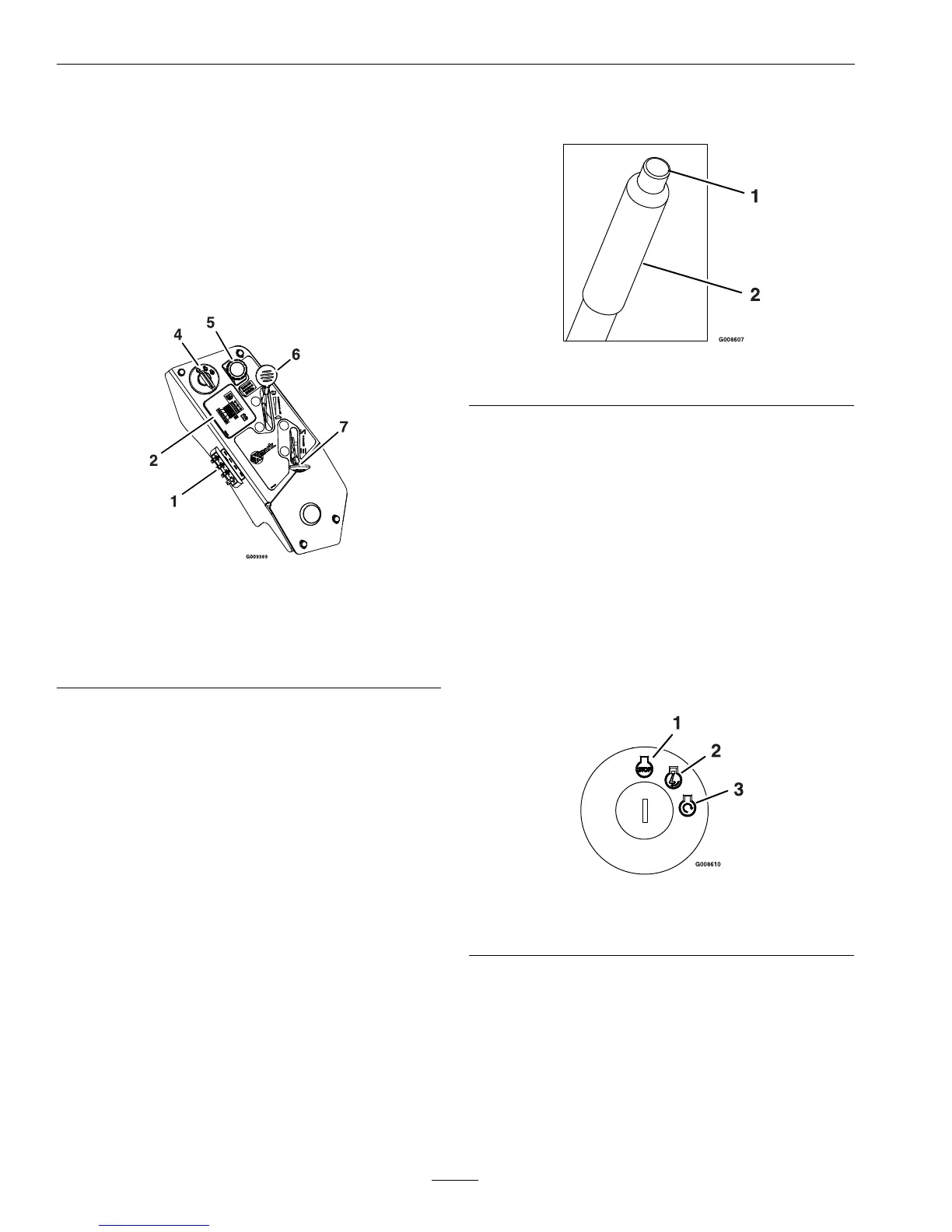
Figure6
RightConsole
1.Fuses
4.PTOengagementswitch
2.Messagedisplay5.Throttle
3.Ignitionswitch
6.Choke
ThrottleControl
Locatedonrightconsole(redlever)(seeFigure6).
Thethrottleisusedtocontrolenginespeed.Moving
thethrottleleverforwardwillincreaseenginespeed
andmovingthethrottlelevertotherearwilldecrease
enginespeed.Movingthethrottleforwardintothe
detentisfullthrottle.
BrakeLever
Locatedonrightsideofunit,justtothefrontofthe
RHmotioncontrollever.
Thebrakeleverengagesaparkingbrakeonthedrive
wheels.
Note:TheLCDindicatorappearsinthemessage
displayontheRHconsolewhentheparkbrakeis
engaged(seeFigure9).
Pulltheleverupandrearwardtoengagethebrake.
Depressthereleasebuttonandpushdownwardto
disengagethebrake.
Figure7
1.Releasebutton2.Parkbrake
Theunitmustbetieddownandbrakeengagedwhen
transporting.
IgnitionSwitch
Locatedonrightconsole(seeFigure6).
Theignitionswitchisusedtostartandstopthe
engine.Theswitchhasthreepositions“OFF”,“ON”
and“START”.Insertkeyintoswitchandrotate
clockwisetothe“ON”position.Rotateclockwiseto
thenextpositiontoengagethestarter(keymustbe
heldagainstspringpressureinthisposition).Allow
thekeytoreturntothe“on”positionimmediately
aftertheenginestarts.
Figure8
1.Off3.Start
2.On
Note:Brakemustbeengaged,motioncontrol
leversout(neutrallockposition)andPTOswitch
disengagedtostartengine.(Itisnotnecessaryforthe
operatortobeintheseattostarttheengine.)
HourMeter
Locatedontherightconsoleinthemessagedisplay
(seeFigure6andFigure9).
22


 To Next Page
 Loading...